
The right teleprompter can help you maintain eye contact, deliver cleaner presentations, and record confident videos without memorizing every line. For laptop-based workflows, compatibility, screen visibility, and setup simplicity matter as much as optical quality.
We’ve rounded up 10 options spanning built-in-screen designs, tablet and laptop-compatible rigs, portable camera teleprompters, and larger setups for demanding production environments. Use the guide below to match the format, size, and features to the way you record.
Best 10 Teleprompters for Laptops Picks for 2026
Best Built-In Display

- Built-in 9-inch FHD display
- Shows scripts, chat, or apps
- Works with PCs, Macs, and laptops
Best For: Streamers and video-call users wanting an all-in-one prompting display
Best Professional Stand

- Supports displays up to 17 inches
- Includes telescopic conference stand
- Uses 60/40 beam-splitter glass
Best For: Professional speeches, conferences, studios, and corporate presentations
Best Screen-Mirroring Option

- Built-in LCD doubles as a computer display
- Supports USB-C, HDMI, and mirroring
- Works with Windows and macOS
Best For: Creators needing flexible laptop, phone, or camera connections
Best Compact Smartphone Setup

- Pre-assembled and portable
- Works with smartphones and cameras
- Includes hood, carry bag, and 70/30 glass
Best For: Mobile creators and webcam users relying on a smartphone for scripts
Premium Large-Screen Pick
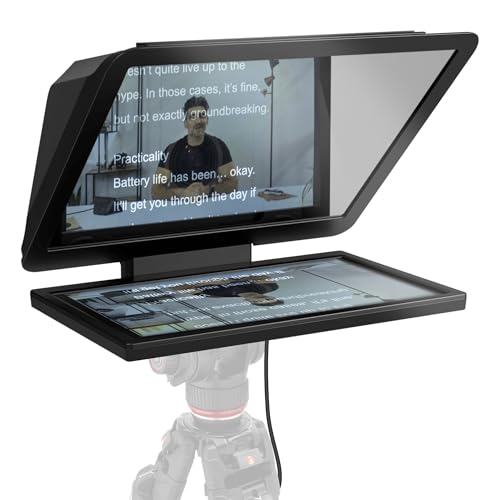
- 15.6-inch Full HD removable display
- Can double as a spare monitor
- Fits DSLR, mirrorless, and studio cameras
Best For: Studio creators needing a large, versatile prompter
Value Tablet Setup

- 12-inch HD display readable up to 10 feet
- Remote and app control included
- Folds flat with a carry case
Best For: Tablet-based presentations and home studios
Largest Portable Option

- Large 17-inch prompting surface
- Wireless remote and app playback controls
- Foldable sunshade with tripod mount
Best For: Creators needing a large mobile recording prompter
Best Adjustable Laptop-Style Teleprompter

- 75% light-transmission glass
- Supports tablets up to 9.84 x 8.68 inches
- Includes remote, app support, and carrying case
Best For: Tablet and smartphone recording with compatible cameras
Best All-in-One Teleprompter

- Supports phones, tablets under 11 inches, and DSLRs
- Includes 49-82mm adapter rings
- App handles TXT/DOCX scripts and remote control
Best For: Multi-device streaming and video production
Best Large-Screen Teleprompter

- Fits tablets up to 13 inches
- 7H glass with 70/30 light transmission
- Supports 35mm, horizontal, and vertical shooting
Best For: Large-tablet prompting with DSLR, mirrorless, or camcorder setups
Best Built-In Display – Elgato Prompter
For shoppers comparing teleprompters for laptops, the Elgato Prompter stands out by including its own display. You can move a script, chat window, or other app onto the Prompter screen from a PC or Mac, avoiding the need for a separate tablet or phone.
Best For: Streamers, video-call users, and creators who want a computer-controlled prompting display with professional eye contact.
Pros:
- Built-in 9-inch FHD display eliminates the need for an extra prompting device.
- Supports scripts, Twitch chat, and video-call content in one setup.
- Compatible with DSLR cameras, webcams, smartphones, personal computers, and laptops.
- Desktop-controlled setup works with PC or Mac and integrates with Stream Deck.
Cons:
- Mac users need free DisplayLink software.
- Android users need free DisplayLink Presenter software.
- Its 0.69 kg compact design still requires attaching a camera and connecting it to the computer.
The Elgato is a strong all-in-one choice when convenience and eye contact matter more than using an existing tablet or laptop screen. Its broad device compatibility and customizable display make it especially practical for streaming and conferencing.
Best Professional Stand – Proaim Speech Teleprompter
The Proaim Professional Speech Teleprompter is a substantial option for buyers seeking teleprompters for laptops, monitors, or tablets. Its 60/40 beam-splitter glass and telescopic conference stand are designed for presentations, speeches, broadcasts, and other fixed-position production work.
Best For: Conference rooms, corporate events, studios, houses of worship, and professional presentations using displays up to 17 inches.
Pros:
- Supports tablets, laptops, and monitors up to 17 inches.
- 60/40 beam-splitter glass provides clear script visibility while preserving line of sight.
- Included telescopic stand allows height adjustment for different presenters and viewing angles.
- Suitable for studio and on-location presentations, broadcasting, training, and live streaming.
Cons:
- At 18.5 pounds, it is considerably less portable than compact teleprompters.
- Its 31.5 x 21.75 x 6.75-inch dimensions require substantial storage and setup space.
- Designed around professional presentation setups rather than a lightweight laptop-only arrangement.
This Proaim model makes the most sense when stability, height adjustment, and large-device support are priorities. It is overbuilt for casual webcam use, but well suited to formal speaking environments where natural eye contact is important.
Best Screen-Mirroring Option – NEEWER X11 Teleprompter
The NEEWER X11 is a flexible pick among teleprompters for laptops because its built-in LCD can function as an external computer display. It can connect directly by USB-C or use HDMI and USB connections, while also supporting screen mirroring from compatible phones and tablets.
Best For: Laptop and desktop users who want a portable monitor-style teleprompter for streaming, video conferencing, or camera-based recording.
Pros:
- Built-in HD LCD works as a second display for Windows and macOS computers.
- Includes cables for USB-C, HDMI, and screen-mirroring setups.
- Supports lenses with threads up to 72 mm and focal lengths from 35 to 200 mm.
- Lightweight 1.3-pound design includes a quick-release plate and adjustable holder.
Cons:
- Driver installation may be required for USB-A/HDMI and first HDMI computer setups.
- Phone mirroring requires compatible devices with DP protocol.
- Voice synchronization is not supported, and apps require separate downloads.
The X11 offers more connection flexibility than a basic phone-based prompter, particularly for users who want a laptop or Mac to supply the content. Check your computer ports, phone compatibility, and lens setup before buying.
Best Compact Smartphone Setup – Glide Gear TMP 75
Glide Gear TMP 75 Teleprompter - Laptop, DSLR, Smartphone - Carry Case, No Assembly
Check Price On AmazonThe Glide Gear TMP 75 is a compact alternative for shoppers considering teleprompters for laptops and webcams but planning to use a smartphone for the script. It arrives assembled, includes a protective hood and carry bag, and fits DSLR, mirrorless, and webcam setups.
Best For: Mobile creators and webcam users who want a lightweight, ready-to-use prompter that works with smartphones rather than iPad tablets.
Pros:
- Compatible with all smartphones and supports DSLR, mirrorless, and webcam setups.
- Pre-assembled design requires no assembly before use.
- All-metal construction and included carry bag support portable production.
- 70/30 beam-splitting glass and included 15mm rails suit camera-rig integration.
Cons:
- Does not support iPad tablets.
- A teleprompter app is not included; the app must offer mirrored text.
- Its 2-pound weight and compact footprint are portable, but it is not a built-in-screen model.
The TMP 75 is a sensible budget-conscious choice when a smartphone is already part of your recording workflow. It is less suitable if you want to use a laptop or tablet as the prompting screen, but its pre-assembled, portable design keeps setup simple.
Premium Large-Screen Pick – Elgato Prompter XL
The Elgato Prompter XL is a strong choice for creators seeking teleprompters for laptops or larger recording setups. Its 15.6-inch Full HD display is removable, works as a spare monitor, and is designed for comfortable reading at extended distances.
Best For: Studio creators who want a full-sized prompter that can also serve as a secondary display.
Pros:
- Large 15.6-inch Full HD display for comfortable reading.
- Removable screen can function as a spare monitor for conferencing and multitasking.
- Compatible with DSLR, mirrorless, and studio camera setups.
- Voice Sync supports natural-paced script scrolling with compatible hardware.
Cons:
- Its 7.43-pound weight and full-sized design may be less convenient for travel.
- Voice Sync requires an NVIDIA RTX GPU or Apple M1-or-newer device.
Choose the Prompter XL if readable distance and display versatility matter more than compact portability. The detachable monitor adds useful flexibility for a permanent or semi-permanent workspace.
Value Tablet Setup – NEEWER Basics X12B
The NEEWER Basics X12B is a practical option for shoppers comparing teleprompters for laptops, tablets, or camera-based recording. It uses a 12-inch HD reflection display, supports iPads and tablets, and folds flat into its included carry case.
Best For: Presentations, online courses, tutorials, and budget-conscious home studios using a tablet as the script source.
Pros:
- No-assembly aluminum-alloy design with a liftable platform.
- 12-inch HD display offers readable text from up to 10 feet away.
- Included Bluetooth remote and app control script playback, speed, pages, and font size.
- Foldable structure and carry case make storage and transport easier.
Cons:
- It does not function as a monitor or provide direct on-screen self-view during recording.
- Not designed for phone shooting, despite app support for smartphones as script devices.
- The remote requires an AAA battery, which is not included.
The X12B keeps the setup focused on essential prompting rather than built-in display features. It is a sensible tablet-based choice when portability, straightforward controls, and lower-cost construction are priorities.
Largest Portable Option – Desview P17 Teleprompter
The Desview P17 suits creators who want a large, portable prompting surface for camera recording. Its 17-inch design supports tablets, iPhone, and Android devices through the Desview app, with adjustable playback controls and a foldable sunshade for glare reduction.
Best For: YouTubers, livestreamers, and video creators who need a large script view with wireless control.
Pros:
- 17-inch format provides a spacious script-reading area.
- App supports mirror and rotate modes, speed from 0.5x to 2x, font settings, and text alignment.
- Wireless remote offers playback, speed, and page controls, with timer and voice-control support through the app.
- Foldable sunshade, quick-release tripod mount, storage bag, and extendable arm support mobile setups.
Cons:
- At 4.38 kg, it is substantial for frequent travel.
- Requires the Desview app for script creation or importing TXT and DOCX files.
- It is not waterproof and should not be disassembled.
The P17 is appealing when maximum reading area and flexible playback controls outweigh weight concerns. Its tripod mount and foldable construction make it suitable for a portable studio, provided your setup can accommodate its size.
Best Adjustable Laptop-Style Teleprompter – NEEWER X12 14-Inch
If you need teleprompters for laptops or tablets, the NEEWER X12 offers a flexible setup for creators using an iPad, smartphone, and compatible camera. Its coated beam-splitter glass, adjustable hood, app support, and included remote make it practical for online teaching, vlogging, and live streaming.
Best For: Tablet- and smartphone-based recording with a compatible camera lens longer than 28mm.
Pros:
- 75% light-transmission glass keeps reflected text readable from up to 10 feet.
- Supports smartphones and tablets up to 9.84 x 8.68 inches, including iPad Air and iPad Pro 11-inch models.
- Includes an RT-110 remote, iOS/Android app compatibility, phone holder, and carrying case.
- Collapsing aluminum-alloy design is easy to assemble, store, and transport.
Cons:
- Not compatible with wide-angle lenses or iPad Pro 12-inch models.
- Requires a camera lens with a focal length greater than 28mm.
The X12 is a versatile choice when your prompting setup centers on a tablet or phone. Check your device dimensions and camera lens before buying, since its compatibility limits are specific.
Best All-in-One Teleprompter – Desview T5
The Desview T5 is a strong option for shoppers comparing teleprompters for laptops, tablets, and phones. It combines a holder for devices under 11 inches with broad camera adapter-ring coverage, a free scripting app, and Bluetooth control for hands-free recording.
Best For: Creators who switch between smartphones, tablets, and DSLR cameras for streaming or video production.
Pros:
- Works with smartphones, tablets under 11 inches, and DSLR cameras.
- Includes adapter rings from 49mm through 82mm for broad lens compatibility.
- Desview app supports TXT and DOCX files, formatting controls, mirroring, timers, and screen rotation.
- Coated glass, light-sealing foam, adjustable panel height, and horizontal or vertical phone shooting add flexibility.
Cons:
- Tablet compatibility is limited to devices under 11 inches.
- At 0.52 kg, it is less lightweight than some compact teleprompter designs.
Choose the T5 if you want one prompting system for multiple devices and lenses. Its extensive adapter-ring set makes it especially practical for users whose camera setup changes frequently.
Best Large-Screen Teleprompter – Desview P13 13-Inch
For shoppers seeking teleprompters for laptops or larger tablets, the Desview P13 provides a 13-inch prompting surface with a portable, no-assembly design. Its high-definition glass, included remote, free app, and camera-friendly shooting options suit video conferences, recording, and on-the-go production.
Best For: Users who want a large iPad or tablet display while recording with a DSLR, mirrorless camera, or camcorder.
Pros:
- Accommodates iPads and tablets up to 13 inches.
- 7H-hardness beam-splitter glass with 70/30 visible-light transmission is designed for clear text in bright outdoor conditions.
- Supports 35mm horizontal shooting and vertical shooting without vignetting.
- Includes a Bluetooth remote, Desview app support, detachable sun hood, and Oxford cloth carry bag.
Cons:
- At 1.7 kg, it is substantially heavier than the NEEWER X12 and Desview T5.
- The supplied notes do not specify compatibility with laptops as display devices; tablet support is the stated use.
The P13 stands out when screen size and framing flexibility matter more than minimum weight. It is a sensible pick for larger tablets and camera-based setups, particularly when you need a portable unit without assembly.
How We Picked the Best Teleprompters for Laptops
We focused on teleprompters that can work with laptops directly or fit naturally into a laptop-centered recording setup. Our comparison considered screen and tablet compatibility, viewing area, portability, camera support, mounting flexibility, setup requirements, and included accessories. We also looked for practical differences between models with built-in displays and those that reflect text from a separate laptop, tablet, or phone.
Quick Comparison
Built-in-screen models such as the Elgato Prompter and Prompter XL are convenient for creators who want a dedicated display and a streamlined desk setup. Tablet- and monitor-compatible designs from Proaim and NEEWER offer more flexibility when you already own a screen. Portable options from Glide Gear and Desview are better suited to creators who move between locations or use DSLR, mirrorless, or smartphone cameras.
Pay close attention to the listed screen size: a larger opening generally makes text easier to read from farther away, while compact models are easier to transport. Compatibility can also vary by camera, lens, tablet dimensions, and mounting hardware, so verify measurements before ordering.
Key Buying Factors for Teleprompters for Laptops
Display and Text Source
Decide whether you want a teleprompter with its own monitor or one that reflects text from a laptop, tablet, or phone. Built-in displays reduce the number of separate components, while reflective designs can be more affordable and adaptable.
Size and Reading Distance
A compact unit is often sufficient for close-up webcam or smartphone recording. Choose a larger 11- to 17-inch-class setup when the camera sits farther away, your script uses larger type, or multiple presenters need to read comfortably.
Camera and Mounting Compatibility
Check support for your camera body, lens diameter, tripod, and laptop placement. Adapter rings, adjustable mounts, and included brackets can make setup easier, but not every model accommodates wide lenses or heavier cameras.
Portability and Setup
Foldable or no-assembly designs suit mobile creators and frequent travel. Heavier aluminum models may provide better stability for studio use but take more space and time to position.
Who Should Buy Which Teleprompters for Laptops?
Choose a built-in-screen model if you want the simplest laptop-adjacent workflow and minimal accessory shopping. Pick a tablet or monitor teleprompter if you already have a preferred display and want broader configuration options. A portable camera prompter is the better choice for location shoots, interviews, and smartphone recording. For studio presenters, educators, and professional video teams, larger aluminum or full-sized designs provide a more comfortable viewing area and steadier mounting.