
Livestreaming gets easier when you can maintain eye contact, follow a script, and stay on message without constantly looking away from the camera. The right teleprompter can make tutorials, product demos, interviews, and presentations feel more polished while reducing retakes.
We selected 10 teleprompters for livestreaming across several setups, including phone- and tablet-compatible designs, built-in-screen models, portable options, and larger beam-splitter systems. Use the guide below to match screen size, mounting style, portability, and control features to your workflow.
Best 10 Teleprompters for Livestreaming Picks for 2026
Premium All-in-One Pick

- Built-in display and Full HD webcam
- HDR-enabled 1080p60 video
- Camera Hub script and chat controls
Best For: Streamers wanting an integrated webcam-and-prompter setup
Versatile Monitor Option
NEEWER X11 2-in-1 Teleprompter
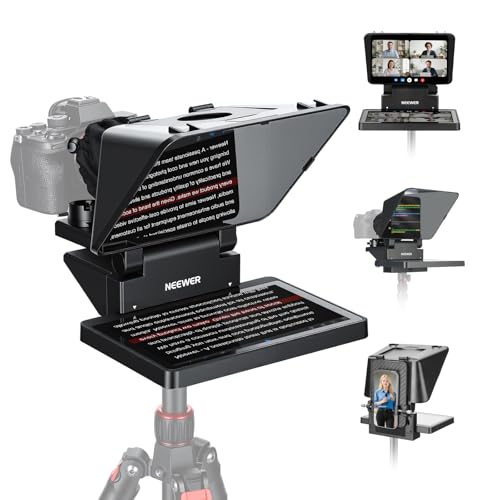
- Built-in LCD monitor for prompts
- Works as a Windows or macOS second display
- Supports 35–200mm focal lengths
Best For: Users wanting multiple display and connection options
Tablet-Based Camera Rig

- Fits tablets up to 11 inches
- Supports 49–95mm lens diameters
- SmallGoGo app imports multiple document types
Best For: Camera users with a tablet and 15mm rail support
Stream-and-Chat Favorite

- Built-in screen for scripts and Twitch chat
- Works with cameras, webcams, and smartphones
- Desktop-controlled through PC or Mac
Best For: Streamers who want prompts or chat near the camera
Best No-Assembly Value

- No-assembly aluminum construction
- 12-inch display readable up to 10 feet
- Remote and app control with carry case
Best For: Tablet-based livestreams, classes, and tutorials
Best Compact Phone Option

- Folds in one second for travel
- Works with phones and tablets under 8 inches
- Bluetooth remote and TCQI app included
Best For: Mobile phone livestreams, vlogs, and interviews
Best Camera-Rig Upgrade

- Assembly-free 12-inch camera teleprompter
- Arca quick-release mount for fast setup changes
- Multiple mounts for lights, microphones, and accessories
Best For: DSLR and camcorder livestream rigs
Best Portable Pick
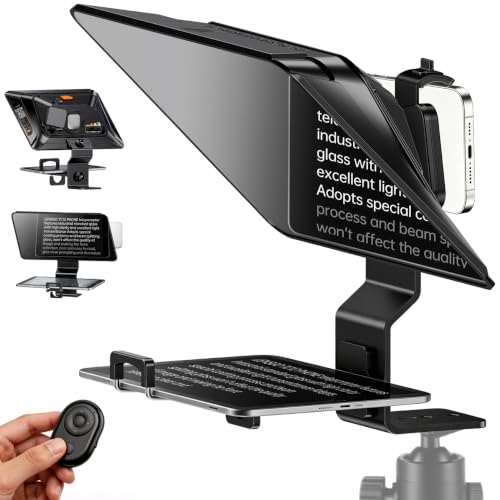
- 14.5-inch HD glass for phones and tablets
- Bluetooth remote with TCQI app control
- Quick setup for horizontal or vertical shooting
Best For: Mobile livestreams, walk-and-talk videos, and smartphone creators
Best Premium Setup

- 14-inch beamsplitter with 10-foot reading range
- No assembly and folds into a carry case
- Tripod and accessory mounting options
Best For: Camera-based livestreaming and expandable studio rigs
Best Value Camera Option

- 75% light-transmission beamsplitter
- Remote and iOS/Android app control
- Collapsible aluminum-alloy design
Best For: Budget-friendly livestreaming with compatible cameras, phones, or tablets
Premium All-in-One Pick – Elgato Prompter Camera Set
For creators seeking teleprompters for livestreaming with minimal equipment, the Elgato Prompter Camera Set combines a built-in display with a Full HD webcam. Its desktop-controlled setup works with PC and Mac, while Camera Hub provides tools for customizing scripts, chat, contrast, and camera controls.
Best For: Streamers and presenters who want an integrated webcam-and-prompter setup.
Pros:
- Built-in display eliminates the need for a separate phone or tablet.
- Includes a Full HD 1080p60 HDR-enabled webcam.
- Camera Hub supports script, chat, contrast, crosshair, and camera customization.
- Works with Stream Deck and supports numerous cameras and wide lenses.
Cons:
- Mac users must download free DisplayLink software.
- Android use requires free DisplayLink Presenter software.
This is a particularly convenient choice when you want livestreaming prompts and a webcam in one system. Its software features add flexibility, though the computer-based setup may be more involved than a simple phone-based solution.
Versatile Monitor Option – NEEWER X11 2-in-1 Teleprompter
The NEEWER X11 is a flexible option among teleprompters for livestreaming, pairing a large beam-splitter teleprompter with a built-in LCD monitor. It can connect to a computer as a second display or mirror supported mobile devices, giving creators several ways to manage scripts without placing a tablet in front of the camera.
Best For: Livestreamers who want computer-monitor functionality and broad camera compatibility.
Pros:
- Built-in LCD monitor supports script display without a separate phone or tablet.
- Works with Windows and macOS as an external computer display.
- Supports lenses up to 72mm and focal lengths from 35 to 200mm.
- Includes adjustable Arca-type mounting hardware and multiple connection cables.
Cons:
- Some connection methods require drivers or specific computer ports.
- Mobile screen mirroring is limited to compatible phones with DP protocol.
- Voice synchronization is not supported.
The X11 stands out for its connection flexibility and monitor functionality. However, buyers should confirm their computer ports, phone compatibility, and preferred lens specifications before choosing it.
Tablet-Based Camera Rig – SMALLRIG 3646 Teleprompter
The SMALLRIG 3646 is designed for creators who already use an iPad or tablet with their camera setup. As one of the more adaptable teleprompters for livestreaming, it supports tablets up to 11 inches, wide lenses from 49mm to 95mm, and app-based text extraction from PDFs, images, Word documents, and TXT files.
Best For: DSLR, mirrorless, and camcorder users who prefer a tablet-based prompting workflow.
Pros:
- Accommodates iPads or tablets up to 11 inches.
- Supports lenses with diameters from 49mm to 95mm.
- SmallGoGo app can convert several document types into editable prompts.
- Includes a top flag and removable hood to help manage glare and cleaning.
Cons:
- Not compatible with smartphones.
- Requires a separately available 15mm LWS baseplate.
- Recommended reading distance is within 5 meters.
This model makes sense for camera operators who already own a suitable tablet and 15mm support system. It offers useful mounting and document features, but the required accessories increase the total setup commitment.
Stream-and-Chat Favorite – Elgato Prompter
The Elgato Prompter is a strong fit for teleprompters for livestreaming when you want to read scripts or Twitch chat while maintaining eye contact. Its built-in screen works like a monitor, and the desktop-controlled design connects to a PC or Mac without relying on a third-party mobile app.
Best For: Streamers, video callers, and presenters who need prompts or chat near the camera.
Pros:
- Built-in display supports scripts, chat, and other on-screen content.
- Compatible with DSLR cameras, webcams, smartphones, PCs, and laptops.
- Camera Hub lets users customize text and chat appearance.
- Works with Stream Deck and supports a wide range of cameras and lenses.
Cons:
- Mac users need free DisplayLink software.
- Android use requires free DisplayLink Presenter software.
- The camera and computer setup may require more space than a simple phone teleprompter.
With its monitor-style display and broad compatibility, the Elgato Prompter is well suited to creators who want more than basic script scrolling. It is especially useful when keeping livestream chat visible is part of the workflow.
Best No-Assembly Value – NEEWER BASICS X12B
The NEEWER BASICS X12B is a practical choice for creators seeking teleprompters for livestreaming, online courses, and tutorials. Its no-assembly aluminum design supports a tablet and camera, while the included remote and app handle script playback and scrolling.
Best For: Tablet-based livestreaming, presentations, online classes, and tutorial recording.
Pros:
- No-assembly design with a lightweight aluminum-alloy build
- 12-inch display with text readable from up to 10 feet
- Bluetooth remote and app control for playback, speed, pages, and font size
- Foldable design includes a protective carry case
Cons:
- Not intended for phone shooting
- Does not function as a monitor or provide direct on-screen self-viewing
- AAA battery for the remote is not included
Choose the X12B if you want straightforward tablet prompting without assembly. Its 12-inch glass and portable folding structure make it well suited to fixed or traveling setups, provided your workflow uses a compatible tablet rather than a phone.
Best Compact Phone Option – LENSGO TC7S
The LENSGO TC7S is a compact option for creators who need teleprompters for livestreaming with a phone. It folds in one second, supports iOS and Android devices, and uses the TCQI app with a Bluetooth remote for hands-free script control.
Best For: Phone-based livestreams, vlogging, online teaching, interviews, and travel shooting.
Pros:
- Ultra-light, portable design folds in one second
- Supports smartphones and tablets below 8 inches
- Beam-splitter glass provides clear reflected text while prompting
- TCQI app supports script entry, TXT uploads, and remote scrolling controls
Cons:
- Smaller 7.9-inch display than the 12-inch alternatives
- Designed for phones and smaller tablets rather than larger tablet setups
- The supplied notes say image-based script import is not recommended
For mobile creators, the TC7S prioritizes portability over display size. Its quick-folding body and phone compatibility are useful for outdoor or travel livestreams, while the app provides the core controls needed for reading naturally on camera.
Best Camera-Rig Upgrade – NEEWER X12 II
The NEEWER X12 II is built for camera-based teleprompters for livestreaming, with an Arca-type quick-release mount, a rigid aluminum structure, and multiple accessory attachment points. Its 12-inch beamsplitter and app-controlled remote support longer, more polished camera presentations.
Best For: DSLR or camcorder livestream rigs, vlogging, online teaching, and accessory-heavy studio setups.
Pros:
- Assembly-free design with a hard aluminum carrying case
- 12-inch beamsplitter offers a reading range of up to 10 feet
- Arca-type quick-release mount supports fast camera mounting and removal
- Multiple 1/4-inch, 3/8-inch, and cold-shoe mounts accommodate accessories
Cons:
- Heavier than the compact phone-oriented option at 3.8 pounds
- AAA batteries for the included remote are not supplied
- Camera mount capacity and adjustment features may be more than basic setups require
The X12 II makes the most sense when your livestreaming setup centers on a dedicated camera and accessories. Its quick-release mounting system and rigid construction favor repeatable studio workflows, while the 12-inch display keeps scripts readable at practical distances.
Best Portable Pick – LENSGO TC12P
For creators who need teleprompters for livestreaming and mobile video, the LENSGO TC12P emphasizes portability and quick setup. Its 14.5-inch glass supports phone or tablet use, while the included remote enables hands-free script control.
Best For: Walk-and-talk videos, smartphone livestreams, Zoom calls, TikTok, and vlogging.
Pros:
- Supports iPhone, Android phones, iPads, and tablets up to 7.3 inches wide.
- Large 14.5-inch HD glass helps make scripts easier to read.
- Bluetooth remote supports play/pause and scroll-speed adjustments through the TCQI app.
- Quick horizontal or vertical setup with anti-glare coated glass and light-blocking foam.
Cons:
- Designed for smartphone and tablet shooting rather than a full camera-based setup.
- Not water resistant.
The TC12P is a practical choice when mobility matters more than a traditional studio configuration. Its phone-focused design and remote-controlled scrolling make it especially convenient for livestreamers and creators recording away from a desk.
Best Premium Setup – NEEWER X14 III
The NEEWER X14 III is a strong option for teleprompters for livestreaming when you want a larger, camera-ready platform. It arrives without assembly, folds into its carry case, and combines a 14-inch beamsplitter with flexible tripod and accessory mounting.
Best For: Camera-based livestreams, online courses, presentations, tutorials, and studio-style recording.
Pros:
- 14-inch HD beamsplitter offers 71% light transmission and a reading range up to 10 feet.
- 45-degree tilt and adjustable camera positioning help accommodate different setups.
- Included RT113 remote and NEEWER app control scrolling, pages, playback, and font size.
- Supports phones and tablets up to 8.7 inches wide, with 1/4-inch and 3/8-inch tripod threads.
Cons:
- At 5.2 pounds, it is less lightweight than a mobile teleprompter.
- Not water resistant.
With its metal frame, quick-release camera plate, accessory shoe mounts, and generous load capacity, the X14 III is suited to a more involved livestreaming rig. It is a compelling pick for creators who prioritize stability and expandability.
Best Value Camera Option – NEEWER X12
The NEEWER X12 offers a flexible starting point for teleprompters for livestreaming with a camera, tablet, or phone. Its aluminum-alloy body, collapsible design, included remote, and app support provide useful features without requiring a complex setup.
Best For: Budget-conscious livestreamers, online teachers, vloggers, and creators using compatible cameras.
Pros:
- HD beamsplitter provides 75% light transmission and readability up to 10 feet away.
- Works with smartphones and tablets up to 9.84 by 8.68 inches.
- Included RT-110 remote and NEEWER app support pausing, speed changes, and page turns.
- Collapsible aluminum-alloy construction supports transport and storage.
Cons:
- Not compatible with wide-angle lenses.
- Camera lens focal length needs to be longer than 28mm.
- Not compatible with the 12-inch iPad Pro.
The X12 is a versatile value pick, particularly if your existing camera uses a compatible lens. Check the lens and tablet limitations before buying, but the included case, remote, and app make it well equipped for everyday livestreaming.
How We Picked the Best Teleprompters for Livestreaming
We compared these models by looking at the factors that matter most during a live broadcast: screen visibility, camera and device compatibility, mounting stability, portability, remote or app control, and setup complexity. We also considered whether each teleprompter suits a phone, tablet, webcam, DSLR, or mirrorless camera.
Because livestreaming setups vary widely, this list includes compact units for mobile creators alongside larger models designed for studio cameras and longer viewing distances. A good teleprompter should keep text readable without blocking the lens, creating excessive glare, or making your eye line look unnatural.
Quick Comparison
| Best For | Look For |
|---|---|
| Phone livestreams | Compact design, phone mount, remote control, and quick setup |
| Webcams and streaming PCs | Built-in display or webcam-friendly mounting |
| Tablet-based scripts | Large tray, clear compatibility limits, and stable support |
| DSLR or mirrorless cameras | Secure camera mount, lens clearance, and adjustable positioning |
| Studio presentations | Larger beamsplitter glass, brighter display, and comfortable reading distance |
Key Buying Factors for Teleprompters for Livestreaming
Screen and Viewing Distance
Larger screens are easier to read from farther away and support bigger text, but they add bulk. A compact phone teleprompter works well at a desk, while a 12- or 14-inch model is better for standing presentations or studio cameras.
Device and Camera Compatibility
Check the supported phone, tablet, webcam, or camera dimensions before buying. Pay close attention to lens clearance, mounting hardware, and whether a listed tablet size refers to the screen diagonal or the device’s physical dimensions. Some models are designed specifically for tablets and are not suitable for smartphones.
Glass Quality and Reflections
Beam-splitter glass should reflect script text clearly while allowing the camera to shoot through it. Brighter displays, suitable text size, and controlled room lighting can improve readability. Keep strong lights from shining directly onto the glass to reduce glare.
Controls and Software
Remote controls and compatible apps let you pause, adjust speed, resize text, and move through a script without touching the setup. Confirm operating-system support and app compatibility if you plan to control the teleprompter from a phone or tablet.
Portability and Setup
Foldable designs are convenient for mobile creators, while aluminum frames and larger glass assemblies may be more stable for permanent setups. Consider the included mounts, tripod or camera support requirements, and how quickly you need to assemble the unit before going live.
Who Should Buy Which Teleprompters for Livestreaming?
Choose a compact phone model if you livestream from a smartphone, travel frequently, or need a simple desk setup. These are convenient but generally offer less reading distance and smaller viewing areas.
Choose a tablet-compatible teleprompter if you already use an iPad or similar tablet for scripts. This option provides a larger text area, but verify the exact tablet-size limits and mounting orientation.
Choose a built-in-screen model if you want a dedicated, consistent setup for a webcam or streaming camera. It can reduce dependence on a separate script device and make positioning more predictable.
Choose a larger 12- or 14-inch unit for studio livestreams, standing presentations, interviews, or longer camera-to-presenter distances. These models take more space but usually provide more comfortable reading and broader compatibility with serious camera rigs.