
When you need to prepare many identical USB drives, manual copying quickly becomes slow, inconsistent, and difficult to manage. The best USB duplicators for bulk copying streamline the process with multiple target ports, standalone operation, and features such as verification or data erasing.
This roundup compares 10 duplicators across different port counts, transfer speeds, drive formats, and use cases. Whether you produce media for customers, deploy software across a fleet, or sanitize drives for reuse, the right capacity and workflow can save substantial time.
Best 10 USB Duplicators for Bulk Copying Picks for 2026
Best Compact Pick

- Standalone two-target USB duplication
- Copy, compare, erase, and sanitize modes
- LCD monitoring with error scanning
Best For: Small IT teams and technicians
Best High-Volume Pick

- Duplicates to up to 31 USB drives
- Standalone operation without software
- Synchronous and asynchronous modes
Best For: Large-scale business and deployment runs
Best Versatile Pick

- Copies to up to 15 USB devices
- Four copy and four erase modes
- Supports flash drives and external HDDs/SSDs
Best For: Mixed-media duplication and sanitization
Best Mid-Size Pick

- Duplicates to seven target drives
- Standalone bit-by-bit copying
- Synchronous and asynchronous support
Best For: Moderate-volume desktop duplication
High-Capacity Pro Pick

- Duplicates up to 15 USB drives at once
- Offers cloning, erasing, and verification modes
- Standalone LCD operation needs no computer
Best For: IT teams handling large USB deployment or sanitization jobs
Compact Multi-Copy Pick

- Copies up to seven USB drives simultaneously
- Supports asynchronous replacement of finished drives
- Compact standalone design with USB 1.0–3.0 support
Best For: Portable small-batch copying and routine USB distribution
Portable Starter Pick

- Duplicates one USB drive to two targets
- Offers quick and whole-media copy modes
- Adds media testing and erase functions
Best For: Small batches, field work, schools, and basic USB duplication
Best High-Capacity Pick
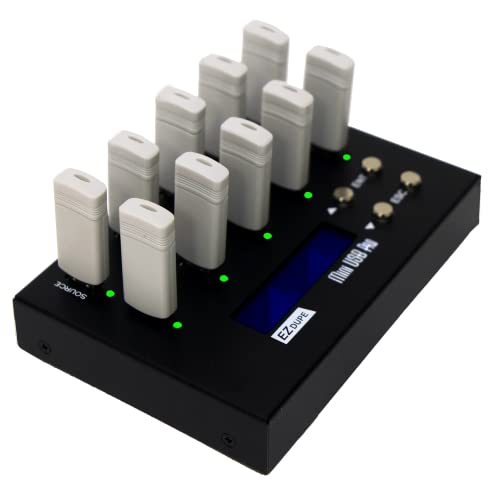
- Copies to up to 9 USB drives simultaneously
- Supports file and sector-by-sector copying
- Includes two erase functions
Best For: High-volume duplication and media sanitization
Best for IT Workflows
StarTech 1-to-5 USB Duplicator

- Copies to 5 USB drives without a computer
- Includes Copy & Compare verification
- Supports multi-pass drive erasure
Best For: Technicians and IT teams
Best Portable Option

- Copies to 4 USB drives simultaneously
- Lists speeds up to 2.5GB per minute
- Supports asynchronous copying and USB power
Best For: Portable, small-batch duplication
Best Compact Pick – StarTech 1:2 USB Duplicator
The StarTech USBDUP12 is a compact choice for usb duplicators for bulk copying when you need two target drives at a time. It works without a computer and supports USB 3.0 and USB 2.0 flash media, with copy, verification, and sanitization options.
Best For: IT technicians and teams that need a small standalone duplicator for routine USB cloning, erasing, and boot-drive preparation.
Pros:
- Supports system/file copying and sector-by-sector duplication.
- Offers quick erase plus single-pass and three-pass overwrite modes.
- LCD status display, error scanning, and Copy & Compare verification.
- Asynchronous copying can use internal memory for source content under 64 MB.
Cons:
- Copies to only two target drives at once.
- Asynchronous mode is limited to source content under 64 MB.
- External USB devices may require their own power source.
Choose this model when portability, drive sanitization, and verification matter more than maximum output volume. Its 1.5 GB/min specification and two-port layout suit smaller production runs.
Best High-Volume Pick – Systor 1:31 USB Duplicator
The Systor SYS-USBD-31 is designed for usb duplicators for bulk copying at a much larger scale, with one source feeding up to 31 USB targets. It operates as a standalone unit and supports both synchronous and asynchronous copy modes.
Best For: Businesses, deployment teams, and production environments that need to duplicate many USB flash drives in a single cycle.
Pros:
- Supports up to 31 target USB drives.
- Copies at speeds up to 2 GB per minute, or 33 MB per second.
- Bit-by-bit copying helps reproduce the source drive contents.
- Copy speed is specified to remain consistent as the number of loaded drives increases.
Cons:
- Its large 31-drive capacity may be excessive for occasional or small jobs.
- The supplied specifications list a USB 1.1 hard-disk interface.
- Warranty coverage is listed as one year for parts and three years for labor.
This is the strongest fit in the group for maximizing output per run. Its capacity and consistent stated transfer rate make it practical when repeating the same duplication task across many drives.
Best Versatile Pick – EZ Dupe USB Cyclone 1:15
The EZ Dupe USB Cyclone is a versatile option among usb duplicators for bulk copying, supporting up to 15 USB flash drives or external HDDs and SSDs. It combines multiple copy modes with four erase modes and independent bandwidth design for each channel.
Best For: Businesses and media or storage workflows that need flexible copying across different USB formats, capacities, and external drives.
Pros:
- Supports USB 1.0, 2.0, 3.0, and 3.1 media, plus external hard drives.
- Offers Essential Files, Full, Partitioned, and Percentage Copy modes.
- Includes Quick, Full, DoD 3-pass, and DoD 7-pass erase modes.
- Supports drives above 2 TB and lists no capacity-size limit.
Cons:
- Its 15-target capacity is lower than the 31-target Systor model.
- Maximum speed depends on the connected USB drives.
- The unit weighs 7 pounds, making it less convenient to move frequently.
The Cyclone stands out when media compatibility and workflow control are priorities. Its drive-monitoring feature can identify slow hard drives, while independent bandwidth design is intended to avoid reducing speed across channels.
Best Mid-Size Pick – Systor 1:7 USB Duplicator
The Systor SYS-USBD-7 offers a practical middle ground for usb duplicators for bulk copying, duplicating one source to seven targets without requiring a computer or software. It performs bit-by-bit copying and supports both synchronous and asynchronous operation.
Best For: Small businesses, IT departments, and personal users who need more capacity than a two-port duplicator without moving to a 31-port system.
Pros:
- Handles up to seven USB target drives in one cycle.
- Standalone design requires no computer or software.
- Supports bit-by-bit copying from the source drive.
- Listed copy speed is up to 2 GB per minute, or 33 MB per second.
Cons:
- Lower output capacity than larger 15- and 31-target models.
- Specifications list a USB 1.1 hard-disk interface.
- The unit weighs 10 pounds and is intended as a desktop device.
This model is well suited to recurring but moderate duplication jobs. It provides a useful seven-drive capacity and standalone workflow while avoiding the footprint and expense implied by a much larger duplicator.
High-Capacity Pro Pick – StarTech 1:15 USB Duplicator
For technicians and IT teams comparing usb duplicators for bulk copying, the StarTech USBDUPE115 stands out with 15 target ports, standalone operation, and support for both data-level and sector-by-sector duplication. Its LCD controls also provide drive-status and verification tools.
Best For: IT professionals, technicians, and teams that need to create or erase many USB drives without a computer.
Pros:
- Copies to up to 15 USB drives simultaneously.
- Supports system/file copying, whole-drive cloning, quick erase, and one- or three-pass overwriting.
- Copy-and-compare verification, error scanning, and LCD status monitoring help with quality control.
- Asynchronous copying can keep the workflow moving for source content under 128 MB.
Cons:
- The 3.9-pound unit is less compact than smaller duplicators.
- Its listed write speed is up to 1.5 GB per minute, so large jobs may take time.
- External USB storage may require its own power source.
The StarTech is the strongest choice here for maximum simultaneous output and added erase and verification functions. It is especially practical for repeatable deployment or sanitization workflows.
Compact Multi-Copy Pick – EZ Dupe 1:7 Mini USB Plus
The EZ Dupe Mini USB Plus is a compact option for usb duplicators for bulk copying when seven target drives are enough. It works without a computer, supports USB 1.0, 2.0, and 3.0 flash media, and adds asynchronous copying for ongoing smaller batches.
Best For: Small businesses, technicians, and users who want a portable seven-drive duplicator with straightforward plug-and-use operation.
Pros:
- Copies to up to seven USB flash drives simultaneously.
- Updated version lists a copy speed of up to 2.5 GB per minute or 45 MB per second, depending on drive performance.
- Asynchronous copying lets users remove finished drives and insert replacements without waiting for a full set.
- Supports USB 1.0, 2.0, 3.0 flash drives and external storage above 2 TB.
Cons:
- It has fewer target ports than higher-capacity duplicators.
- Actual speed depends on the read/write performance of the connected drives.
- External USB hard drives require their own power source.
This EZ Dupe model balances throughput, portability, and ease of use. Its seven ports and asynchronous mode make it a practical middle ground for recurring but not industrial-scale copying.
Portable Starter Pick – BestDuplicator UB300 1:2
For modest workloads, the BestDuplicator UB300 offers a simple standalone approach to usb duplicators for bulk copying. It duplicates one source to two target drives, supports quick or bit-for-bit copying, and includes testing and erase functions for basic media preparation.
Best For: Schools, field technicians, small IT departments, and users who usually need two duplicate USB drives at a time.
Pros:
- Copies one USB flash drive to two targets simultaneously without a computer.
- Provides both data-only Quick Copy and Whole Media bit-for-bit cloning.
- Includes capacity checks, device information, speed testing, and erase functions.
- Compact, lightweight design with LCD navigation and individual port indicators.
Cons:
- Its two-target capacity is limited for larger production runs.
- Designed for USB 1.1 and USB 2.0 media rather than newer USB standards.
- Additional memory-card duplication requires a compatible USB card reader sold separately.
The UB300 is a sensible entry-level choice when portability and straightforward controls matter more than maximum output. Its testing tools are useful for checking drives before distribution.
Best High-Capacity Pick – EZ Dupe 1-to-9 USB Duplicator
For bulk copying, the EZ Dupe 1-to-9 USB Duplicator can copy to up to nine USB drives simultaneously without a computer. It supports USB 1.0, 2.0, and 3.0 media, with both essential-file and sector-by-sector copying modes.
Best For: Organizations that need to duplicate many USB drives at once and occasionally sanitize media.
Pros:
- Copies to up to nine USB drives simultaneously.
- Offers quick file copying and whole-media, sector-by-sector copying.
- Includes two erase functions for data sanitization.
- Supports external USB hard drives up to 2TB when separately powered.
Cons:
- Its listed copy speed is up to 2GB per minute, which may be slower than some newer duplicators.
- External hard drives require their own power source.
This model stands out when output volume matters most. Its nine-port capacity and built-in erase options make it a practical standalone choice for repeated duplication and media cleanup.
Best for IT Workflows – StarTech 1-to-5 USB Duplicator
The StarTech 1-to-5 USB Duplicator is a standalone option for usb duplicators for bulk copying, with support for cloning, drive erasure, and copy verification. Its LCD menu and error-scanning features are useful for technicians managing boot drives or shared media.
Best For: IT professionals and technicians who need duplication, verification, and secure erasure controls.
Pros:
- Duplicates up to five USB drives without a computer.
- Supports file-based and sector-by-sector copying.
- Provides Copy & Compare verification plus error and bad-sector scanning.
- Offers quick erase and single- or three-pass overwrite modes.
Cons:
- Copies to fewer drives simultaneously than nine-port models.
- Asynchronous copying is limited to source content under 64MB.
- External USB devices may need a separate power source.
Its five-target capacity is suited to smaller production runs, while the LCD controls, verification, and overwrite options add useful operational oversight. It is especially compelling for managed IT and support environments.
Best Portable Option – EZ Dupe Mini USB Plus MK II
The updated EZ Dupe Mini USB Plus MK II is a compact standalone choice for usb duplicators for bulk copying when four simultaneous targets are enough. It reaches up to 2.5GB per minute, supports USB 1.0 through 3.0 media, and can use a power bank or USB power source.
Best For: Portable duplication jobs, small production runs, and users who want asynchronous copying.
Pros:
- Copies to four USB drives simultaneously.
- Offers a listed speed of up to 2.5GB per minute or 45MB per second.
- Supports asynchronous copying so finished drives can be replaced without waiting for the full set.
- Works with a power bank or other USB power source.
Cons:
- Has fewer target ports than nine-drive duplicators.
- Actual speed depends on the connected drives’ read and write performance.
- External USB storage requires its own power source.
This updated model balances portability and throughput. Its four-port layout is less suited to the largest batches, but asynchronous operation and flexible power options make it convenient for mobile or intermittent duplication work.
How We Picked the Best USB Duplicators for Bulk Copying
We focused on standalone duplicators that can copy USB media without requiring a computer. The selection spans two- to 31-target designs, giving occasional users and high-volume teams practical options. We also considered advertised transfer speeds, USB-generation compatibility, support for flash drives and external storage, LCD controls, verification features, and secure erasing or sanitization modes.
Port count matters, but it is not the only measure of productivity. A smaller unit may be easier to carry and simpler to operate, while a larger duplicator can reduce labor when many drives must be prepared in each batch.
Quick Comparison
Two- and four-port models suit small offices, classrooms, repair benches, and occasional media preparation. Seven- to 15-port systems offer a useful middle ground for recurring batches. A 31-port model is better suited to production, fulfillment, IT deployment, or training environments where throughput matters more than compact size.
Check the product specifications carefully before ordering. Some models target USB 2.0 media, while others accept USB 3.0 or USB 3.1 devices. Advertised speed is typically a maximum and depends on the source drive, target drives, file mix, and interface standard.
Key Buying Factors for USB Duplicators for Bulk Copying
Target-Port Capacity
Choose enough target ports to match your normal batch size. Extra ports can improve productivity, but they also increase cost and physical footprint. Buying slightly above your average workload may be worthwhile if demand is likely to grow.
Copy Speed and Source Performance
Compare the stated transfer rate, but treat it as a best-case figure. A fast source drive and similar-quality target media help the duplicator reach higher speeds. Slower or mixed drives can become the bottleneck.
Copy Modes and Verification
Useful systems may support whole-drive copying, file-system-aware copying, comparison or verification, and asynchronous operation. Verification is especially valuable when drives will be distributed to customers or used for critical deployments.
Erasing and Sanitization
If you recycle or repurpose drives, look for dedicated erase functions and clear reporting. Sanitization requirements vary by organization, so confirm that the available erase method meets your policy before relying on it.
Media Compatibility and Controls
Confirm compatibility with the capacities, connector types, and USB generations you use most. LCD screens and physical controls are convenient in shared work areas because they reduce dependence on a host computer and make batch status easier to check.
Who Should Buy Which USB Duplicators for Bulk Copying?
Choose a compact two- to four-target duplicator for occasional copying, mobile technicians, and small teams. A seven- or nine-target model is a balanced choice for schools, offices, and regular but moderate production. Five- and 15-target systems can fit teams that need more throughput without moving to the largest chassis.
For continuous or high-volume work, a 31-target duplicator can deliver the greatest batch capacity and reduce operator time. Prioritize USB 3.x support when modern high-speed media is part of your workflow, and favor sanitization features when drives are reused between projects. Before buying, estimate your weekly batch volume, average drive size, and acceptable completion time; those three figures usually reveal the right capacity more clearly than port count alone.