
USB duplicators can save substantial time when you need multiple identical flash drives without relying on a computer for every copy. The best models balance copying speed, simultaneous drive capacity, compatibility, and ease of use.
This roundup compares 10 options priced below $500, including standalone duplicators, compact multi-drive copiers, and USB hubs suited to simpler computer-assisted workflows. Consider your media type, daily volume, and required copy speed before choosing.
Best 10 USB Duplicators Under 500 Picks for 2026
Best Compact Duplicator

- Copies up to four USB drives at once
- Standalone, computer-free operation
- Supports USB 1.0/2.0/3.0 and over 2TB
Best For: Portable multi-drive copying
Best Long-Cable Hub

- Adds four USB 3.0 data ports
- Includes a 10-foot cable
- Works with Windows, Mac, and Linux
Best For: Computer-based USB expansion
Best Professional Features
Vinpower 1-to-3 USB Duplicator

- Copies three drives without a PC
- Offers Smart and Raw Copy modes
- Adds DoD wiping and error skipping
Best For: Business USB deployment and erasure
Best High-Port Expansion
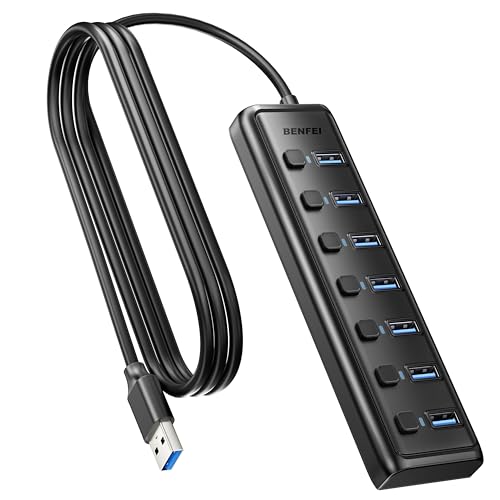
- Adds seven USB 3.0 data ports
- Includes individual switches and LEDs
- Works across major desktop operating systems
Best For: Multi-drive computer workstations
Best Portable SD Card Duplicator

- Standalone SD/microSD duplication without a PC
- Smart Copy, Raw Mode, and error skipping
- Compact design with secure erase
Best For: Field SD and microSD duplication
Best USB Expansion Hub
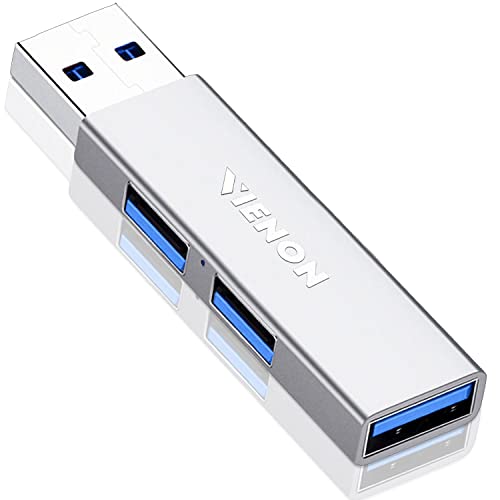
- Adds three USB 3.0 ports
- Up to 5 Gbps data transfer
- Plug-and-play Windows, Mac, and Linux support
Best For: Expanding USB connectivity
Best USB Flash Drive Duplicator

- Copies or erases up to five USB drives
- Supports file and sector-by-sector duplication
- LCD, error scanning, and Copy & Compare verification
Best For: IT teams and repeat USB production
Best Budget USB Port Expander

- Expands one USB-A port to four
- Up to 5Gbps stated transfer rate
- Compact plug-and-play design
Best For: Adding USB-A ports for drives and peripherals
Best Standalone USB Duplicator

- Copies one USB drive to two targets
- Supports quick and bit-for-bit modes
- Operates without a computer
Best For: Small-batch cloning and field deployment
Best High-Capacity USB Duplicator

- Duplicates up to 10 drives at once
- Supports USB 3.0 and 2.0 media
- Works from images, drives, or folders
Best For: Computer-connected bulk USB duplication
Best Compact Duplicator – EZ Dupe Mini USB Plus MK II
For shoppers comparing usb duplicators under 500, the EZ Dupe Mini USB Plus MK II is a compact standalone option for copying up to four USB drives at once. It requires no computer and supports USB 1.0, 2.0, and 3.0 flash media.
Best For: Home users, small businesses, and portable multi-drive copying.
Pros:
- Copies up to four USB drives simultaneously.
- Standalone operation requires no computer.
- Supports drives above 2TB and offers asynchronous copying.
- Rated copy speed reaches up to 2.5GB per minute, depending on the drives.
Cons:
- External USB storage devices require their own power source.
- Actual speed depends on the connected flash drives.
Its small footprint, power-bank compatibility, and broad USB support make this a practical choice when portability and straightforward duplication matter more than advanced erasing features.
Best Long-Cable Hub – Arvitek 4-Port USB 3.0 Hub
Although it is not a standalone duplicator, the Arvitek hub can be useful alongside usb duplicators under 500 when a computer-based workflow needs more USB ports. Its four USB 3.0 ports and 10-foot cable provide flexible desktop placement.
Best For: Users connecting several USB drives and peripherals to a computer-based setup.
Pros:
- Provides four USB 3.0 ports with data speeds up to 5Gbps.
- Extra-long 10-foot cable suits flexible desk layouts.
- Plug-and-play compatibility with Windows, Mac OS, and Linux.
- Compact and lightweight design.
Cons:
- It is a hub, not a standalone USB duplicator.
- Designed for data transfer only and does not charge devices.
This is best viewed as an accessory for expanding a computer-based duplication station, rather than a direct replacement for dedicated cloning hardware.
Best Professional Features – Vinpower 1-to-3 USB Duplicator
The Vinpower Flash Memory USB Duplicator stands out among usb duplicators under 500 for its professional-oriented feature set. This standalone unit copies three USB drives, supports Smart and Raw Copy modes, and also includes secure erasing and read-error handling.
Best For: IT teams, offices, schools, and organizations handling recurring USB deployment or data-erasure tasks.
Pros:
- Duplicates up to three USB drives without a PC.
- Smart Copy and bit-by-bit Raw Copy support different duplication needs.
- Includes DoD 5220.22-M data wiping.
- Read Error Skip can bypass damaged sectors during copying.
Cons:
- Copies three drives at a time, fewer than four-port alternatives.
- The supplied notes do not specify a copy-speed rating.
With copying, erasing, and error-skipping functions in one compact device, this model is particularly appealing for repeatable business workflows and more demanding media-management tasks.
Best High-Port Expansion – BENFEI 7-Port USB 3.0 Hub
The BENFEI 7-Port Hub is another computer-accessory option to consider with usb duplicators under 500. It expands one USB connection to seven USB 3.0 data ports, allowing multiple flash drives and peripherals to remain connected to a laptop or desktop.
Best For: Computer-based duplication setups that need many connected USB devices.
Pros:
- Expands a computer to seven USB 3.0 ports.
- Supports data transfer speeds up to 5Gbps.
- Individual port switches and LED indicators aid device management.
- Compatible with Windows, Mac OS X, Linux, and Chrome OS.
Cons:
- It is not a standalone duplicator.
- USB ports are for data transfer and cannot charge devices.
Its seven individually controlled ports make it useful for organizing a multi-drive computer workflow, but buyers seeking PC-free copying should choose dedicated duplicator hardware instead.
Best Portable SD Card Duplicator – Vinpower SDMiniDup 1-to-3
Vinpower SDMiniDup 1 to 3 Standalone SD/MicroSD Card Flash Memory Drive Duplicator Copier
Check Price On AmazonIf you need a compact option among USB duplicators under 500 for SD and microSD media, the Vinpower SDMiniDup offers standalone operation without a computer. It can copy accessible files quickly or duplicate cards bit by bit in Raw Mode.
Best For: Field technicians, photographers, and users duplicating SD or microSD cards without a PC.
Pros:
- Copies to up to three SD or microSD cards at once.
- Smart Copy and bit-by-bit Raw Mode support different duplication needs.
- Read Error Skip can preserve recoverable data from cards with bad sectors.
- Secure Erase and a compact 1.2-pound design add practical versatility.
Cons:
- Designed for SD and microSD media rather than USB flash drives.
- Requires access to electricity for operation.
The SDMiniDup is a focused choice for memory-card workflows. Its error-skipping and secure-erasure functions make it more capable than a basic copier, while its small footprint suits mobile use.
Best USB Expansion Hub – VIENON 3-Port USB 3.0 Hub
Although it is not a standalone duplicator, this VIENON hub can be useful alongside USB duplicators under 500 when you need more connectivity. It expands one USB port into three and supports simultaneous data transfers at up to 5 Gbps.
Best For: Users who need extra USB ports for flash drives, keyboards, mice, printers, cameras, or other peripherals.
Pros:
- Provides three USB 3.0 ports for simultaneous use.
- Supports transfer speeds up to 5 Gbps and backward compatibility with USB 2.0 and 1.0.
- Plug-and-play operation works with Windows, Mac, and Linux systems.
- Compact aluminum housing suits desks, laptops, and vehicle use.
Cons:
- It expands connectivity but does not duplicate or erase drives.
- Does not support charging.
- Bus-powered external devices may have power limitations.
Choose this hub as a practical accessory rather than a duplicator. It is a simple way to connect multiple USB devices, but dedicated cloning or erasing requires separate hardware.
Best USB Flash Drive Duplicator – StarTech 1-to-5 Standalone
For buyers comparing USB duplicators under 500, the StarTech 1:5 Standalone USB Flash Drive Duplicator is built specifically for cloning and erasing USB media without a computer. It supports system-and-file copying, sector-by-sector duplication, and multiple erase standards.
Best For: IT technicians and teams producing several USB boot drives, distributing files, or sanitizing flash media.
Pros:
- Duplicates or erases up to five USB drives from one source.
- Supports USB 3.0, 2.0, and 1.1 flash media and external USB storage.
- Offers file-based, sector-by-sector, quick-erase, and one- or three-pass overwrite modes.
- LCD monitoring, error scanning, and Copy & Compare help with verification.
Cons:
- External USB devices may require their own power source.
- Asynchronous copying is limited to source content under 64 MB.
- Its listed transfer rate is 1.5 GB/min, so larger jobs may take time.
This is the strongest fit here for dedicated USB duplication and sanitization. Its standalone controls and verification features suit repeat production work, while the five-target design is more efficient than copying drives individually.
Best Budget USB Port Expander – 4-Port USB 3.0 Hub
If you need more connections rather than true drive-to-drive cloning, this compact hub is a practical budget option among USB duplicators under 500. It expands one USB-A port into four and supports up to 5Gbps data transfer for compatible devices.
Best For: Laptop and desktop users who need additional USB-A ports for flash drives, external hard drives, printers, keyboards, or mice.
Pros:
- Provides four USB-A 3.0 ports from one connection.
- Supports stated data-transfer speeds up to 5Gbps.
- Plug-and-play compatibility with Windows, macOS, ChromeOS, and Linux.
- Lightweight 1-foot cable design is easy to carry.
Cons:
- It is a USB expansion hub, not a standalone duplicator.
- Requires a host computer or compatible USB device.
The RUUPRRN hub is best viewed as a low-cost connectivity accessory for workflows involving multiple USB devices. It can make source and target drives easier to connect, but copying still depends on your computer or other host device.
Best Standalone USB Duplicator – BestDuplicator UB300 1:2
For straightforward drive cloning without a computer, the BestDuplicator UB300 is one of the more purpose-built choices among USB duplicators under 500. Its standalone design copies one USB flash drive to two targets simultaneously.
Best For: IT departments, schools, businesses, technicians, and field deployments that need simple two-drive USB duplication without Windows or Mac software.
Pros:
- Duplicates one source USB drive to two target drives at once.
- Offers Quick Copy and Whole Media bit-for-bit cloning modes.
- Includes capacity checks, device information, speed tests, and erase functions.
- LCD display and port LEDs help monitor operation.
Cons:
- Uses USB 1.1/2.0 media and is not a USB 3.0 duplicator.
- Rated copy speeds are up to 1.5GB per minute per target port.
- Other card formats require a compatible USB card reader sold separately.
The UB300 is a strong fit when independent operation matters more than high port count or USB 3.0 speed. Its verification and erase tools also make it useful for preparing flash drives for repeated deployment.
Best High-Capacity USB Duplicator – DupliM 1-to-10 Mini
When you need to create several copies at once, the DupliM Mini offers a computer-connected approach suited to larger batches among USB duplicators under 500. It can duplicate up to 10 USB 3.0 or 2.0 drives using included software for Windows and Mac.
Best For: Businesses, educators, technicians, and content distributors who need simultaneous duplication of multiple USB flash drives.
Pros:
- Duplicates up to 10 USB drives simultaneously.
- Supports USB 3.0 for faster flash-drive duplication.
- Can copy from image files, flash drives, or selected files and folders.
- Includes software, power adapter, USB 3.0 cable, and one-year parts-and-labor warranty.
Cons:
- Requires a connected Windows or Mac computer.
- Performance depends on the host computer, source, and target media.
- Designed for USB flash or pen drives rather than standalone operation.
The DupliM Mini is the most scalable option in this group for batch production, especially when flexible source options are useful. Choose it over a standalone unit if computer-based control and up to 10 target drives are more important than independent operation.
How We Picked the Best USB Duplicators Under 500
We focused on practical differences that matter in real copying workflows: the number of target ports, standalone operation, supported media, USB generation, advertised speed, portability, and erasing or verification features. The selection includes dedicated flash-drive duplicators as well as USB hubs, which can be useful when copying is handled through a computer rather than through a standalone controller.
Because prices and specifications can change, confirm current compatibility and included accessories before ordering. A hub is not a true standalone duplicator, while a dedicated duplicator may require the source and target drives to use compatible formats and capacities.
Quick Comparison
| Best For | What to Look For |
|---|---|
| Occasional home or office copying | Compact design, simple controls, and one-to-three target capacity |
| Higher-volume duplication | More target ports, faster USB performance, and copy verification |
| Portable workflows | Standalone operation, low weight, and minimal accessories |
| Computer-assisted copying | USB 3.0 hub, adequate power, and a dependable host computer |
| SD or microSD media | Dedicated card duplicator rather than a standard USB-only model |
Key Buying Factors for USB Duplicators Under $500
Target Capacity and Throughput
A 1-to-3 unit is suitable for small batches, while a 1-to-4, 1-to-5, or 1-to-10 design reduces hands-on time for larger runs. Port count alone does not determine speed: total throughput may be shared across all targets, so check the manufacturer’s stated copying rate.
Standalone Operation
Standalone models copy directly from a source drive and typically use dedicated buttons or an LCD. They are convenient for repeatable jobs and do not tie up a computer. USB hubs are more flexible for file-management tasks, but they depend on operating-system software and the host computer’s available power.
Compatibility and Media Handling
Check whether the unit supports USB 2.0, USB 3.0, or both, along with the drive capacities and file systems you use. If your workflow includes SD or microSD cards, choose a card duplicator specifically designed for those formats. Some devices clone the entire drive, while others copy files; that distinction matters for bootable or partitioned media.
Verification, Erasing, and Power
Verification helps confirm that target drives match the source after copying. Secure or full-drive erasing can also be valuable when reusing media, but erase modes differ by model. For hubs, especially multi-port USB 3.0 versions, consider whether an external power adapter is included or required for several connected drives.
Who Should Buy Which USB Duplicators Under 500?
Choose a compact standalone duplicator if you need straightforward, repeatable copying away from a computer. A higher-port model makes more sense for offices, event production, installers, and sellers preparing multiple drives at once. Select a USB 3.0 hub when you already manage files on a computer and primarily need additional ports rather than an independent cloning appliance.
For SD or microSD production, use the dedicated card duplicator in this roundup. Buyers working with mixed media should prioritize compatibility over maximum port count. Finally, if your jobs are infrequent, compare the cost of a simple hub and computer workflow against a standalone unit; the latter earns its premium when convenience, consistency, and reduced labor matter most.