
Choosing the right rudder pedals can make a flight sim setup feel far more natural, especially when you want smoother taxiing, coordinated turns, and precise yaw control.
In this roundup, we focus on the best USB rudder pedals for flight simulator use in 2026, with options that fit beginner rigs, upgraded HOTAS setups, and serious cockpit-style builds.
Best 10 USB Rudder Pedals for Flight Simulator Picks for 2026
Best Adjustable Tension
Logitech G Pro Flight Rudder Pedals
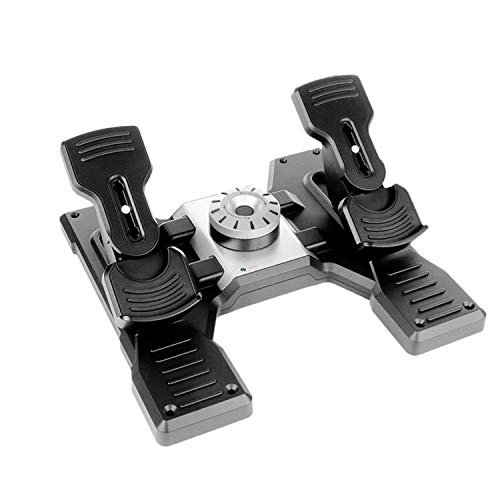
- Adjustable tension dial for a customized pedal feel
- Self-centering rudder action with differential toe brakes
- USB connection with adjustable foot rests for stable control
Best For: Sim pilots who want realistic rudder control with tunable resistance and toe brakes.
Best for Dual-Rudder Control
Thrustmaster T-Flight Hotas X USB Flight Stick

- Built-in dual rudder control without separate pedals
- Detachable throttle for flexible desk or cockpit placement
- 12 programmable buttons and 5 axes for custom control
Best For: PC simmers who want rudder input built into a simple HOTAS setup.
Best Yoke-and-Pedals Bundle
Logitech G Pro Flight Yoke + Pedals

- Bundle includes both yoke and rudder pedals
- Self-centering pedals with differential toe brakes
- 54 programmable controls on the yoke
Best For: Flight sim users who want a coordinated yoke-and-pedals cockpit setup.
Best for Easy Setup
Thrustmaster T-Flight Stick X USB Joystick
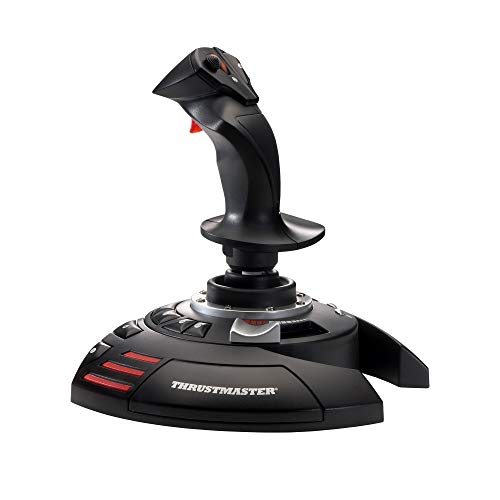
- Plug-and-play USB connection
- Twist rudder plus integrated throttle
- Weighted base with 12 programmable buttons
Best For: PC flight sim players who want a simple all-in-one controller instead of separate pedals.
Best with Throttle Quadrant
Logitech Pro Flight Rudder Pedals & Throttle Quadrant

- Adjustable self-centering pedals with damping control
- Differential toe brakes for finer runway handling
- Includes a 3-axis throttle quadrant with extra switches
Best For: Sim pilots who want rudder pedals plus extra throttle and system controls in one bundle.
Best for Console & PC Flyers
Thrustmaster TFRP Rudder Pedals

- PS5, Xbox Series X|S, and PC compatibility
- Long travel axis for precise rudder input
- Aluminum rails for smooth, stable motion
Best For: Console and PC sim pilots who want smooth, accurate rudder control.
Best All-in-One Flight Rig
Logitech G X56 HOTAS + Pro Flight Rudder Pedals

- Bundle includes throttle, joystick, and rudder pedals
- Adjustable pedal tension for lighter or heavier aircraft feel
- Toe brakes improve taxiing, landing, and ground control
Best For: Flight sim pilots who want a bundled HOTAS and pedal setup for immersive control.
Best for Realistic Yaw Control
Thrustmaster TPR Rudder Pedals

- Pendular design feels smooth and highly realistic
- Magnetic sensors deliver precise, wear-resistant input
- Adjustable springs help tailor pedal resistance
Best For: Serious PC sim pilots who want premium-feel rudder control and precise yaw response.
Best Bundle Option
ThrustMaster TFRP Rudder Pedals + T16000M HOTAS

- Includes rudder pedals and a full HOTAS-style controller
- USB connection keeps setup simple on PC
- A smart bundle for upgrading into flight sims
Best For: Sim pilots who want pedals and a matching joystick-throttle setup in one purchase.
Best Xbox-Ready HOTAS Bundle
T-Flight Full Kit with Rudder Pedals

- Includes rudder pedals for smoother yaw control
- Official Xbox support simplifies console play
- HOTAS layout adds throttle, stick, and 14 buttons
Best For: Xbox or PC sim pilots who want an all-in-one flight control bundle with pedals included.
Best Adjustable Tension – Logitech G Pro Flight Rudder Pedals
If you’re comparing usb rudder pedals for flight simulator use, the Logitech G Pro Flight Rudder Pedals are a solid pick for pilots who want realistic foot control without a steep learning curve. The self-centering action, adjustable tension, and toe brakes make them a practical match for everything from light GA flying to heavier jet operations.
Best For: Sim pilots who want adjustable pedal feel, reliable toe brakes, and a straightforward USB setup.
Pros:
- Adjustable tension dial lets you tune the pedal resistance to your preference.
- Self-centering design and differential toe brakes improve realism and control.
- USB 2.0 connection keeps setup simple on supported Windows PCs.
- Adjustable foot rests and non-slip materials help improve comfort and stability.
Cons:
- Windows-only compatibility limits use for Mac and console setups.
- Plastic construction may feel less premium than higher-end metal pedals.
- Requires desk or floor space due to the wider pedal base.
For simmers who want usb rudder pedals for flight simulator control that feels more natural than a twist stick, this model hits a nice balance of precision, comfort, and ease of use. It stands out most for adjustable resistance and dependable toe braking rather than exotic extras.
Best for Dual-Rudder Control – Thrustmaster T-Flight Hotas X USB Flight Stick
If you want a simple all-in-one stick and throttle that can cover rudder input without adding extra hardware, this Thrustmaster is a practical alternative to usb rudder pedals for flight simulator setups. It gives you programmable controls, adjustable stick tension, and a detachable throttle for either compact desk play or a more spread-out cockpit layout.
Best For: PC pilots who want an easy-to-set-up HOTAS with built-in dual rudder control and flexible desk placement.
Pros:
- Dual rudder control via stick rotation or a progressive lever
- Detachable throttle works well for compact or split setups
- 12 programmable buttons and 5 axes add good control flexibility
- Adjustable resistance helps fine-tune stick feel
Cons:
- Not a separate pedal set, so it may not suit simmers who want true foot control
- PC-focused and not the most advanced option for high-end sim rigs
For buyers comparing usb rudder pedals for flight simulator use, this is a solid shortcut if you prefer rudder input built into the stick rather than a separate pedal unit. It’s especially appealing for newcomers, desktop users, and anyone who wants a cleaner setup with fewer cables.
Best Yoke-and-Pedals Bundle – Logitech G Pro Flight Yoke + Pedals
If you want a more complete control setup than standalone usb rudder pedals for flight simulator use, this Logitech bundle pairs a realistic yoke with self-centering rudder pedals and toe brakes. It’s a strong fit for pilots who want to build good habits, improve control fidelity, and keep everything in one matched ecosystem.
Best For: Flight sim users who want a bundled yoke-and-pedals setup for more realistic desktop flying.
Pros:
- Includes both the Pro Flight Yoke System and matching rudder pedals
- Self-centering pedals with differential toe brakes add more precise runway control
- Adjustable, non-slip footrests help accommodate different foot sizes
- Yoke adds 54 programmable controls for more versatile cockpit mapping
Cons:
- More expensive than buying usb rudder pedals for flight simulator use alone
- Requires more desk space than a compact pedals-only setup
This is a practical upgrade if you’re looking beyond basic pedals and want a more immersive control stack. For simmers comparing usb rudder pedals for flight simulator setups, the real appeal here is the complete, coordinated package rather than just the pedals themselves.
Best for Easy Setup – Thrustmaster T-Flight Stick X USB Joystick
If you want a simple, desk-friendly controller for flight sims, this Thrustmaster stick is a practical pick. It’s especially appealing if you’re comparing usb rudder pedals for flight simulator setups but would rather get built-in rudder control and a throttle in one device.
Best For: PC sim pilots who want plug-and-play flying, integrated throttle control, and twist-rudder input without adding separate pedals.
Pros:
- Plug-and-play USB setup keeps installation quick and easy
- Twist rudder and built-in throttle reduce the need for extra hardware
- Weighted base helps keep the stick stable during aggressive inputs
- 12 programmable buttons and presets add useful customization
Cons:
- Twist rudder won’t feel as immersive as dedicated pedals
- Single-stick layout may be too basic for advanced sim rigs
- Plastic-focused build is more practical than premium
For newcomers and casual flyers, this is an efficient way to cover core controls without extra clutter. If you’re shopping for usb rudder pedals for flight simulator use but want a lower-cost, space-saving alternative, this stick delivers the essentials in one compact package.
Best with Throttle Quadrant – Logitech Pro Flight Rudder Pedals & Throttle Quadrant
If you want usb rudder pedals for flight simulator use that go beyond basic yaw control, this Logitech set adds both self-centering pedals and a matching throttle quadrant for a more complete cockpit feel. The adjustable tension dial lets you tailor pedal resistance, while the differential toe brakes and extra levers give you more precision for taxi, landing, and engine management.
Best For: Sim pilots who want rudder pedals plus extra throttle and system controls in one bundle.
Pros:
- Self-centering pedals with adjustable damping for a more realistic feel
- Differential toe brakes improve ground handling and landing control
- Throttle quadrant adds 3 axis levers and 3 rocker switches for more inputs
- Flexible mounting options help fit different desk and cockpit setups
Cons:
- More expensive and bulkier than standalone rudder pedals
- Best suited to users who have room for a multi-piece control setup
This is a strong pick if you want usb rudder pedals for flight simulator setups that feel closer to a real cockpit, especially when you value adjustable pedal response and extra engine controls in the same package.
Best for Console & PC Flyers – Thrustmaster TFRP Rudder Pedals
If you want usb rudder pedals for flight simulator setups that work across PS5, Xbox, and PC, the Thrustmaster TFRP is a practical pick. It combines a long rudder travel, self-centering action, and smooth sliding rails to give you more precise foot control in civilian and combat sims.
Best For: Sim pilots who want console-compatible rudder pedals with realistic travel, steady resistance, and reliable everyday control.
Pros:
- Long rudder travel helps make turns and coordinated maneuvers feel more accurate.
- Self-centering axis provides smooth, predictable control input.
- Aluminum rail system adds rigidity and helps the pedals glide consistently.
- Works with PS5, Xbox Series X|S, and PC flight sim setups.
Cons:
- Not the most compact option for small desks or cramped cockpit mounts.
- More focused on solid all-around control than on high-end pro-grade features.
For buyers comparing usb rudder pedals for flight simulator use, the TFRP stands out for its smooth feel, strong compatibility, and simple ergonomic design. It is a sensible upgrade if you want better yaw control without moving into a much more expensive pedal set.
Best All-in-One Flight Rig – Logitech G X56 HOTAS + Pro Flight Rudder Pedals
If you want a more complete cockpit-style setup, this bundle pairs a HOTAS controller with dedicated usb rudder pedals for flight simulator play. It gives you hands-on throttle, stick, yaw, and toe-brake control in one package, which is ideal if you’re moving beyond a basic joystick and want more realism without piecing together separate accessories.
Best For: Flight sim pilots who want a bundled HOTAS and rudder pedal setup for more immersive control.
Pros:
- Includes both the X56 throttle/joystick and Pro Flight Rudder Pedals
- Adjustable pedal tension helps match lighter props or heavier jet feel
- Toe brakes and yaw control add more realistic taxiing and landing control
Cons:
- Bundle is larger and takes more desk or floor space than a standalone controller
- More expensive than buying basic usb rudder pedals for flight simulator use alone
- May be more setup than casual players need
This is a strong choice if you want a coordinated throttle, stick, and pedal setup instead of mixing and matching gear. The X56 adds plenty of buttons and fine control, while the included rudder pedals round out the experience for users who want usb rudder pedals for flight simulator sessions that feel more like a real cockpit.
Best for Realistic Yaw Control – Thrustmaster TPR Rudder Pedals
If you want usb rudder pedals for flight simulator use that feel closer to real aircraft controls, the Thrustmaster TPR stands out for its pendular design and high-precision magnetic sensing. It’s aimed at sim pilots who care more about smooth, repeatable rudder input than compact size or entry-level pricing.
Best For: Serious PC flight sim pilots who want a realistic pedal feel, precise yaw response, and long-session durability.
Pros:
- Pendular suspended mechanism delivers smooth, natural rudder motion
- H.E.A.R.T magnetic sensors provide frictionless, accurate input over time
- Adjustable spring resistance lets you tune the feel for different aircraft types
Cons:
- Premium-focused design may be overkill for casual sim flyers
- PC-oriented setup limits appeal if you need broad console compatibility
For pilots comparing usb rudder pedals for flight simulator setups, this model is a strong pick when realism and fine control matter more than a basic plug-and-play pedal set. Its adjustable feel and precise yaw authority make it well suited to combat, commercial, and general aviation simming.
Best Bundle Option – ThrustMaster TFRP Rudder Pedals + T16000M HOTAS
If you want usb rudder pedals for flight simulator use plus a matching joystick setup, this Thrustmaster bundle is a practical way to cover both controls in one purchase. The TFRP pedals give you dedicated rudder input, while the T16000M HOTAS adds a precise throttle-and-stick combo for more complete PC flight control.
Best For: Sim pilots who want a bundled starter-to-midrange control setup with pedals and HOTAS in one box.
Pros:
- Includes rudder pedals and a full HOTAS-style controller
- USB connection keeps setup simple on PC
- Good fit for flight sims, space sims, and general aviation play
- Ergonomic layout helps reduce upgrade guesswork
Cons:
- Bundle may be more than you need if you only want pedals
- Not as premium as higher-end metal pedal sets
- Desk space requirements are higher than for a standalone controller
For buyers comparing usb rudder pedals for flight simulator setups, this bundle stands out because it delivers the pedals plus the matching hands-on controls that many newcomers end up buying separately. It is a strong convenience pick if you want a more complete cockpit feel without piecing everything together one item at a time.
Best Xbox-Ready HOTAS Bundle – T-Flight Full Kit with Rudder Pedals
If you want a more complete cockpit setup than a standalone stick, this bundle is a strong pick for usb rudder pedals for flight simulator use on both PC and Xbox. It combines a HOTAS layout with included rudder pedals, so you get yaw control, throttle control, and menu-friendly console support in one package.
Best For: Sim pilots who play on Xbox Series X|S or PC and want an all-in-one controller bundle with pedals included.
Pros:
- Includes TFRP rudder pedals for smoother yaw and taxi control
- Official Xbox buttons make console navigation easier without a second controller
- Detachable throttle, 5 axes, and 14 mappable buttons add useful sim flexibility
- Good fit for beginners building a full flight-sim setup
Cons:
- Not ideal if you only want standalone rudder pedals
- More of a bundled starter system than a high-end enthusiast setup
This kit makes sense if you want usb rudder pedals for flight simulator sessions plus a matching stick-and-throttle control scheme in one purchase. It is especially appealing for casual and mid-level sim pilots who value convenience, console compatibility, and smoother coordinated turns over modular upgrades.
How We Picked the Best USB Rudder Pedals for Flight Simulator
We looked for pedals and bundles that balance control accuracy, comfort, compatibility, and value. For USB Rudder Pedals for Flight Simulator use, the most important traits are stable construction, smooth axis response, and easy PC connection. We also considered whether each option works well as a standalone pedal set or as part of a broader control ecosystem.
Quick Comparison
Some buyers want a simple pedal set to improve yaw control, while others want a bundle that includes a stick, throttle, or yoke for a more complete cockpit. Standalone pedals are usually the best choice if you already own a good HOTAS or yoke. Bundles can be better value if you are starting from scratch and want one purchase to cover multiple controls.
Key Buying Factors for USB Rudder Pedals for Flight Simulator
Axis Feel and Precision
Look for smooth, predictable movement with enough resistance to make small corrections easy. Better sensors and more refined travel usually translate to steadier rudder input during takeoff, landing, and crosswind corrections.
Heel-Toe Capability and Toe Brakes
Not every sim pilot needs toe brakes, but they are useful for taxi control and more realistic ground handling. If you fly aircraft that rely on differential braking, this feature is worth prioritizing.
Build Quality and Pedal Travel
Metal rails, solid housings, and a stable base matter more than flashy design. Wider travel can improve finesse, while adjustable tension can help match your preferred feel.
Compatibility and Setup
Most USB Rudder Pedals for Flight Simulator use are best suited to PC, but some bundles and pedal sets also support consoles. Check whether the pedals are truly plug-and-play, require software tuning, or work best within a specific brand ecosystem.
Space and Mounting
Before buying, measure your desk or sim rig footprint. Pedals that slide around or sit too close together can be frustrating, especially during long sessions.
Who Should Buy Which USB Rudder Pedals for Flight Simulator?
Beginners should prioritize easy setup and bundled value. If you are building a first PC flight sim station, a HOTAS or yoke bundle with pedals can be the simplest path.
Intermediate and advanced sim pilots should lean toward standalone pedals with better precision and sturdier construction, especially if they already have a preferred stick or throttle. If you fly helicopters, taildraggers, or aircraft that demand fine yaw work, investing in higher-end pedals is usually worth it.
Budget buyers should focus on dependable basics rather than premium extras, while enthusiasts with dedicated rigs should look for the most refined pedal action, strongest materials, and the best long-term comfort.