
Wireless plotter printers make it easier to produce large CAD drawings, posters, presentations, and technical documents without dedicating every project to a wired workstation.
We compared 10 wide-format options from Epson, HP, and Canon, including compact 24-inch models and higher-capacity 36-inch printers, to help you choose the right fit for your workspace and workload.
Best 10 Wireless Plotter Printers Picks for 2026
Compact Wireless Pick
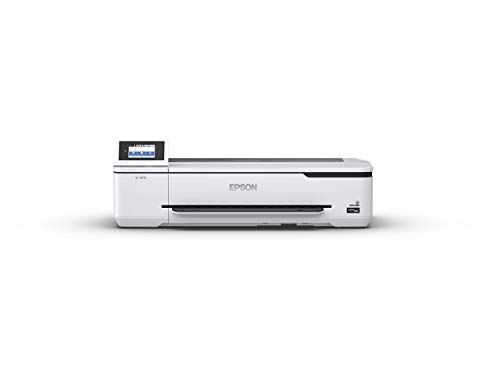
- A1/D-size prints in as fast as 34 seconds
- Compact desktop-friendly 24-inch design
- Wireless, Wi-Fi Direct, and touchscreen control
Best For: Small offices needing fast wide-format color prints
High-Volume Office Choice
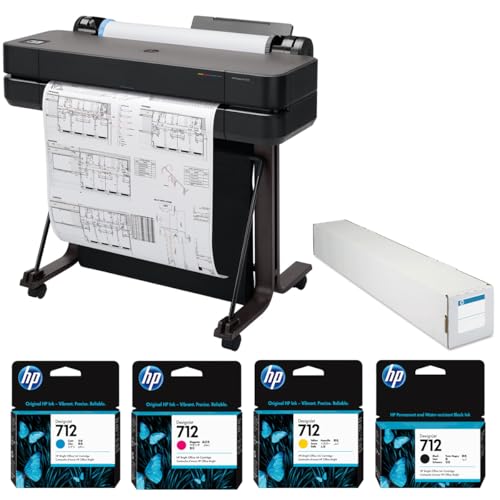
- Up to 76 A1 prints per hour
- Includes stand, feeder, spindle, ink, and paper roll
- Wi-Fi, Wi-Fi Direct, Ethernet, USB, and AirPrint
Best For: Offices producing frequent A1 technical documents
Multifunction Wireless Option

- Flatbed scanning and enlargement copying
- USB, cloud, and Wi-Fi workflow options
- Automatic feeding for up to 100 letter sheets
Best For: Offices needing printing, scanning, and copying in one unit
Low-Running-Cost Choice

- Cartridge-free bottle-based ink system
- 1120 mL of CMYK ink included
- A1/D-size prints in as fast as 34 seconds
Best For: Frequent users prioritizing included ink and lower running costs
Best Compact CAD Pick

- 24-inch roll printing with sheet-feed support
- Includes 2-year onsite HP Care Pack
- HP Click and HP Smart simplify remote jobs
Best For: Compact CAD, blueprint, poster, and map printing
Best 36-Inch Canon Option

- Supports media up to 36 inches by 59 feet
- Wi-Fi, Ethernet, and USB connectivity
- LUCIA TD pigment inks with 2400 x 1200 dpi
Best For: Networked 36-inch office printing
Best Full-Size Workflow

- 36-inch rolls plus 13-by-19-inch sheet support
- Includes feeder, stand, spindle, and media bin
- Automatic media switching with Wi-Fi and Ethernet
Best For: High-capacity CAD, GIS, poster, and signage workflows
Best Connected 36-Inch Pick

- 36-inch roll printing with automatic sheet/roll switching
- Wi-Fi, Ethernet, USB, and HP Smart app support
- Two-year onsite support and HP Click workflow tools
Best For: Architectural, engineering, construction, and CAD printing
Best Compact 24-Inch Option

- Supports 24-inch rolls and automatic sheet feeding
- Includes 280 ml of four-color ink
- Wi-Fi, Ethernet, and USB connectivity
Best For: Office posters, banners, and mixed roll-and-sheet printing
Best 36-Inch Color Production Pick

- Five-color pigment ink for sharp lines and vibrant images
- Automatic media detection and color calibration
- Includes stand, catch basket, and 300 ml of ink
Best For: Professional 36-inch technical, poster, and color printing
Compact Wireless Pick – Epson SureColor T3170
The Epson SureColor T3170 is a practical choice among wireless plotter printers for offices that need detailed color plans, posters, or A1/D-size documents without dedicating much floor space. Its wireless and Wi-Fi Direct connectivity supports printing from computers, tablets, and smartphones.
Best For: Desktop-oriented offices needing fast, wide-format color printing.
Pros:
- Produces A1/D-size prints in as fast as 34 seconds.
- Compact 24-inch wide-format design can fit on a desktop.
- 4.3-inch color touchscreen simplifies setup and print tasks.
- High-capacity cartridges reduce how often ink needs replacement.
Cons:
- Optional stand is sold separately.
- Print-only design does not provide scanning or copying.
- Uses cartridges rather than the included bottle-based system of the T3170x.
Choose the T3170 when workspace efficiency and straightforward wireless printing matter most. Its 2400 x 1200 dpi resolution and fast A1 output make it well suited to everyday professional documents.
High-Volume Office Choice – HP DesignJet T630
The HP DesignJet T630 is a strong option among wireless plotter printers for teams handling recurring technical drawings, presentations, and renderings. It combines a stand, automatic sheet feeder, manual feed, Wi-Fi, Wi-Fi Direct, and wired networking for flexible office deployment.
Best For: Busy offices that need a 24-inch plotter with multiple paper-feeding options.
Pros:
- Prints A1 pages in about 30 seconds, with up to 76 A1 prints per hour.
- Supports media from A4 through A1, including bond, coated, technical, and photo paper.
- Includes a stand, auto sheet feeder, spindle, ink, and matte bond paper roll.
- Offers Wi-Fi, Wi-Fi Direct, Gigabit Ethernet, USB, AirPrint, and ChromeOS support.
Cons:
- At 86.7 pounds, it is substantially less portable than compact desktop models.
- The supplied details list its printer connectivity type as wired despite Wi-Fi features.
- It is a print-only machine without built-in scanning or copying.
The T630 makes sense when throughput, included accessories, and broad connectivity are more important than a small footprint. Its 2400 x 1200 optimized dpi output is designed for clear, detailed large-format work.
Multifunction Wireless Option – Canon imagePROGRAF TC-21M
The Canon imagePROGRAF TC-21M stands apart from many wireless plotter printers by adding a flatbed scanner and copying functions. It can enlarge letter-size originals, print from a USB flash drive, and handle roll media up to 24 inches wide or sheets through A1 size.
Best For: Offices that need wide-format printing plus scanning and enlargement copying.
Pros:
- Flatbed scanner supports direct enlargements of smaller originals.
- Prints from a USB flash drive and supports cloud printing and scanning.
- Automatic feeder holds up to 100 letter-size or 50 11-by-17-inch sheets.
- 2.7-inch tiltable touchscreen provides straightforward control.
Cons:
- Its 24-inch multifunction design may require more dedicated workspace than compact plotters.
- It uses a simplex print process rather than automatic duplex printing.
- It is designed for A1 maximum media, rather than larger formats.
For users who regularly digitize, enlarge, or reproduce documents, the TC-21M offers capabilities that print-only plotters lack. Its Wi-Fi connectivity and 2400 x 1200 dpi resolution add flexibility for mixed office workflows.
Low-Running-Cost Choice – Epson SureColor T3170x
The Epson SureColor T3170x is one of the more economical wireless plotter printers to consider when ongoing ink costs matter. Its cartridge-free design uses high-capacity bottles, and the box includes 1120 mL of ink for producing posters and technical drawings.
Best For: Offices seeking cartridge-free wide-format printing with substantial included ink.
Pros:
- Includes two full sets of CMYK ink bottles totaling 1120 mL.
- Auto-stop bottles are designed for easier, cleaner filling.
- Produces A1/D-size prints in as fast as 34 seconds.
- Compact 24-inch design includes wireless connectivity and a 4.3-inch LCD screen.
Cons:
- Media is not included with the printer.
- The optional stand is sold separately.
- Its listed maximum sheet size is 11 x 17 inches, while roll media supports 24-inch widths.
The T3170x is a sensible fit for frequent users who want to reduce reliance on replacement cartridges. It retains the compact footprint and fast output of the T3170 while shifting the ink system toward high-volume, lower-running-cost use.
Best Compact CAD Pick – HP DesignJet T210
The HP DesignJet T210 is a practical choice among wireless plotter printers for professionals who need color CAD drawings, posters, maps, signage, or sewing patterns in a relatively compact 24-inch format. Its roll and sheet handling, automatic cutter, HP Click software, and remote printing support help simplify recurring large-format work.
Best For: Architects, engineers, construction professionals, and offices printing technical drawings, blueprints, posters, maps, or patterns up to 24 inches wide.
Pros:
- Supports media rolls up to 24 inches wide and offers sheet feeding.
- Includes a 2-year HP Care Pack with onsite support.
- HP Click provides PDF error checking, alerts, auto-nesting, and drag-and-drop file submission.
- Supports Wi-Fi-enabled remote management and printing through the HP Smart app.
Cons:
- The automatic sheet feeder is optional rather than included.
- It uses HP 712 ink cartridges and an HP 713 printhead.
- Its maximum media width is smaller than the 36-inch models in this roundup.
The T210 balances useful wireless workflow features with a manageable 24-inch footprint. Choose it when most projects fit its width and included support is a priority.
Best 36-Inch Canon Option – Canon imagePROGRAF TM-300
The Canon imagePROGRAF TM-300 is a 36-inch wireless plotter printer designed for offices that need broad media support and Canon print quality. Wi-Fi connectivity, Ethernet, pigment-based LUCIA TD inks, and 2400 x 1200 dpi resolution make it suited to professional large-format output.
Best For: Offices that need 36-inch banners, posters, plans, or other large-format prints with Wi-Fi and wired network connectivity.
Pros:
- Handles media up to 36 inches wide and up to 59 feet long.
- Offers both Wi-Fi and Ethernet connectivity, plus USB.
- Uses LUCIA TD pigment inks and supports 2400 x 1200 dpi resolution.
- Includes a 1-year onsite warranty.
Cons:
- The supplied specifications list a maximum sheet capacity of one.
- The product information describes a monochrome output type despite listing color inks.
- Its listed print speed is up to 3 pages per minute.
The TM-300 is a sensible fit when 36-inch capacity and network flexibility matter more than compact dimensions. Verify the desired color workflow and media-handling setup before buying.
Best Full-Size Workflow – HP DesignJet T630
The HP DesignJet T630 is a full-size option among wireless plotter printers, combining 36-inch roll printing with an included automatic sheet feeder, stand, and media bin. Automatic roll-and-sheet switching, HP Click software, and Wi-Fi, Ethernet, and USB connectivity make it well suited to busy CAD and graphics workflows.
Best For: Architecture, engineering, construction, GIS, and office teams producing technical drawings, maps, posters, and signage up to 36 inches wide.
Pros:
- Supports rolls up to 36 inches wide and sheets up to 13 by 19 inches.
- Includes an automatic sheet feeder, stand, spindle, and media bin.
- Automatically switches between roll and sheet media and cuts finished prints.
- Provides Wi-Fi, Gigabit Ethernet, USB, HP Click, and app-based controls.
Cons:
- At 123 pounds and 52 inches wide, it requires substantial space and support.
- It includes a 1-year limited warranty rather than the T210’s 2-year Care Pack.
- It uses HP 712 ink cartridges and an HP 713 printhead.
The T630 is the strongest match here for teams that regularly print full-width technical or presentation documents and want fewer manual media changes. Its large footprint makes workspace planning essential.
Best Connected 36-Inch Pick – HP DesignJet T650
For professionals comparing wireless plotter printers, the HP DesignJet T650 combines 36-inch roll printing with Wi-Fi, Ethernet, and USB connectivity. Its automatic sheet/roll switching and included HP Click software make it well suited to mixed-size technical and presentation workflows.
Best For: Architects, engineers, construction professionals, and users printing CAD drawings, maps, renders, and posters.
Pros:
- Supports media rolls up to 36 inches wide plus sheets up to 13 by 19 inches with the included feeder.
- Automatic sheet/roll switching, cutter, media bin, and roll cover simplify handling.
- Includes two-year onsite HP Care Pack support and HP Click tools for PDF checking and auto-nesting.
- Offers Wi-Fi, Gigabit Ethernet, USB, and remote printing through the HP Smart app.
Cons:
- Uses HP 712 and HP 713 OEM cartridges.
- The large 52-inch-wide chassis requires substantial installation space.
The T650 is a strong all-around choice when wireless access, wide-format flexibility, and hands-off media switching matter as much as accurate line quality.
Best Compact 24-Inch Option – Canon imagePROGRAF TC-21
The Canon imagePROGRAF TC-21 is a practical choice among wireless plotter printers for offices that need wide output without a 36-inch floor-standing unit. It supports 24-inch roll media and cut sheets, with built-in Wi-Fi for printing from computers, smartphones, and tablets.
Best For: Offices and small teams producing posters, banners, crisp text, and vibrant graphics on roll or sheet media.
Pros:
- Prints up to 24 inches wide from roll media or its automatic sheet feeder.
- Includes a full 280 ml set of four-color ink.
- Built-in Wi-Fi plus Ethernet and USB connectivity supports flexible office workflows.
- Tiltable touchscreen and front/top access make setup and maintenance more approachable.
Cons:
- Its four-color ink system is less specialized than the five-color system in some larger-format models.
- Maximum listed media size is 24 inches wide, limiting larger technical drawings.
The TC-21 stands out for buyers who want wireless convenience and automatic roll-and-sheet feeding in a relatively compact 24-inch format.
Best 36-Inch Color Production Pick – Canon imagePROGRAF TM-340
For high-volume wide-format work, the Canon imagePROGRAF TM-340 pairs 36-inch output with five-color pigment ink and wireless-ready network productivity. Automatic media detection and color calibration reduce routine adjustments when producing technical documents, posters, and other large prints.
Best For: Professional users who need 36-inch prints, consistent color, sharp lines, and a supplied stand with catch basket.
Pros:
- Five-color pigment ink produces crisp text, sharp lines, and vibrant images.
- Automatic media selection detects media type, width, and remaining length.
- Automatic color calibration helps maintain consistent print results.
- Includes a printer stand, catch basket, 300 ml of starter ink, USB, and Gigabit Ethernet.
Cons:
- At 130.5 pounds, it is substantially heavier than desktop-format alternatives.
- The listed connectivity details emphasize USB and Ethernet rather than built-in Wi-Fi.
- Its large footprint requires dedicated workspace.
The TM-340 is a compelling fit when 36-inch capacity, pigment-based output, media automation, and color consistency are higher priorities than compactness.
How We Picked the Best Wireless Plotter Printers
We focused on practical factors that affect day-to-day wide-format printing: wireless connectivity, maximum media width, print quality, ink configuration, media handling, operating convenience, and intended workload. The selection includes accessible desktop-style models for home offices and small businesses, along with larger units designed for frequent poster, plan, and presentation printing.
We also considered useful extras such as automatic roll handling, sheet feeders, media bins, stands, cutting functions, color calibration, and included warranty or support coverage. Because product configurations can vary by seller, confirm the listed accessories, ink supply, and service terms before ordering.
Quick Comparison
| Best For | Typical Size | What to Prioritize |
|---|---|---|
| Home offices and occasional CAD | 24 inches | Compact footprint, simple wireless setup, affordable ink |
| Small design or architecture firms | 24 inches | Reliable paper handling, accurate color, low operating friction |
| Posters and presentation graphics | 24 or 36 inches | Color consistency, borderless capability, media flexibility |
| High-volume wide-format work | 36 inches | Fast throughput, large rolls, stand, and dependable support |
Key Buying Factors for Wireless Plotter Printers
Width and Workspace
A 24-inch printer handles most architectural sheets, engineering plans, classroom displays, and medium-size posters while taking less room. Choose a 36-inch model when you regularly print larger plans, banners, or tiled-free presentation graphics. Measure both the printer and the space needed to load rolls and collect finished pages.
Wireless Connectivity and Workflow
Look for dependable Wi-Fi, straightforward mobile or desktop apps, and compatibility with the operating systems used by your team. Wireless printing is convenient, but a wired network or USB option can provide a useful fallback for large files and busy offices.
Ink, Detail, and Color
For CAD, prioritize sharp lines, dependable black text, and economical replacement cartridges. For posters and marketing graphics, pay closer attention to color management, the number of ink colors, calibration tools, and supported media types. Review cartridge yields rather than comparing printer prices alone.
Media Handling and Ownership Costs
Automatic roll loading, sheet feeders, cutters, stands, and catch baskets can save substantial time. Also check supported roll diameters, paper thickness, replacement printheads, maintenance requirements, and warranty coverage. A slightly more expensive printer may be the better value if it reduces setup and service interruptions.
Who Should Buy Which Wireless Plotter Printers?
Choose a compact 24-inch Epson or HP model if you need occasional CAD drawings, school projects, or office posters and want a manageable footprint. A 24-inch Canon multifunction model is worth considering when scanning or copying is part of the workflow. For users who need a stronger balance of convenience and output capacity, models with automatic roll and sheet handling are practical upgrades.
Choose a 36-inch HP or Canon printer when large plans, posters, or frequent production are central to your work. Canon’s 5-color models may appeal to users focused on presentation graphics and color consistency, while HP options with stands, bins, or extended onsite support can suit busy offices that value easier handling and service coverage. Before buying, match the printer’s width, ink system, and included accessories to your actual media sizes and monthly volume.