
Wireless sim racing button boxes can make a cockpit feel cleaner and more natural by moving critical controls off the keyboard and onto your rig. They are especially useful for racers who want quick access to ignition, lights, wipers, pit tools, and menu functions without breaking immersion.
In this roundup, we focus on practical choices for PC sim racers, truck sim players, and buyers who want the best mix of layout, mountability, and everyday usability in 2026.
Best 10 Wireless Sim Racing Button Boxes Picks for 2026
PXN Pick
PXN CB1 Multi-Function USB Racing Button Box

- 30 programmable buttons for sim controls
- Adjustable RGB lighting with multiple effects
- Windows PC support for many racing and driving games
Best For: PC sim racers who want lots of programmable inputs and lighting
Truck Sim Switcher

- Ignition-style controls with start button and toggles
- Designed for ATS and ETS2 immersion
- Windows 10+ automatic recognition
Best For: Truck sim fans who want a compact ignition and switch panel
PXN Core
PXN CB1 USB-C Sim Racing Button Box

- 30-button layout for flexible mapping
- USB-C connection for Windows PC/laptop
- Simple black multiuse design
Best For: PC and laptop sim racers who want a clean, button-heavy control box
Immersion Build
Obokidlyamor 27-Button Truck Control Box
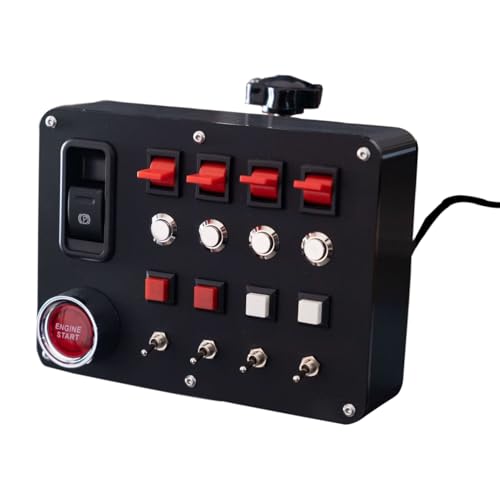
- 27 customizable inputs with custom lettering options
- Realistic one-button start and parking brake switches
- Compatible with many wheel bases and mounts
Best For: Truck sim cockpit builders who want realistic switch feel and labeling
Precision Control for PC Rigs
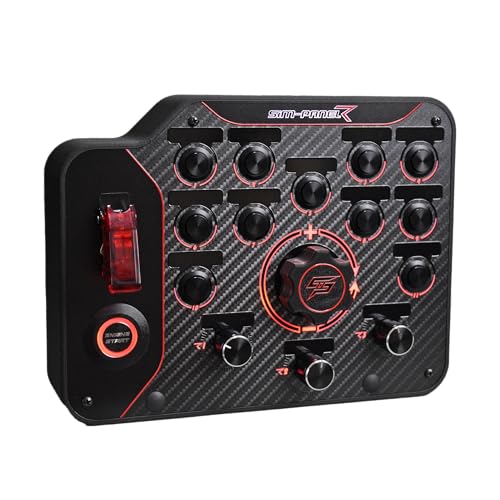
- Individually programmable button modes
- Horizontal layout for easier reach and visibility
- USB PC support with desk clamp and VESA mount
Best For: PC racers who want a customizable, ergonomic button box for a rig or desk
Multi-Sim Utility Pick

- 30 programmable inputs across multiple control types
- Plug-and-play USB setup for Windows PCs
- RGB lighting plus desk clamp and VESA mounting
Best For: Sim racers and hobbyists who want lots of programmable controls across multiple genres
Premium Wheel-Mounted Option

- Quick-release mounted with no cables or batteries
- 17-button layout with customizable controls
- Rigid wheel-integrated design for PC use
Best For: Asetek SimSports users who want a rigid, wheel-mounted control panel
Premium Classic Sim Panel
SIM-PANEL Classic 2 Button Box for ATS/ETS2

- Desk clamps and 100mm VESA mounting
- 11-color backlighting with Simlink customization
- Brushed stainless buttons and realistic knobs
Best For: PC truck sim racers wanting a sturdy, premium-feel panel
Rim-Style GT Control Hub

- Quick-release compatible with stable no-play mounting
- No cables, batteries, or wireless signals for transmission
- Rigid design with customizable rim support
Best For: Racers who want a GT-style wheel-mounted control box
Vertical Layout Race Panel

- Individually programmable controls
- Vertical ergonomic layout
- Desk clamp and 75mm VESA mounting
Best For: PC racers wanting a compact, mountable programmable panel
PXN Pick – PXN CB1 Multi-Function USB Racing Button Box
If you want wireless sim racing button boxes-style convenience without losing physical controls, the PXN CB1 is a practical USB option for PC racers who want a more complete dashboard feel. It gives you 30 programmable buttons, adjustable RGB effects, and broad Windows/game support, making it a flexible add-on for sim driving, trucking, and farming titles.
Best For: PC sim racers who want a highly customizable button box with lots of inputs and RGB lighting.
Pros:
- 30 programmable buttons for turn signals, wipers, cruise control, horns, and more
- Adjustable RGB lighting with 7 effects plus color and brightness control
- Compatible with Windows 7/8/10/11 and many popular sim titles
- Clamp mounting supports tables up to 70 mm thick
Cons:
- USB wired design, not wireless
- Primarily aimed at PC use
- Best when you have space for a dedicated mounted control box
Overall, the CB1 stands out for quantity of controls and customization rather than simplicity. If your priority is building a more immersive PC sim cockpit with plenty of mapped functions, this is the most feature-packed option in the group.
Truck Sim Switcher – ETS2/ATS USB Ignition Panel
This is a focused choice for wireless sim racing button boxes shoppers who really want truck-sim immersion from physical controls. The panel combines a covered toggle switch, a red illuminated start button, and additional toggle switches, so ATS and ETS2 players can add real-feeling ignition and accessory controls to their setup.
Best For: Truck sim players who want a compact switch panel with ignition-style controls.
Pros:
- Includes a red illuminated engine start button and covered toggle switch
- Five-in-one panel design with multiple physical switches
- Compatible with ATS/ETS2 and other racing or ship games
- Automatic recognition on Windows 10 and above
Cons:
- Limited to a smaller set of inputs than larger button boxes
- USB wired connection only
- More specialized for truck sim use than all-around sim racing
For sim drivers who value a believable ignition sequence over a huge button count, this panel is appealing. It is less versatile than full-featured control boxes, but it delivers the kind of tactile start-up feel many truck sim fans want.
PXN Core – PXN CB1 USB-C Sim Racing Button Box
The PXN CB1 is a straightforward pick for wireless sim racing button boxes comparisons if you mainly want a clean, modern control box for a PC cockpit. It keeps the same core idea as a multi-button sim panel, with 30 inputs and USB-C connectivity for Windows desktop and laptop setups.
Best For: PC and laptop sim racers who want a simple USB-C button box with lots of mapped controls.
Pros:
- 30 buttons provide plenty of mapping flexibility
- USB-C connection for a modern wired setup
- Works with Windows desktop and laptop systems
- Compact, multiuse design in a black finish
Cons:
- No RGB lighting listed in the supplied specs
- Wired rather than wireless
- Minimal product detail compared with feature-rich alternatives
This model makes sense if you want the CB1’s control count without extras getting in the way. It looks best suited to racers who care about mapping convenience and compatibility more than visual effects.
Immersion Build – Obokidlyamor 27-Button Truck Control Box
Among wireless sim racing button boxes alternatives, this Obokidlyamor control box is built for users who want highly immersive truck and sim-racing controls. It offers 27 customizable buttons, a one-button start switch with multiple functions, and an electronic parking brake switch, making it especially suited to ATS/ETS2 and compatible steering wheel ecosystems.
Best For: Truck sim and cockpit builders who want customizable labeling and realistic switch behavior.
Pros:
- 27 input buttons with customizable lettering options
- One-button start switch with power-on, start, and shutoff functions
- Electronic parking brake switch for added realism
- Supports many bases and wheel setups, including G29, Moza, Fanatec, and others
Cons:
- 3D-printed body may show small print lines
- USB wired connection, not wireless
- Designed more for setup depth than plug-and-play simplicity
The combination of customizable labels, realistic switches, and broad mounting compatibility makes this a strong cockpit upgrade. It is especially compelling for players who want their control box to feel like part of a real vehicle dash.
Precision Control for PC Rigs – SIM-PANEL Gen 2 Horizontal
If you want wireless sim racing button boxes in the sense of a clean, uncluttered control setup, the SIM-PANEL PC Sim Racing Gen 2 focuses on fast access and tailored inputs for PC racers. Its horizontal layout is built to keep controls visible and easy to reach, while individually programmable button modes let you assign functions for different racing disciplines.
Best For: PC sim racers who want a highly customizable, ergonomically laid out button box for desk or rig mounting.
Pros:
- Individually programmable button modes for tailored control mapping
- Horizontal layout improves visibility and reach during intense sessions
- USB PC compatibility with desk clamp and 75mm VESA mounting support
- Customizable backlighting and high-precision input response
Cons:
- PC only, so it won’t work with consoles
- No wireless connectivity, since it uses USB
Overall, this is a strong choice if your priority is organized, high-speed access to racing functions on a PC-based setup. It leans more toward precision and customization than novelty, which makes it practical for serious sim rigs.
Multi-Sim Utility Pick – PXN CB1 RGB Button Box
The PXN CB1 is a versatile option for wireless sim racing button boxes shoppers who actually want a wired USB controller with broad sim use. It offers 30 programmable inputs, RGB lighting, and a plug-and-play Windows setup, making it useful for racing, truck, flight, and farming sim players who want plenty of mapped controls.
Best For: PC sim users who want a feature-rich, easy-to-set-up button box for multiple simulator genres.
Pros:
- 30 programmable inputs for buttons, toggles, rotary dials, and joystick control
- Plug-and-play USB setup with Windows 7/8/10/11 support
- Adjustable RGB lighting with seven effects, plus color and brightness control
- Desk clamp and 100 x 100 mm VESA mounting options
Cons:
- Uses USB, so it is not wireless
- ABS resin housing may feel less premium than metal builds
For buyers who want maximum flexibility across different simulator types, the CB1 stands out for input count and mounting versatility. It’s a practical pick if you value easy setup and a lot of programmable controls over a minimalist design.
Premium Wheel-Mounted Option – Asetek La Prima GT
If you’re comparing wireless sim racing button boxes, the Asetek La Prima GT takes a different approach by mounting directly to a compatible Asetek SimSports quick release instead of using a separate USB panel. That makes it a strong fit for racers who want a rigid, cable-free wheel-mounted control solution with customizable controls for GT, rally, or touring-style driving.
Best For: PC sim racers already using Asetek SimSports gear who want a rigid, quick-release-mounted control panel.
Pros:
- Quick-release compatible design with stable data and power transmission
- No cables, batteries, or wireless signals needed
- 17-button control layout with customization options
- Rigid front face plate and handles for a solid feel
Cons:
- Requires compatible Asetek SimSports quick-release hardware
- Not a standalone USB button box
This is the most specialized option in the group, and it makes sense if you want your controls integrated into the wheel ecosystem. It’s less universal than the USB button boxes above, but it delivers a tidy, stable setup for the right rig.
Premium Classic Sim Panel – SIM-PANEL Classic 2 Button Box for ATS/ETS2
If you want wireless sim racing button boxes for a desk-friendly truck sim setup, this SIM-PANEL unit is built for straightforward control and strong presence. It focuses on tactile hardware, visible backlighting, and mounting flexibility, making it a practical match for ATS/ETS2 players who want a more immersive cockpit feel.
Best For: PC truck sim racers who want a sturdy, backlit control panel with a premium feel.
Pros:
- Integrated desk clamps and 100mm VESA mounting support help keep it stable.
- Enhanced backlighting with 11 color options improves visibility in low light.
- Brushed stainless steel buttons add a premium tactile feel.
- True-to-life ignition switch and brake knobs increase realism.
Cons:
- USB wired power means it is not a wireless panel.
- Designed for PC/Windows use rather than consoles.
- Focuses on truck sim controls, so it is less general-purpose than some racing panels.
This is a strong choice if your priority is a durable, highly visible control box with realistic truck-sim touches. The matte black finish and metal build make it feel like a serious part of a sim rig rather than a simple accessory.
Rim-Style GT Control Hub – ASETEK Forte GT Button Box
For buyers comparing wireless sim racing button boxes, the Forte GT Button Box stands out as a rig-focused control panel built around stability and quick swaps. It is made for racers who want a rigid, customizable steering wheel PC accessory that can adapt to rally, touring, or GT use without relying on cables, batteries, or wireless signals for power and data.
Best For: Sim racers who want a rigid, quick-release-compatible GT-style button box with easy customization.
Pros:
- Quick-release compatibility supports stable, no-play mounting.
- No cables, batteries, or wireless signals are needed for data and power transmission.
- Strong, rigid front face plate and handles support a secure feel.
- Works across rally, touring, and GT-style setups with compatible rims.
Cons:
- Compatibility is centered on Forte and La Prima rims/accessories.
- It is more specialized than a standalone desk-mounted button box.
- Not described as a universal wireless control box.
This is a smart pick if you want a button box that behaves like part of a wheel ecosystem rather than a separate panel. The emphasis is on rigidity, easy installs, and customization for drivers who change setups often.
Vertical Layout Race Panel – SIM-PANEL PC Sim Racing Gen 2
If you are shopping wireless sim racing button boxes alternatives for a PC rig, this SIM-PANEL Gen 2 focuses on clean control access rather than wireless convenience. Its vertical layout, programmable buttons, and mounting options are aimed at racers who want quick recognition and easy operation under pressure.
Best For: PC sim racers who want a compact, programmable vertical button box with flexible mounting.
Pros:
- Individually programmable buttons let you assign multiple functions.
- Vertical layout is designed to improve reach, visibility, and ergonomics.
- Integrated desk clamp and 75mm VESA compatibility widen mounting options.
- Customizable backlighting helps the controls stand out.
Cons:
- PC-only compatibility excludes consoles.
- USB power means it is not a wireless unit.
- Vertical layout may not suit every cockpit preference.
Overall, this is a practical pick for drivers who value organization and fast input over flashy extras. The layout and programmability make it especially useful when you need a compact panel that stays readable during intense sessions.
How We Picked the Best Wireless Sim Racing Button Boxes
We looked for button boxes that solve real cockpit problems: fast access to controls, clear labeling or customization, solid construction, and easy PC integration. Because the category overlaps across sim racing and truck sim, we also considered whether a product is better suited to a full race rig, a desk setup, or ATS/ETS2-style driving.
Quick Comparison
When comparing Wireless Sim Racing Button Boxes, the biggest differences usually come down to input count, layout style, mounting options, and how much personalization you get. More inputs are not always better if the controls are cramped or hard to reach. A simpler panel may be the better choice if you only need core functions.
Key Buying Factors for Wireless Sim Racing Button Boxes
Layout and Reach
Choose a layout that matches how you drive. Horizontal panels can suit broader cockpits and desk-mounted setups, while vertical designs may fit tighter spaces or let you stack controls in a smaller footprint. The best layout is the one you can operate by muscle memory during a race.
Inputs and Customization
Look at the number of switches, toggles, rotary controls, and programmable buttons, then map them to what you actually use. For most racers, the most valuable functions are ignition, starter, lights, pit limiter, wipers, brake bias, camera controls, and menu navigation.
Mounting and Build Quality
Good mounting matters as much as the controls themselves. A stable clamp, desk mount, or rig mount keeps the panel from shifting under use. Sturdy housings, tactile switches, and readable legends improve long-term satisfaction, especially on a busy sim rig.
Compatibility and Use Case
Not every panel is equally useful for every sim. Some are tuned for racing, while others better fit ATS/ETS2 trucking workflows. If you use multiple sims, pick a box that offers flexible mapping and enough spare inputs to adapt as your needs grow.
Who Should Buy Which Wireless Sim Racing Button Boxes?
If you want a cleaner all-in-one cockpit, choose a versatile panel with enough programmable controls for both race day and casual driving. If you are building a dedicated truck sim setup, prioritize switch-heavy layouts and easy-access functions over flashy extras. If your rig is compact, favor a smaller panel with strong mounting over a larger board that crowds your wheel and shifter space.
For buyers who want a practical upgrade, the best Wireless Sim Racing Button Boxes are the ones that match your driving style, fit your available space, and keep the controls you use most within immediate reach.