
If you need to trace UART, I2C, or SPI traffic without overspending, the right logic analyzer can save hours of guesswork. This roundup focuses on practical options for hobbyists, embedded developers, and FPGA tinkerers.
We compared affordable 8-channel tools alongside higher-end alternatives so you can choose based on speed, software, and workflow—not just the spec sheet.
Best 10 8 Channel Logic Analyzers Picks for 2026
Budget 24MHz Starter Pick
HiLetgo USB Logic Analyzer Device

- 8 channels with up to 24MHz sampling
- Supports UART, IIC, and SPI debugging
- Includes EMI ferrite ring USB cable
Best For: Everyday embedded debugging on a budget
Multi-Tool Debugger Pick

- Logic analyzer plus CKLink and DAPLink support
- Up to 80MHz sampling rate
- Handles 4 UART ports at once
Best For: RISC-V and ARM board debugging with one device
Accessory-Rich Debug Kit
USB Logic Analyzer with Test Hooks

- 8 channels with 24MHz sampling
- Includes 12 colored test hook clips
- Supports UART, SPI, IIC, and 1-Wire
Best For: Beginners who want clips bundled with the analyzer
Portable SBC Debug Pick

- Logic analyzer plus CKLink and DAPLink modes
- Up to 80MHz sampling rate
- Built for Linux SBC, ARM, and RISC-V work
Best For: Portable debugging for Linux SBC and embedded boards
High-Speed 16-Channel Pick
DSLogic Plus USB-Based Logic Analyzer

- 8-channel capture up to 200MHz in buffer mode
- Dual-mode stream and buffer operation
- DSView supports Windows, macOS, and Linux
Best For: Buyers who want high-speed capture with room to scale beyond eight channels
Budget 8-Channel Debug Tool
USB Logic Analyzer 24MHz 8 Channel

- Eight channels with up to 24MHz sampling
- Works with Saleae Logic Analyzer software and PulseView
- Decodes UART, SPI, and IIC protocols
Best For: Budget users who need straightforward 8-channel serial debugging
Cross-Platform 16-Channel Choice

- 16 channels at 100MHz per channel
- Decodes 30+ protocols for embedded debugging
- Compatible with Windows, macOS, and Linux
Best For: Developers who want more than eight channels and broad protocol support
Practical 8-Channel Pick

- 8-channel capture up to 24MHz
- Sigrok PulseView support with UART, I2C, and SPI decoding
- Works with 5V, 3.3V, 2.5V, and 2.0V logic levels
Best For: General-purpose digital debugging and protocol checks
Minimalist Debug Tool

- 8 channels with 24MHz capture rate listed
- Surface-mount design
- Simple bare-bones option with few extras listed
Best For: Buyers who want a basic 8-channel USB analyzer
Accessory-Rich Bundle
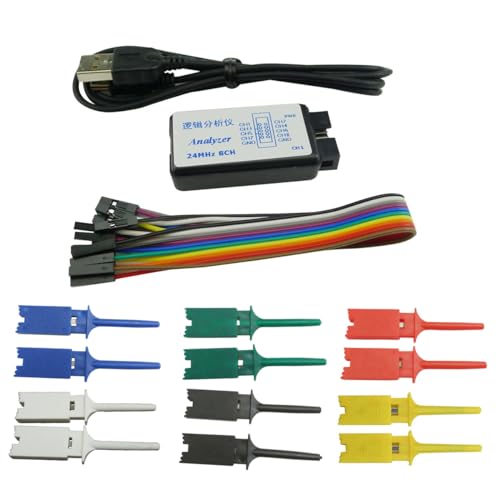
- 8 channels, up to 24Msps sampling
- Includes 12 test hook clips, USB cable, and female cable
- Supports UART, IIC, and SPI on 0~5V systems
Best For: MCU and communication debugging with included probes
Budget 24MHz Starter Pick – HiLetgo USB Logic Analyzer Device
If you need one of the more straightforward 8 channel logic analyzers for common embedded debugging, this HiLetgo unit keeps things simple. It supports up to 24MHz sampling across 8 channels and is aimed at practical UART, IIC, and SPI troubleshooting, making it a sensible pick for general-purpose digital signal analysis.
Best For: Hobbyists and students who want a basic 8-channel analyzer for everyday protocol debugging.
Pros:
- 8-channel capture with up to 24MHz sampling
- Supports UART, IIC, and SPI debugging
- Wide input voltage range from -0.5V to 5.25V
- Includes an EMI ferrite ring USB cable
Cons:
- Focused on general use rather than advanced multi-function debugging
- Typical application guidance suggests around 10M use cases
- No bundled clip set or extra debugging accessories listed
For a low-frills 8 channel logic analyzer, this model covers the core jobs without adding complexity. It fits well when you mainly need protocol visibility and solid sampling for routine hardware development.
Multi-Tool Debugger Pick – Sipeed SLogic Combo 8
The Sipeed SLogic Combo 8 stands out among 8 channel logic analyzers because it combines logic analysis with CKLink, DAPLink, and USB2 UART functions in one tool. With a maximum 80MHz sampling rate and switchable modes, it is built for users who want one device to cover more of the debugging workflow.
Best For: Developers who want a combined analyzer, debugger, and UART tool for RISC-V or ARM boards.
Pros:
- Combines logic analyzer, CKLink, DAPLink, and USB2 UART functions
- Up to 80MHz sampling rate for logic analysis
- Supports 4 serial ports at once with up to 20M baud rate
- Includes an extra virtual serial port for log observation
Cons:
- More specialized than a basic standalone logic analyzer
- Best suited to users who will use the multi-tool features
- Technical and SDK support requires checking the listed store/documentation path
If your workflow involves both protocol capture and board debugging, this is the most versatile option here. It makes sense when you want one compact tool instead of several separate debug devices.
Accessory-Rich Debug Kit – USB Logic Analyzer with Test Hooks
For buyers comparing 8 channel logic analyzers, this Keeyees-style kit is attractive because it adds practical accessories right away. It offers 24MHz, 8-channel capture for UART, SPI, and IIC debugging, plus 12 test hook clips that make it easier to connect during MCU, ARM, and FPGA development.
Best For: Users who want a basic analyzer bundled with test clips for easier hands-on probing.
Pros:
- 8-channel logic analyzer with 24MHz sampling
- Includes 12 SMD IC test hook clips in 6 colors
- Supports common protocol analysis like RS232, SPI, IIC, and 1-Wire
- Comes with tutorial and support materials mentioned in the notes
Cons:
- Still a basic 24MHz analyzer rather than a higher-speed instrument
- Accessory value matters most if you will actually use the clips
- Specification notes list the frequency detail inconsistently
This bundle is a practical choice if you want to start probing immediately without buying extra clips later. It is best when convenience and beginner-friendly setup matter as much as the analyzer itself.
Portable SBC Debug Pick – WayPonDEV SLogic Combo 8
This WayPonDEV version is a strong fit if you are shopping for 8 channel logic analyzers that can do more than capture signals. It combines logic analyzer, CKLink, DAPLink, and USB2 UART functions, and it is positioned for Linux single-board computer and RISC-V or ARM debugging with an 80MHz maximum sampling rate.
Best For: Linux SBC users who want a portable analyzer and debugger in one device.
Pros:
- Combines analyzer, CKLink, DAPLink, and USB2 UART functions
- Up to 80MHz logic analyzer sampling rate
- Supports 4 serial ports at once, with up to 20M baud on UART0/UART1
- Designed for ARM, RISC-V, and Linux single-board computer workflows
Cons:
- More specialized than a simple capture-only logic analyzer
- Most valuable when you need debugger functions too
- SDK and support details are tied to the vendor store path in the notes
If your projects live around SBCs and embedded boards, this model is easy to justify. It gives you the flexibility of a logic analyzer and the convenience of built-in debug modes in one portable kit.
High-Speed 16-Channel Pick – DSLogic Plus USB-Based Logic Analyzer
If you want one of the more capable 8 channel logic analyzers and may need room to grow beyond eight lines, the DSLogic Plus is built for high-speed capture and longer sessions. Its dual-mode design lets you choose stream mode for long sample duration or buffer mode for higher sampling rates, which makes it flexible for serious protocol and waveform work.
Best For: Users who want an 8-channel-capable analyzer with headroom for faster captures, deeper memory, and cross-platform decoding support.
Pros:
- Supports 8 channels at up to 200MHz in buffer mode, with 16-channel expansion available.
- Dual-mode operation: stream mode for long captures and buffer mode for high sample rates.
- 256Mbits on-board SDRAM plus up to 16G sample depth in stream mode.
- DSView software works on Windows, macOS, and Linux with nearly a hundred protocol decoders.
Cons:
- Highest 400MHz rate is limited to 4 channels in buffer mode, not 8 or 16.
- Advanced features may be more than casual troubleshooters need.
The DSLogic Plus stands out when you need more than a basic 8 channel logic analyzer and want flexible capture modes. If cross-platform software, protocol decoding, and strong memory depth matter, it is a very capable pick.
Budget 8-Channel Debug Tool – USB Logic Analyzer 24MHz 8 Channel
This compact option fits the needs of many 8 channel logic analyzers setups, especially when you mainly need affordable debugging for UART, SPI, and I2C. With up to 24MHz sampling and compatibility with Saleae Logic Analyzer software plus PulseView, it covers common embedded troubleshooting without a steep learning curve.
Best For: Budget-minded users who need an 8-channel analyzer for everyday serial protocol debugging.
Pros:
- Eight digital channels with up to 24MHz sampling.
- Compatible with Saleae Logic Analyzer software and PulseView.
- Supports UART, SPI, IIC, and automatic protocol analysis.
- Wide 0V to 5.5V input range with a 1.5V threshold.
Cons:
- Lower-end sampling rates may be more practical for many general uses than the peak spec.
- Fewer channels than 16-channel alternatives if you outgrow an 8-line setup.
For basic embedded debugging, this analyzer gives you the core features most users expect from an 8 channel logic analyzer. It is especially appealing if you want protocol decoding support without paying for more hardware than you need.
Cross-Platform 16-Channel Choice – LA1010 USB Logic Analyzer
The LA1010 is a strong pick if you are comparing 8 channel logic analyzers but want more channel count and a higher sampling ceiling for embedded work. It offers 16 input channels at 100MHz per channel, real-time waveform display, and support for more than 30 standard protocols, making it a practical tool for deeper digital debugging.
Best For: Developers who need an 8-channel-style workflow but want 16 channels, 100MHz sampling, and broad protocol coverage.
Pros:
- 16 input channels with 100MHz sampling rate per channel.
- Supports 30+ protocols including I2C, SPI, UART, CAN, and more.
- Works with Windows, macOS, and Linux with auto-install drivers.
- Portable design with low 0.5W power consumption.
Cons:
- More analyzer than a simple 8-channel-only setup may require.
- Software and feature list are broad, which may be overkill for basic tasks.
The LA1010 is best for users who want extra channel headroom and broad protocol decoding without losing cross-platform convenience. If your projects may grow beyond eight signals, this model offers a lot of flexibility.
Practical 8-Channel Pick – 24MHz USB Logic Analyzer
If you need one of the more straightforward 8 channel logic analyzers for everyday digital debugging, this 24MHz USB model covers the basics well. It supports common protocols like UART, I2C, and SPI, and offers multiple sampling rates so you can match capture speed to your project.
Best For: General-purpose MCU, FPGA, and digital logic troubleshooting where 8 channels and protocol decoding matter.
Pros:
- 8-channel capture with a maximum 24MHz sampling rate
- Works with Sigrok PulseView and decodes UART, I2C, and SPI
- Supports 5V, 3.3V, 2.5V, and 2.0V logic levels
- Includes a ferrite-ring USB cable to help reduce noise
Cons:
- Not recommended for 1.8V systems
- General-use speed is noted as around 10MHz, so it is not aimed at the fastest captures
Overall, this is a practical choice if you want a budget-friendly 8 channel logic analyzer with broad compatibility and clear timing support. The included documentation and support are also helpful if you are just getting started.
Minimalist Debug Tool – 24MHz 8-Channel SCM Analyzer
USB Logic SCM 24MHz 8 Channel 24M/Seconds Logic Analyzer Debugger for Logic Analyzer
Check Price On AmazonThis USB logic analyzer keeps things simple for buyers who mainly want an 8 channel capture tool with 24MHz capability. The listing confirms 8 channels and a surface-mount design, making it a basic debugging option for digital signal work.
Best For: Users who want a simple 8-channel USB logic analyzer without extra kit extras.
Pros:
- 8 channels for monitoring multiple digital signals
- 24MHz / 24M-seconds capture rate listed
- Compact surface-mount form factor
Cons:
- Very limited supplied details on protocol support, software, or included accessories
- No logic-level range or sample-rate options are provided in the notes
If you already know the analyzer specs you need, this model is a bare-bones way to get into 8 channel logic analyzers. Its appeal is simplicity, but the sparse listing means you may want to verify compatibility before buying.
Accessory-Rich Bundle – 24MHz 8CH Logic Analyzer Kit
If you want 8 channel logic analyzers bundled with probes and cables, this kit stands out for its accessories. It supports up to 24Msps, includes selectable lower rates, and is built for UART, IIC, and SPI debugging on common 0~5V digital systems.
Best For: MCU developers who want a logic analyzer kit with test hooks and a ready-to-use accessory set.
Pros:
- 8 digital channels with up to 24Msps sampling
- Includes 12 colorful test hook clips plus USB and female cable
- Supports UART, IIC, and SPI debugging
- Compatible with Windows, Linux, and older Windows versions listed in the notes
Cons:
- Input range is limited to 0~5V, so it is not meant for higher-voltage logic
- 10M/s is described as plenty, which may matter if you are chasing the highest capture performance
This is the most complete bundle of the three if you want to start capturing signals right away. The included clips make it especially convenient for MCU and communication-debug workflows.
How We Picked These 8 Channel Logic Analyzers
We prioritized tools that are easy to use, broadly compatible, and relevant for common debugging jobs like serial bus capture, signal timing checks, and bring-up on microcontrollers or SBCs. For the most part, that means looking at sampling rate, channel count, supported protocols, software quality, and included accessories such as test clips and cables.
Because 8 Channel Logic Analyzers are often bought for learning and troubleshooting, we also weighed setup friction, documentation, and whether the device is a simple starter tool or a more capable bench instrument.
Quick Comparison: What Matters Most
The simplest 24 MHz USB analyzers are usually the best value for UART, I2C, and SPI at modest speeds. They are ideal when you want fast, low-cost visibility into digital signals. More advanced units, such as 16-channel or high-speed models, are better when you need deeper capture windows, higher sample rates, or more complex buses and parallel signals.
Accessory bundles can matter too. Included hook clips, cables, and ferrite suppression can make the difference between a tool that works immediately and one that needs extra purchases before first use.
Key Buying Factors for 8 Channel Logic Analyzers
Sampling Rate and Signal Speed
Pick a sampling rate that is comfortably above the fastest signal you expect to inspect. For common embedded work, 24 MHz can be enough for many basic bus checks, but faster interfaces and cleaner timing analysis benefit from more headroom.
Channel Count and Expansion
Eight channels are enough for many serial debugging tasks, but if you plan to analyze multiple buses at once or inspect parallel data lines, consider whether you should step up to 16 channels or a model with more memory.
Software and OS Support
Good software matters as much as hardware. Look for stable Windows, macOS, or cross-platform support, plus reliable protocol decoding for UART, I2C, SPI, and other common standards.
Accessories and Probe Quality
Usefulness often comes down to the extras. Hook clips, solid leads, and a tidy USB connection improve connection reliability and reduce setup time when probing dense boards.
Who Should Buy Which 8 Channel Logic Analyzers?
If you are a beginner or weekend maker, choose a low-cost 8-channel USB analyzer bundle with clips and software support. If you work regularly with embedded systems, a better-supported combo kit or a more capable desktop-grade analyzer may be worth it. If your work involves higher-speed signals, larger captures, or more channels, skip the basic units and move to a premium model with stronger sampling specs and memory depth.
In short, the best choice depends on your board, your bus speeds, and how often you debug. Match the analyzer to the complexity of your projects, and you will get much more value from the tool.