
Choosing among the best film scanners for Windows depends on more than advertised resolution. Your film formats, preferred workflow, editing needs, and tolerance for manual scanning all affect which model makes sense.
This roundup compares 10 options ranging from straightforward LCD-equipped digitizers to advanced 35mm scanners with high bit depth and infrared dust removal.
Best 10 Film Scanners for Windows Picks for 2026
High-Resolution Pick

- 7200 DPI scanning for 35mm film
- Includes SilverFast and QuickScan software
- Supports Windows 7 through 11
Best For: Detailed 35mm negative and slide scanning
Standalone Convenience Pick

- Scans multiple film and slide formats
- 5-inch display and HDMI output
- Works without a computer or drivers
Best For: Fast, simple home film archiving
Professional Calibration Pick

- Includes an advanced IT8 calibration target
- SilverFast 9 Ai Studio software included
- 7200 DPI CCD scanning with infrared tools
Best For: Calibrated 35mm archival workflows
Family Archive Pick

- Scans film, slides, photos, and business cards
- Large 5-inch screen with standalone controls
- Includes 8GB SD card and three-year warranty
Best For: Beginner-friendly mixed photo archiving
Best for Easy Setup
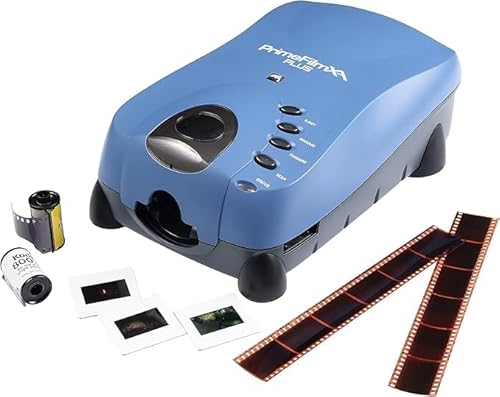
- Automatic feeding supports up to 40 frames
- 10,000 dpi, 48-bit CCD scanning
- Autofocus and DNG-enabled software
Best For: Automated, high-detail 35mm and roll-film scanning
Best Standalone Option

- Built-in 5-inch LCD with gallery mode
- Supports 135, 110, 126, and 50mm formats
- Saves scans to SD or SDHC cards
Best For: Simple home digitizing and immediate photo preview
Best Manual Scanning Value

- 10,000 dpi, 48-bit CCD output
- Manual holders keep the workflow focused
- Includes dust removal and color tools
Best For: Hands-on 35mm negative and slide scanning
Best Touchscreen Pick
ClearScan T7 24MP Film Scanner

- 7-inch touchscreen simplifies scanning
- Supports multiple film formats
- Includes 16GB SD card
Best For: Beginners and computer-free home scanning
Best Heavy-Duty Pick

- Scans at up to 7200 dpi
- Infrared dust and scratch detection
- Includes SilverFast SE Plus 9
Best For: Detailed 35mm scanning on Windows
Best Budget Standalone Pick

- Saves JPEGs to SD card
- Includes adjustable rapid feeder
- Scans at 1800 dpi
Best For: Casual 35mm and slide digitizing
High-Resolution Pick – Plustek OpticFilm 8100
For shoppers comparing film scanners for windows, the Plustek OpticFilm 8100 is a dedicated 35mm negative and slide scanner built around detailed, high-resolution output. Its 7200 DPI CCD sensor, bundled software, and Windows 7 through 11 support make it a strong option for users who want computer-based control over their scans.
Best For: Digitizing 35mm negatives and slides when high resolution and advanced image processing matter.
Pros:
- 7200 DPI resolution with 48-bit output for detailed image files
- Captures shadow and highlight detail with a CCD sensor
- Includes Plustek QuickScan and SilverFast SE Plus software
- Supports Windows 7, 8, 10, and 11, plus compatible Mac versions
Cons:
- Designed for 35mm film and slides rather than printed photos or multiple film formats
- Requires a computer and USB connection for operation
The OpticFilm 8100 is a focused choice for Windows users who prioritize scan detail and software-assisted editing over standalone convenience. The included carry bag is useful for storage and transport.
Standalone Convenience Pick – Magnasonic FS71 24MP
The Magnasonic FS71 is a practical alternative among film scanners for windows because it can scan without a computer while still transferring files through USB. Its large display, broad format support, and quick JPEG saving make it well suited to straightforward home archiving.
Best For: Families who want to scan several film formats quickly without installing computer software.
Pros:
- Converts 35mm, 110, 126, and Super 8 film plus several slide formats
- Large 5-inch LCD screen for previewing scans directly
- Saves JPEG files to an SD card with support for up to 128GB
- Scans photos in less than five seconds each, according to the supplied notes
Cons:
- HDMI cable and SD card are not included
- Offers 24-bit color depth rather than the higher bit-depth output of dedicated professional models
Choose the FS71 when ease of use and format flexibility are more important than maximum computer-based editing control. Brightness and RGB adjustments can be made on the scanner itself.
Professional Calibration Pick – Plustek OpticFilm 8300i Ai
For Windows users seeking advanced control from film scanners for windows, the Plustek OpticFilm 8300i Ai combines 7200 DPI CCD scanning with SilverFast 9 Ai Studio and an included IT8 calibration target. Its infrared-assisted tools and expanded image-processing features are aimed at more careful color and restoration workflows.
Best For: Experienced users archiving 35mm slides who want calibration tools and advanced scan correction.
Pros:
- Includes a 35mm IT8 calibration target compliant with ISO 12641-2
- Bundles SilverFast 9 Ai Studio and Plustek QuickScan Plus
- Offers infrared iSRD, HDRi, Multi-Exposure, and NegaFix features
- Supports Windows 7 through 11 and includes a USB flash drive for installation
Cons:
- Focused on 35mm slides and film rather than a broad range of media
- Advanced software may require more time to learn than a standalone scanner
The 8300i Ai is the most feature-rich option in this group for users who care about color calibration and image refinement. It is a better fit for deliberate archival work than quick, casual scanning.
Family Archive Pick – DigitPro M129A Photo Scanner
The DigitPro M129A keeps film scanners for windows simple with standalone operation, one-touch controls, and direct SD card storage. It handles film, slides, printed photos, and business cards, while the included accessories and large screen make it approachable for household photo projects.
Best For: Beginners and families digitizing mixed collections of negatives, slides, and printed photographs.
Pros:
- Converts 35mm slides, 135 and 110 negatives, printed photos, and business cards
- Uses a large 5-inch HD viewing screen for previews and basic editing
- Operates without a computer, software, apps, or drivers
- Includes an 8GB SD card, holders, trays, cleaning brush, and USB cable
Cons:
- 1080P output is less resolution-focused than the dedicated 7200 DPI Plustek models
- Uses a CMOS sensor and does not list advanced calibration or infrared correction features
The M129A emphasizes accessibility and convenience rather than professional scan refinement. Its included SD card and three-year warranty add practical value for first-time users and family archiving.
Best for Easy Setup – PrimeFilm XA Plus
For shoppers comparing film scanners for Windows, the Pacific Image PrimeFilm XA Plus is a premium option for detailed 35mm scans. Its automatic feeding, autofocus, CCD sensor, and 10,000 dpi resolution suit users digitizing larger film collections.
Best For: Windows users who want automated roll or film-strip scanning with extensive image-quality controls.
Pros:
- Automatically feeds film strips and rolls for up to 40 frames.
- 10,000 dpi resolution and 48-bit output support detailed, true-color scans.
- Autofocus, Magic Touch dust removal, color adjustment, and DNG support add flexibility.
- Supports Windows 7/8/10/11 and Mac OS X 10.13 or later.
Cons:
- Requires at least 4 GB of RAM and 50 GB of available storage.
- Its 3 kg weight and advanced feature set may be more than casual users need.
The XA Plus is a strong fit when convenience and maximum scan detail matter. Its automatic workflow makes it especially appealing for larger batches, while the included software provides useful post-processing options.
Best Standalone Option – KODAK Slide N Scan
The KODAK Slide N Scan is a convenient choice among film scanners for Windows if you want to preview and save scans without relying heavily on computer software. Its built-in 5-inch LCD, simple controls, and SD-card support make it approachable for home archiving.
Best For: Families and casual users digitizing 135, 110, 126 film and 50mm slides with an easy standalone workflow.
Pros:
- Large 5-inch LCD allows immediate previewing and gallery viewing.
- Handles 135, 110, and 126 negatives plus 50mm slides.
- Saves digital files directly to an SD or SDHC card up to 32GB.
- Includes easy-load trays, a cleaning brush, and USB and HDMI cables.
Cons:
- SD card is not included.
- Its 24-bit color depth and CMOS sensor are less specified for professional-level output than the dedicated CCD models.
Choose this KODAK model for simplicity and format versatility rather than advanced scanning control. The integrated screen and direct-to-card saving are useful when sharing or organizing family negatives and slides.
Best Manual Scanning Value – PrimeFilm XE Plus
The Pacific Image PrimeFilm XE Plus is a focused option for Windows users who prefer manual control over the scanning process. It scans 35mm negatives and slides at 10,000 dpi and combines a CCD sensor with image-enhancement tools for detailed archival work.
Best For: Film enthusiasts who want high-resolution 35mm scans and hands-on control over holders and image adjustments.
Pros:
- 10,000 dpi, 48-bit CCD scanning captures detailed 35mm film and slides.
- Auto exposure, contrast, color, multipass exposure, and DNR support image refinement.
- Magic Touch helps remove dust and scratches, while CyberView X offers further adjustments.
- Supports Windows 7/8/10/11 and Mac OS X 10.13 or later.
Cons:
- Manual film and slide insertion is slower than an automatic feeder.
- Designed for 35mm media, so it does not offer the KODAK model’s listed 110 and 126 format support.
The XE Plus makes sense when scan quality and editing flexibility take priority over batch automation. Its manual holders and software tools give careful users more involvement in preparing and refining each scan.
Best Touchscreen Pick – ClearScan T7 24MP Film Scanner
For shoppers comparing film scanners for windows, the ClearScan T7 is a convenient standalone option for digitizing several common film formats. Its 7-inch touchscreen simplifies previewing, adjusting, scanning, and saving without requiring a computer.
Best For: Beginners, families, and anyone who wants to scan film directly to an SD card.
Pros:
- Large 7-inch touchscreen offers straightforward controls.
- Supports 35mm/135, 126, 110, and Super 8 negatives and slides.
- 24MP output and an included 16GB SD card support convenient archiving.
- Works without complicated software or computer setup.
Cons:
- Image quality can vary with the age, exposure, and condition of the original film.
- Uses USB connectivity rather than a more extensive computer-focused workflow.
The ClearScan T7 stands out for ease of use and broad format support. It is a practical choice when simple, computer-free scanning matters more than advanced restoration controls.
Best Heavy-Duty Pick – Plustek OpticFilm 8200i SE
Among film scanners for windows, the Plustek OpticFilm 8200i SE is designed for detailed 35mm negative and slide scanning. Its 7200 dpi resolution, 48-bit input, and infrared dust-and-scratch detection make it the more advanced choice for image-focused workflows.
Best For: Windows users scanning 35mm negatives and mounted slides who want high resolution and built-in defect removal.
Pros:
- 7200 x 7200 dpi resolution provides detailed scans.
- Infrared channel helps detect dust and scratches.
- Supports up to 48-bit input and includes Multi-Exposure functionality.
- Includes SilverFast SE Plus 9 and supports Windows 7 through 11 and compatible Mac versions.
Cons:
- Limited to 35mm negatives and mounted slides.
- Requires a computer-based USB workflow rather than standalone SD-card scanning.
- Its 1.8 kg weight makes it less portable than compact scanners.
The OpticFilm 8200i SE is the strongest fit for users who prioritize resolution and software-assisted cleanup. Its narrower format support and computer requirement are trade-offs for more advanced scanning features.
Best Budget Standalone Pick – DIGITNOW! 135 Film Scanner
The DIGITNOW! 135 is a compact option for shoppers seeking film scanners for windows that can also work without a computer. It converts 35mm film and slides to JPEG files, saving them to an SD card or sending them to a computer over USB.
Best For: Casual 35mm and slide digitizing with simple controls, an included feeder, and flexible saving options.
Pros:
- Standalone design saves scans to SDHC cards up to 32GB.
- Includes an adjustable rapid slide feeder and slide mounts.
- Offers 1800 dpi scanning and a 2.4-inch TFT LCD display.
- Supports Windows XP through Windows 10 and Mac OS.
Cons:
- Supports 35mm film and slides rather than a wider range of formats.
- Its 1800 dpi resolution is lower than the Plustek model’s stated 7200 dpi.
- The listed operating-system support does not mention Windows 11.
The DIGITNOW! 135 is a straightforward choice for basic home archiving. Its standalone operation and rapid feeder are useful for convenience, while its lower resolution suits casual rather than highly detailed scanning.
How We Picked These Film Scanners for Windows
We selected models across several common scanning needs, including 35mm negatives, mounted slides, 110 and 126 film, and Super 8. We also considered resolution, color depth, dust and scratch handling, scanning speed, connection or file-transfer options, and ease of use.
Not every scanner marketed for Windows works the same way. Dedicated film scanners generally offer better control and image quality, while all-in-one units are often faster for casual digitizing and may save files directly to an SD card. Software compatibility and bundled tools were also important because they influence how much editing is possible after capture.
Specifications can vary by operating system, software version, and film condition. Before buying, verify current Windows support, included cables, and the exact holders or adapters supplied.
Quick Comparison
| Best For | Look For | Typical Advantage |
|---|---|---|
| Occasional family archives | Built-in screen and simple controls | Minimal setup |
| 35mm enthusiasts | High optical resolution and 48-bit output | More detail and editing latitude |
| Mixed film collections | 110, 126, 135, slide, or Super 8 support | Greater format flexibility |
| Professional-quality work | Infrared cleaning and strong dynamic range | Better shadow and highlight recovery |
| Fast sharing | SD-card storage or HDMI display | Convenient standalone operation |
Key Buying Factors for Film Scanners for Windows
Film Format Compatibility
Start with the film you actually own. Many dedicated models focus on 35mm strips and mounted slides, while all-in-one scanners may also accept 110, 126, or Super 8. A holder that fits your negatives securely can matter as much as the headline resolution.
Resolution and Real Image Detail
Higher stated DPI does not automatically mean sharper scans. Look for optical resolution rather than only interpolated numbers. For ordinary online sharing, moderate resolution is usually sufficient; larger prints and aggressive cropping benefit from a capable dedicated scanner.
Color Depth and Dynamic Range
48-bit output can preserve more tonal information for editing, especially in dark negatives or faded slides. Dynamic range is equally important because it affects shadow detail and the scanner’s ability to retain subtle highlights.
Dust, Scratch, and Software Tools
Infrared dust and scratch removal can reduce cleanup work, but it may not work with every film type, particularly some black-and-white or specialty films. Bundled scanning software can add color correction, cropping, batch tools, and restoration features, so check whether it is Windows-compatible.
Workflow and Connectivity
USB-connected scanners are better suited to computer-based archiving and detailed editing. Models with screens and SD-card storage are convenient when you want quick JPEG files without keeping a computer beside the scanner. Consider scan speed, file naming, and whether manual positioning will become frustrating for large collections.
Who Should Buy Which Film Scanners for Windows?
Choose a Standalone LCD Scanner If Convenience Comes First
These are a practical choice for families digitizing a modest collection. Built-in displays, simple controls, and direct storage reduce setup, though image controls may be less extensive than on dedicated computer-connected models.
Choose a Dedicated 35mm Scanner for Quality
Photographers and serious archivists should prioritize a dedicated scanner with high optical resolution, 48-bit output, stable film holders, and Windows software. Infrared cleaning is especially useful when scanning valuable slides or large batches.
Choose a Multi-Format Model for Varied Collections
If your archive includes more than standard 35mm, select a scanner that explicitly supports the formats you own. Confirm that the package includes the necessary adapters rather than assuming every advertised format is ready to scan.
Choose Based on Your Editing Habits
For quick sharing, a simple JPEG-focused workflow may be enough. For restoration, printing, or long-term archival files, favor models that provide higher bit depth, reliable computer software, and flexible output settings.