
The best book scanners make it easier to digitize bound books, oversized pages, magazines, and fragile documents without forcing them through a sheet feeder. This roundup compares 10 standout models across portable, desktop, and large-format categories.
We focus on image quality, page handling, software features, scanning speed, and practical workflow differences so you can choose a scanner that fits your archive, office, classroom, or research setup.
Best 10 Book Scanners Picks for 2026
Professional Pick

- 24MP camera with up to 5696 × 4272 resolution
- A3 scanning and curved-page flattening
- OCR exports scans to editable formats
Best For: Professional desktop book and document scanning
Large-Format Choice
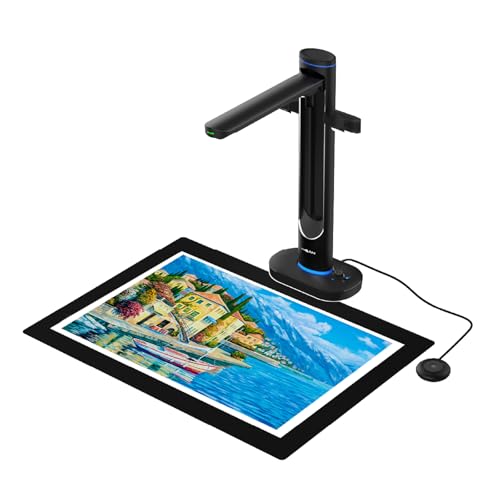
- Captures books and documents up to A2 size
- Dual 48MP cameras with up to 600 DPI
- Includes OCR, text-to-speech, and UVC camera modes
Best For: Large, fragile, and archival materials
Portable Pick

- Foldable design weighs only 2 pounds
- 24MP camera with 5696 × 4272 resolution
- Creates searchable PDFs and editable office files
Best For: Portable book and document scanning
Easy Overhead Scanning

- Scans bound materials without cutting or damaging them
- Auto-corrects page curves and distortion
- Supports page-turn detection and multi-item scanning
Best For: Convenient scanning of books and mixed media
Best All-Around Book Scanner

- Two-second page scanning with multiple output formats
- Laser-assisted curved-page flattening
- Built-in glare-free smart lamp
Best For: Home offices, libraries, and general book digitization
Best Large-Format Book Scanner

- Captures interchangeable A2 and A3 formats
- 26MP sensor with enhanced 600 DPI output
- Automatic flattening, page repair, and OCR
Best For: Large books, maps, newspapers, and technical documents
Best Portable Book Scanner

- About one-second scanning speed
- Foldable four-pound design with foot pedal
- Works as a scanner and USB document camera
Best For: Classrooms, travel, thin books, and flat documents
Best with Extra Features

- A2/A3 capture area for oversized materials
- 26MP camera with book-flattening tools
- OCR exports to common editable formats
Best For: Maps, newspapers, manuscripts, and large bound documents
High-Resolution Workhorse

- 38MP sensor with 410 DPI capture
- A3 area and automatic curve flattening
- Fast scanning with OCR and HDMI output
Best For: Detailed, high-volume book and document digitization
Fast Everyday Digitizer

- 1.5-second scanning for rapid book capture
- Curved-page flattening and multi-item support
- 180+ language OCR with multi-light illumination
Best For: Quick home, office, and research book digitization
Professional Pick – CZUR ET24 Pro
For shoppers comparing book scanners, the CZUR ET24 Pro is a feature-rich desktop option with a 24MP camera, A3 scanning capacity, page-flattening technology, and OCR for converting scans into editable files.
Best For: Home offices, researchers, and professionals digitizing books, documents, and other materials up to A3 size.
Pros:
- 24MP camera captures up to 5696 × 4272 resolution at 320 DPI.
- Flattens curved book pages and supports A3- and A4-size materials.
- ABBYY OCR supports more than 180 languages and exports to PDF, Word, and Excel.
- Supports USB and HDMI connections, plus Windows, macOS, and select Linux systems.
Cons:
- Very glossy paper is not recommended.
- Thai and Hebrew OCR are not supported; Arabic support varies by operating system.
- At 4.5 kg, it is less portable than foldable models.
The ET24 Pro stands out when image quality, format flexibility, and OCR matter more than compactness. Its three-light setup and preview screen add control, though users should check operating-system and language requirements before buying.
Large-Format Choice – VIISAN S48 Duo
Among book scanners, the VIISAN S48 Duo is designed for oversized or fragile materials that are better captured from above than pressed flat. Its dual cameras, AI processing, OCR, and text-to-speech features support both archiving and teaching workflows.
Best For: Libraries, schools, archives, and offices scanning large books, maps, bound materials, and teaching documents.
Pros:
- Scans materials up to A2 size without flattening or damaging bindings.
- Dual 48MP cameras provide up to 600 DPI capture.
- AI processing helps flatten curved pages, remove finger marks, and correct edge distortion.
- OCR, text-to-speech, and UVC camera functionality support accessibility and live presentations.
Cons:
- Requires a USB 2.0 port and at least 4GB of RAM, with 16GB recommended.
- Its large-format capability may be unnecessary for users scanning only standard pages.
- Some advanced features depend on compatible Windows or macOS systems.
The S48 Duo is a strong fit when document size, preservation, and accessibility are priorities. It offers more than basic scanning, functioning as a presentation camera as well as an archival tool.
Portable Pick – CZUR Shine Ultra Pro
The CZUR Shine Ultra Pro is a practical choice for book scanners when portability matters. It combines a 24MP camera with page-flattening software, multiple editable output formats, and a foldable, height-adjustable design weighing only 2 pounds.
Best For: Students, mobile professionals, and home users who need a foldable scanner for books and everyday documents.
Pros:
- Foldable 90-degree design and 2-pound weight make it easy to transport.
- 24MP capture reaches 5696 × 4272 resolution.
- Flattens curved book pages after pixel transformation.
- Exports to JPG, PDF, searchable PDF, Word, and Excel.
Cons:
- Uses a USB connection rather than a listed wireless connection.
- Mac compatibility depends on the processor and operating-system version.
- Its listed scanner type is document-focused, so buyers seeking very large-format scanning may need another model.
The Shine Ultra Pro balances image resolution and portability well for routine digitization. It is especially appealing for users who move between workspaces and need editable files without carrying a heavier desktop scanner.
Easy Overhead Scanning – ScanSnap SV600
The ScanSnap SV600 is an established overhead option for book scanners, letting users digitize books, newspapers, magazines, photos, and documents without cutting or damaging them. Automated correction and page-turning features help streamline repeated scans.
Best For: Users scanning bound books, newspaper clippings, photos, and mixed documents with minimal handling.
Pros:
- Scans books and other bound materials directly without cutting them.
- Auto Book Correction flattens pages and corrects curve distortion.
- Page Turning Detection can start scans automatically as pages are turned.
- Multi Document Detection crops and rotates multiple items in one scan.
Cons:
- Its 1200 DPI specification is lower than the higher-resolution camera models in this roundup.
- At 6.6 pounds, it is the heaviest listed option.
- Finger removal requires the Point Retouch function rather than fully automatic correction.
The SV600 favors convenient overhead workflows and automated handling over the newest high-resolution specifications. Its page-turning and correction tools make it particularly useful for longer scanning sessions involving books and mixed media.
Best All-Around Book Scanner – CZUR Aura Pro
The CZUR Aura Pro is a versatile choice among book scanners for home offices, libraries, and anyone digitizing books or documents. It scans a page in about two seconds, supports A3 and A4 materials, and includes OCR for converting scans into searchable or editable files.
Best For: Users who want a book scanner that also functions as a reading lamp and handles curved book pages.
Pros:
- Scans pages in approximately two seconds and exports JPG, Word, PDF, and searchable PDF files.
- OCR supports more than 180 languages, with AI-assisted image processing.
- Three laser lines help flatten curved pages, while 32 LEDs and supplemental lights improve illumination.
- Works with Windows XP through Windows 11 and supported macOS versions.
Cons:
- Thai, Hebrew, and Arabic are not supported by the OCR.
- Requires a USB connection rather than Wi-Fi or Bluetooth.
The Aura Pro stands out as a balanced book-scanning solution with useful lighting, page-flattening technology, and broad file-format support. It is especially practical when accurate book capture and everyday document scanning matter equally.
Best Large-Format Book Scanner – VIISAN S21 Pro A2/A3 Scanner
For oversized materials, this book scanner combines A2 and A3 capture in a foldable design. Its 26MP sensor, software-enhanced 600 DPI output, automatic page repair, and multi-format OCR make it suitable for books, newspapers, maps, drawings, and other large documents.
Best For: Researchers, educators, offices, and archives that need flexible A2/A3 scanning and advanced document processing.
Pros:
- Switches between A2 and A3 formats using a 90-degree hinge and telescopic height adjustment.
- 26MP capture, software-enhanced 600 DPI output, and automatic flattening support detailed scans.
- OCR can create searchable PDF, Word, Excel, ePub, and TXT files in more than 180 languages.
- Foldable, lightweight design also supports 3D objects, video recording, and UVC/UAC conferencing.
Cons:
- Not recommended for highly glossy or glare-prone paper.
- Not compatible with ARM-based devices such as Surface Pro X.
- Some AI features require connection to Google Gemini through the VisualCam Lite web interface.
The S21 Pro is the most flexible option here for large-format work. Its A2/A3 support and automation are compelling for demanding projects, though buyers should confirm computer compatibility and consider lighting conditions for glossy originals.
Best Portable Book Scanner – CZUR Shine Ultra
The CZUR Shine Ultra is a compact option among book scanners, designed for A3 and A4 documents and pages. It captures a page in about one second, folds for transport, and can work as both a USB document camera and scanner for scanning, OCR, and remote teaching.
Best For: Students, teachers, and mobile users who need a lightweight scanner for thinner books and flat documents.
Pros:
- Scans at approximately one page per second and supports materials up to A3 size.
- 13MP CMOS camera with automatic cropping, smart paging, multiple color modes, and side combining.
- OCR supports more than 180 languages and the unit works with Zoom and Google Meet as a document camera.
- Foldable, height-adjustable design weighs about four pounds and includes a foot pedal.
Cons:
- Curved-page flattening is intended for thinner books; CZUR recommends its ET series for thicker books.
- Not compatible with Android or iOS devices.
- Thai, Hebrew, and Arabic are not supported by the OCR.
The Shine Ultra prioritizes portability and speed, making it a practical choice for classroom use, travel, and everyday flat documents. Its limitations are most relevant to users scanning thick books or working from mobile devices.
Best with Extra Features – VIISAN S21 A2 Book Scanner
The VIISAN S21 is one of the more versatile book scanners for oversized materials. Its adjustable A2/A3 capture area, 26MP camera, and book-focused software make it suitable for maps, newspapers, manuscripts, and bound documents.
Best For: Users scanning large-format books, journals, maps, and mixed media on Windows or macOS x64/x86 systems.
Pros:
- Captures documents up to A2 size and folds with a 90-degree hinge for easier storage.
- Book software can flatten curved pages, remove fingers, repair edges, and split facing pages.
- Embedded OCR can export scans to PDF, Word, Excel, EPUB, or TXT.
- Supports snapshots, business cards, 3D objects, remote collaboration, and video recording.
Cons:
- Bundled OfficeCam software does not support ARM-based devices such as the Surface Pro X.
- Very glossy paper is not recommended, and the built-in LEDs are not intended for bright-light use.
Choose the S21 when oversized capture and automated book correction matter more than a compact flatbed design. Confirm your computer architecture before buying, since the supplied software is limited to x64 and x86 Windows PCs and macOS.
High-Resolution Workhorse – CZUR ET MAX Book Scanner
The CZUR ET MAX is a high-resolution option among book scanners, pairing a 38MP CMOS sensor with automated curve flattening and rapid page capture. Its A3 scanning area and broad operating-system support suit demanding digitization and demonstration workflows.
Best For: High-volume users who need detailed A3 scans, searchable files, and compatibility with Windows, macOS, or supported Ubuntu versions.
Pros:
- 38MP sensor captures up to 7168 × 5376 resolution at 410 DPI.
- Automatically flattens curved book pages and removes distortion without unbinding books.
- OCR supports more than 180 languages and creates editable or searchable files.
- Scans a page in about 1.5 seconds with practiced operation and includes HDMI output.
Cons:
- Thai and Hebrew OCR are not supported; Arabic support is limited by operating system.
- Glossy or highly reflective materials are not recommended.
- Linux support is limited to Ubuntu 20.04 through 24.04.
The ET MAX stands out when image detail, speed, and A3 capacity are priorities. Its language and material limitations are worth checking before committing to a specialized scanning project.
Fast Everyday Digitizer – CZUR ET16 Plus Book Scanner
The CZUR ET16 Plus is designed for efficient book scanning, using a 16MP camera and approximately 1.5-second page scanning. Its page-flattening technology, multiple lights, and OCR support make it a practical choice for books, binders, cards, and small physical objects.
Best For: Home, office, and research users who want to digitize books quickly on compatible Windows or macOS computers.
Pros:
- Can scan a 300-page book in about 10 minutes with practiced operation.
- Flattens curved book pages using CZUR’s page-processing technology.
- Scans books, binder documents, business cards, vouchers, and physical objects.
- OCR supports more than 180 languages, with 10 LED lights and two supplemental lights.
Cons:
- Very glossy paper is not recommended.
- Thai and Hebrew OCR are unsupported, while Arabic support is limited to Windows.
- Requires compatible Windows or macOS versions and a USB connection.
The ET16 Plus is a sensible fit for fast personal or office digitization when 16MP resolution is sufficient. It offers useful book correction and broad document versatility without requiring traditional page-by-page flatbed scanning.
How We Picked the Best Book Scanners
We selected these Book Scanners based on the features that matter most when digitizing bound or delicate materials. Resolution, camera quality, capture area, and page-flattening performance help determine how clearly a scanner reproduces text and images. We also considered OCR, automatic cropping, finger removal, page-turn detection, lighting, software compatibility, and overall ease of use.
The list includes overhead scanners for books and large documents, portable document cameras for flexible setups, and higher-resolution models suited to archives or frequent production work. Because scanning needs vary, no single model is ideal for every buyer.
Quick Comparison
| Best For | What to Look For |
|---|---|
| Home books and notes | Compact design, simple software, and automatic page correction |
| Libraries and archives | High resolution, gentle book handling, and reliable OCR |
| Oversized documents | A2 or A3 capture area and strong edge-to-edge lighting |
| Classrooms and remote instruction | Fast live preview, USB connectivity, and text-to-speech or OCR tools |
| Frequent professional use | Durable construction, fast capture, and advanced batch-processing features |
Key Buying Factors for Book Scanners
Resolution and Image Quality
Higher megapixel counts can preserve small print, illustrations, and fine line detail, but sensor quality and lighting are equally important. For ordinary text, a well-designed 16MP or 24MP scanner may be sufficient. Large artwork, archival materials, and heavy cropping benefit from higher-resolution cameras.
Book Size and Capture Area
Check whether the scanner supports the pages you actually plan to digitize. A4 models suit most standard books and paperwork, while A3 and A2 scanners are better for newspapers, maps, textbooks, sheet music, and oversized artwork.
Page Flattening and Book Handling
Curved pages can produce distorted text near the spine. Look for software that automatically flattens page curves, removes fingers, detects page boundaries, and corrects perspective. A noncontact overhead design is especially useful for fragile or valuable books.
OCR and Workflow Software
OCR converts scanned pages into searchable or editable text. If you plan to create searchable PDFs, accessible course materials, or editable documents, confirm that the included software supports your operating system and desired export formats.
Portability and Connectivity
Portable scanners are convenient for classrooms, offices, and occasional projects, while larger units provide more stable positioning and broader capture areas. USB connectivity is common, but check cable requirements, software installation, and compatibility before buying.
Who Should Buy Which Book Scanners?
Choose a compact CZUR Shine or Aura-style model if you need a straightforward scanner for home documents, books, and occasional projects. The ScanSnap SV600 is a strong fit for users who prefer a recognized overhead scanning workflow and dependable document organization.
For oversized books, maps, newspapers, or other large materials, consider a VIISAN large-format model or an A2/A3 document camera with automatic flattening. Buyers handling demanding archival or professional workloads should prioritize the CZUR ET24 Pro or ET MAX, with their higher-resolution cameras and advanced capture capabilities.
Finally, consider the ET16 Plus when you want a capable overhead scanner without moving into the highest-resolution category. Whichever model you choose, match the capture area, software features, and expected scanning volume to your real workflow rather than relying on resolution alone.