
Portable book scanners make it easier to digitize bound books, loose documents, receipts, and photos without relying on a full-size office scanner. The right model can save space while delivering useful OCR, image quality, and file-format flexibility.
Our roundup covers overhead book scanners, wand-style handheld models, and USB document cameras so you can match the scanner to your workflow, portability needs, and budget.
Best 10 Portable Book Scanners Picks for 2026
Best for Fast A3 Scanning

- About one-second-per-page scanning
- Supports A3 and A4 materials
- Foldable design with OCR and document-camera modes
Best For: Fast overhead scanning of thinner books and large documents
Best for Single-Sheet Portability

- Weighs only 9.44 ounces
- Scans pages in as little as 5.5 seconds
- USB-powered with included OCR software
Best For: Portable scanning of loose documents, receipts, and ID cards
Best for Untethered Wand Scanning

- Lightweight handheld A4 scanner
- Stores scans on an included 16GB SD card
- Up to 900 dpi resolution with USB transfer
Best For: Handheld scanning of occasional book pages, photos, and documents
Best for Book Scanning and Reading

- Two-second-per-page scanning
- Laser-assisted curved-page flattening
- Built-in smart lamp with four color temperatures
Best For: Digitizing bound books while providing comfortable reading illumination
Best Battery-Powered Pick
Handheld Document and Photo Scanner

- Battery-powered handheld design
- 300/600/900 dpi settings
- JPEG/PDF storage on included 16GB card
Best For: Travelers and casual document, receipt, photo, or page scanning
Best Feature-Rich Pick
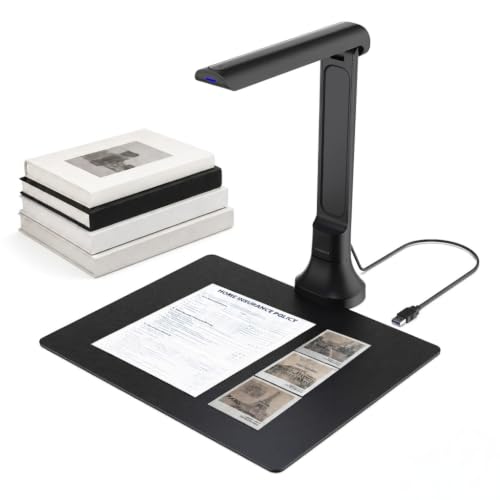
- 16MP autofocus camera
- OCR and text-to-speech tools
- Works as a document camera and webcam
Best For: Students, educators, researchers, and accessibility-focused users
Best Compact Overhead Pick
CZUR Lens800 Pro Portable Scanner

- One-second-per-page scanning
- Contact-free A4 capture
- Foldable 0.93-pound USB design
Best For: Fast scanning of books, cards, and delicate documents
Best Wireless Wand Scanner

- Rechargeable handheld design with MicroSD storage
- Scans at up to 1050 dpi in JPEG or PDF
- Includes OCR and Readiris PDF software
Best For: Travelers and professionals needing high-resolution handheld scans
Best Document Camera Scanner

- 12MP camera scans pages in about one second
- Foldable 0.93-pound design with USB connection
- OCR and processing software supports 180+ languages
Best For: Fast, contact-free scanning of documents and cards
Best Budget Handheld Scanner
Portable 900 DPI Color Scanner

- Plug-and-play operation without software installation
- 300/600/900 dpi modes with JPEG and PDF storage
- Includes a 16GB MicroSD card
Best For: Students and travelers needing simple battery-powered scanning
Best for Fast A3 Scanning – CZUR Shine Ultra
The CZUR Shine Ultra is a strong choice among portable book scanners when you need fast, overhead scanning for A3 or A4 materials. It scans in about one second per page, includes OCR, and folds for easier transport, though its curved-page flattening technology is intended for thinner books.
Best For: Users scanning books, documents, and objects up to A3 size on Windows or macOS.
Pros:
- Scans pages in about one second and supports A3 and A4 materials.
- 13MP camera with auto cropping, smart paging, and multiple color modes.
- OCR supports more than 180 languages and it can function as a USB document camera.
- 90-degree foldable design with a height-adjustable neck and foot pedal.
Cons:
- Not compatible with Android or iOS.
- Curved-page flattening is intended for thinner books; thicker books may require the ET series.
- Thai, Hebrew, and Arabic are not supported by the listed OCR.
Choose the Shine Ultra if speed, A3 support, and flexible overhead scanning matter most. Its USB-only computer compatibility and thinner-book limitation are important considerations before buying.
Best for Single-Sheet Portability – Epson WorkForce ES-50
The Epson WorkForce ES-50 is one of the simplest portable book scanners for loose pages, receipts, and identification cards. This lightweight, USB-powered model feeds single sheets and creates searchable or editable files with included OCR software.
Best For: Travelers, students, and home offices that primarily scan loose documents rather than bound books.
Pros:
- Lightweight 9.44-ounce design for easy carrying.
- Scans a single page in as quickly as 5.5 seconds.
- Handles documents up to 8.5 by 72 inches, plus receipts and ID cards.
- Includes OCR, ScanSmart software, and USB power with no battery or external supply required.
Cons:
- Single-sheet-fed design is less suitable for bound books and delicate pages.
- Windows and Mac compatibility is listed, but the minimum system requirements specify Windows 7.
- Requires connection to a computer for operation.
The ES-50 is a practical pick when compact size and straightforward loose-sheet scanning outweigh book-specific features. For bound volumes, an overhead scanner or wand scanner may be more convenient.
Best for Untethered Wand Scanning – MUNBYN Portable Scanner
The MUNBYN Portable Scanner offers a compact wand-style approach to portable book scanners. It scans photos, documents, and book pages independently to a supplied 16GB SD card, then transfers files to a computer by USB.
Best For: Users who want a lightweight handheld scanner for occasional book pages, photos, and documents without a feeding mechanism.
Pros:
- Compact 0.66-pound design that supports scanning up to A4 size.
- Scans independently in about 3 to 5 seconds at 900 dpi.
- Includes a 16GB SD card for storing thousands of scan files.
- Does not require a driver and connects to a computer by USB for transfers.
Cons:
- Handheld scanning requires practice to maintain consistent movement and alignment.
- The listed OCR workflow relies on separate software rather than a clearly included OCR application.
- Wand scanning may be slower or less convenient for large batches than an automatic document feeder.
The MUNBYN is appealing for portability and flexible scanning of bound or loose material. It is best suited to smaller projects where handheld control is acceptable and built-in feeding automation is not essential.
Best for Book Scanning and Reading – CZUR Aura Pro
The CZUR Aura Pro combines a book and document scanner with a smart reading lamp, making it a versatile option among portable book scanners. Its laser-based page-flattening system, rapid two-second scanning, and searchable-PDF output are designed for digitizing bound books and documents.
Best For: Readers and researchers who want book scanning plus adjustable, glare-free illumination.
Pros:
- Scans pages in about two seconds and outputs JPG, Word, PDF, and searchable PDF files.
- Three laser lines help flatten curved book pages for clearer captures.
- 32 LEDs and supplemental side lights provide four color-temperature settings.
- Works with Windows XP/7/8/10/11 and supported macOS versions.
Cons:
- At 1.5 kg, it is less lightweight than compact wand-style scanners.
- Uses USB connectivity and does not require Wi-Fi or Bluetooth, limiting wireless flexibility.
- Thai, Hebrew, and Arabic are not supported by the listed OCR.
The Aura Pro is a compelling choice when book-page flattening and comfortable reading are priorities. Its integrated lighting adds everyday usefulness, while the larger upright design is less travel-friendly than the smallest portable scanners.
Best Battery-Powered Pick – Handheld Document and Photo Scanner
This compact handheld model is a straightforward option for shoppers comparing portable book scanners for occasional document, receipt, photo, and page capture. It needs no software installation, saves scans as JPEG or PDF files to the included 16GB Micro SD card, and runs on two AA batteries.
Best For: Travelers, students, home users, and professionals who want quick, cable-free scanning of loose pages, receipts, photos, and book content.
Pros:
- Battery-powered and lightweight at 9.6 ounces for convenient travel use.
- Offers 300, 600, and 900 dpi resolution settings.
- Saves directly to a 16GB Micro SD card in JPEG or PDF format.
- Works with Windows and Mac systems through USB connectivity.
Cons:
- Two AA batteries are required and are not included.
- Scanning is performed by moving the handheld unit across the page, which may require a steady hand.
- Its listed maximum sheet size is A4, so it is less suited to larger originals.
Choose this scanner when portability and standalone operation matter more than automated page feeding or advanced text recognition. Its included memory card and selectable resolution make it practical for basic archiving on the go.
Best Feature-Rich Pick – 16MP Foldable Book Scanner
For shoppers seeking portable book scanners with stronger software features, this foldable USB document camera combines 16MP imaging with autofocus, OCR, and text-to-speech. It can capture books, papers, photos, receipts, and other objects, while automatic edge correction supports quick multi-page scanning.
Best For: Students, teachers, remote workers, researchers, and users who need OCR, read-aloud functions, video conferencing, or AI-assisted translation and summaries.
Pros:
- 16MP autofocus camera provides detailed real-time captures.
- OCR can convert scans into editable Word, Excel, PDF, and searchable text files.
- Text-to-speech and multilingual recognition add accessibility and proofreading support.
- Foldable, plug-and-play design works with Windows and macOS without drivers.
Cons:
- Requires a USB connection rather than standalone battery operation.
- AI translation, summarization, and voice features require the VisualCam Lite Web UI and Gemini connection.
- At 350 grams, it is portable but less pocketable than a handheld wand scanner.
This is the most versatile choice of the three for digitizing books and using scanned content afterward. Its camera format also makes it useful for online teaching and meetings, but buyers should plan on using a computer and the associated software features.
Best Compact Overhead Pick – CZUR Lens800 Pro Portable Scanner
The CZUR Lens800 Pro is a compact overhead option for comparing portable book scanners that avoid feeding pages through a slot. Its 8MP camera captures A4 documents, books, forms, certificates, and business cards, while the software adds OCR and document-processing tools.
Best For: Users who want fast, contact-free scanning of books, cards, and delicate documents, plus occasional webcam use.
Pros:
- Scans at a claimed speed of one second per page.
- Contact-free design helps avoid jams and reduces handling of originals.
- OCR software supports Word, Excel, PDF, and editable PDF output in more than 180 languages, with stated exclusions.
- Foldable, 0.93-pound design uses one USB connection for power and data.
Cons:
- Its 270 dpi specification is lower than the handheld scanner’s maximum 900 dpi.
- Not recommended for very glossy paper.
- Requires compatible Windows or macOS software rather than standalone operation.
Select this model when fast, non-contact capture and a small desktop footprint are priorities. It is especially appealing for books and cards that should not be fed through a conventional scanner, provided your documents fit within the A4 capture area.
Best Wireless Wand Scanner – IRIScan Book 7
The IRIScan Book 7 is a versatile option among portable book scanners for travelers, students, and professionals who need to capture documents without carrying a full-size scanner. It scans directly to a MicroSD card or computer, offers up to 1050 dpi resolution, and includes OCR and PDF-editing software.
Best For: Windows and Mac users who want a rechargeable handheld scanner with SD-card storage, OCR, and high-resolution document or photo scanning.
Pros:
- Rechargeable battery and compact handheld design support scanning on the go.
- Offers 300, 600, and 1050 dpi modes for documents and photos.
- Includes MicroSD storage, OCR software, and Readiris PDF editing tools.
- Can save JPEG or PDF files and combine multiple scans into one PDF.
Cons:
- Does not support Wi-Fi connectivity.
- AC adapter is not included.
- Higher-resolution scans take longer and use more storage space.
The IRIScan Book 7 is a strong choice when portability, rechargeable operation, and built-in OCR matter more than wireless connectivity. Its SD-card workflow also makes it practical for scanning away from a computer.
Best Document Camera Scanner – CZUR Lens1200 Pro
The CZUR Lens1200 Pro takes a document-camera approach to portable book scanners, capturing pages without feeding or touching them. Its foldable 12MP camera scans a page in about one second and uses software for cropping, OCR, file conversion, and document organization.
Best For: Users who want fast, contact-free scanning of documents, cards, forms, and other flat materials with computer-based OCR and processing tools.
Pros:
- 12MP camera captures up to 4032 × 3024 resolution.
- Scans a page in approximately one second and can detect multiple targets.
- Foldable, 0.93-pound design is convenient for travel.
- Software supports intelligent cropping, document combining, and OCR in more than 180 languages.
Cons:
- Requires a USB connection for power and data.
- Scanning software must be downloaded separately.
- Not recommended for very glossy paper or books.
The Lens1200 Pro is best suited to fast, touch-free desktop scanning rather than traditional wand scanning. Its webcam mode adds flexibility, while the USB-only setup keeps operation simple but tethered.
Best Budget Handheld Scanner – Portable 900 DPI Color Scanner
This battery-powered model is a straightforward choice among portable book scanners for receipts, photos, books, and everyday documents. It requires no software installation, saves scans directly to the included 16GB MicroSD card, and supports JPEG and PDF formats.
Best For: Students, travelers, and home users who want an inexpensive plug-and-play scanner with adjustable resolution and generous removable storage.
Pros:
- Offers 300, 600, and 900 dpi scan settings.
- Includes a 16GB SD card and supports cards up to 32GB.
- Works with Windows, Mac, iOS, and Android through a USB cable.
- Requires no software installation and uses automatic calibration to help reduce blurry scans.
Cons:
- Runs on two AA batteries, which are not included.
- Scanned files are saved to the MicroSD card rather than transferred wirelessly.
- Manual handheld gliding requires steady movement for consistent results.
This scanner prioritizes simplicity and portability over advanced software features. It is a practical fit for occasional document and photo capture when direct SD-card storage and broad device compatibility are more important than rechargeable power.
How We Picked the Best Portable Book Scanners
We focused on scanners that are practical for mobile use and capable of handling more than ordinary flat sheets. Our evaluation criteria included scan resolution, capture area, portability, OCR support, connection options, file storage, software compatibility, and ease of handling bound materials.
The selection includes overhead scanners designed to flatten page-turning workflows, compact sheet-fed units for travel, handheld scanners with onboard storage, and document-camera designs that connect directly to a computer. Since advertised specifications do not always reflect real-world convenience, buyers should also consider setup time, page alignment, lighting, and the software required for text recognition.
Quick Comparison of These Portable Book Scanners
| Scanner type | Best suited to | Important strengths |
|---|---|---|
| Overhead book scanner | Bound books and bulk digitizing | Non-contact capture, larger page areas, page-flattening features |
| Mobile document scanner | Receipts, forms, and loose pages | Small footprint, simple USB operation, easy travel |
| Handheld wand scanner | Occasional scans away from a desk | Battery operation, onboard storage, maximum portability |
| Document camera scanner | Live demonstrations and computer-based capture | Flexible positioning, autofocus, OCR software support |
Key Buying Factors for Portable Book Scanners
Scanning Method and Page Handling
For bound books, an overhead scanner is generally more comfortable than dragging a handheld wand across each page. A document camera can be useful when you need to preview pages on a computer. Compact mobile scanners are often better for loose documents and receipts than for thick books.
Resolution and Image Quality
Resolution matters most for small print, illustrations, and photographs. Higher DPI can preserve more detail, but it may create larger files and slower workflows. For ordinary text, consistent lighting and accurate alignment can matter as much as the headline resolution.
OCR, Formats, and Software
If you plan to search or edit scanned text, confirm that OCR is included and check which operating systems it supports. JPG and PDF are common choices, while searchable PDF and editable text formats are more useful for archives and research.
Portability and Storage
Check folded dimensions, weight, power requirements, and whether the scanner needs a computer. Models with SD-card storage or wireless operation are convenient for field work, while USB-powered scanners are often simpler for desk use.
Who Should Buy Which Portable Book Scanners?
Choose an overhead CZUR model if your main goal is digitizing bound books efficiently with a hands-off capture setup. An Epson mobile scanner is a sensible fit for travelers and office users who mostly scan loose paperwork. MUNBYN and IRIScan handheld models are better for users who prioritize compact storage and scanning away from a workstation.
Document-camera options such as the DB8401 or CZUR Lens series suit teaching, demonstrations, receipts, and flexible computer-based capture. For photos and mixed everyday documents, compare color quality, supported paper size, storage, and the included software rather than choosing solely by maximum DPI.