
Choosing among the best laptops for multitasking means looking beyond processor names. Memory capacity, SSD speed, display comfort, keyboard design, and upgrade flexibility all affect how smoothly a laptop handles video calls, browser tabs, documents, spreadsheets, and creative apps at once.
This roundup compares 10 current laptops across several budgets and use cases, from affordable everyday systems to higher-memory machines designed for heavier workloads. Use the guide below to narrow your choice based on performance, portability, storage, and long-term value.
Best 10 Laptops for Multitasking Picks for 2026
Best Overall Powerhouse

- Ryzen 7 with 8 cores and 16 threads
- 32GB RAM for demanding multitasking
- 2TB combined storage with dock included
Best For: Business users and heavy multitaskers
Best Everyday Value

- 16GB DDR5 memory for everyday multitasking
- 120Hz Full HD IPS display
- Wi-Fi 6 and useful port selection
Best For: Students, home users, and office work
Best Touchscreen Productivity Pick
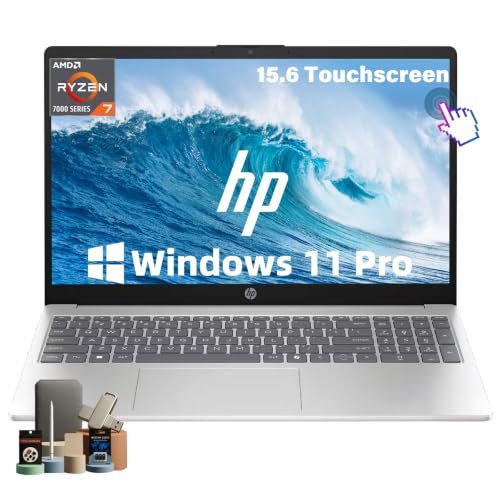
- 32GB RAM and 1TB NVMe SSD
- Eight-core Ryzen 7 processor
- Touchscreen, numeric keypad, and privacy shutter
Best For: Remote workers and productivity-focused users
Best Portable Mac

- A18 Pro chip with Apple Intelligence support
- Up to 16 hours of battery life
- 2.71-pound aluminum design
Best For: Mobile students and Apple ecosystem users
Efficient Everyday Choice

- Intel Core 3 processor with 8GB RAM
- 512GB SSD and Full HD matte display
- Numeric keypad, Wi-Fi 6, and ComfortView
Best For: Everyday work, study, and home productivity
Big-Screen Productivity Pick

- Ryzen 5 processor with 16GB RAM
- 17.3-inch anti-glare display
- 512GB SSD and full-size numeric keypad
Best For: Multi-window office work and large-screen productivity
Portable Student Value

- Ryzen 3 processor with 8GB LPDDR5 memory
- Full HD IPS display in a 3.9-pound design
- Wi-Fi 6, backlit keyboard, and 128GB SSD
Best For: Portable schoolwork and light everyday multitasking
Balanced Everyday Pick
Dell 15.6-inch Touchscreen Laptop

- 13th Gen Core i5 processor with 10 cores
- 512GB SSD and Full HD touchscreen
- 1080p webcam, Wi-Fi 6, and versatile ports
Best For: Students, families, and everyday home-office multitasking
Big-Screen Choice
HP OmniBook 3 17.3-inch Laptop

- 17.3-inch Full HD IPS display
- Up to 14 hours 15 minutes of battery life
- 512GB SSD, LPDDR5 RAM, and enhanced video calls
Best For: Home users and remote workers who want a large display
Memory-Focused Value
HILLSUSU 15.6-inch Business Laptop

- 16GB RAM for browser-heavy multitasking
- 512GB SSD with Windows 11 Pro and Office
- Backlit keyboard and full numeric keypad
Best For: Students and professionals prioritizing memory and productivity features
Best Overall Powerhouse – HP Ryzen 7 Touchscreen Laptop
For shoppers comparing laptops for multitasking, this HP combines an eight-core Ryzen 7 processor with 32GB of RAM, making it well suited to juggling office apps, browser tabs, creative work, and video calls. Its 15.6-inch FHD touchscreen, Windows 11 Pro, and included storage dock add flexibility for a productivity-focused setup.
Best For: Business users and multitaskers who want abundant memory, a large touchscreen, and expanded storage.
Pros:
- Ryzen 7 7730U offers 8 cores, 16 threads, and boost speeds up to 4.5GHz.
- 32GB DDR4 RAM supports demanding multitasking.
- Includes a 1TB SSD, 1TB docking-station storage, and a 7-in-1 dock.
- Windows 11 Pro, numeric keyboard, Wi-Fi 6, and multiple ports support productivity.
Cons:
- Integrated Radeon 610M graphics are better suited to everyday multimedia than dedicated-graphics workloads.
- The seal is opened for the RAM and SSD upgrade, with separate warranty coverage for upgraded components.
- The included docking-station storage may be less convenient than internal storage.
This is a strong choice when memory capacity and workstation-style flexibility matter most. The touchscreen and accessory bundle make it especially practical for users building a versatile home or office workspace.
Best Everyday Value – Dell Pro 15.6-inch Laptop
This Dell is a sensible pick among laptops for multitasking when your workload centers on documents, web research, email, and video calls. Its 16GB DDR5 memory, NVMe SSD, 120Hz FHD display, and broad port selection cover common home, school, and office needs.
Best For: Students, home users, and everyday professionals who need dependable multitasking performance.
Pros:
- Intel Core 3 100U has 6 cores and speeds up to 4.7GHz.
- 16GB DDR5 RAM and a 256GB PCIe NVMe SSD support responsive everyday use.
- 15.6-inch IPS display offers Full HD resolution and a 120Hz refresh rate.
- Wi-Fi 6, USB-C, HDMI, USB-A, and an SD card slot provide flexible connectivity.
Cons:
- 256GB of storage is more limited than the capacity offered by several alternatives.
- Integrated Intel UHD Graphics are intended for everyday use rather than graphics-intensive work.
- The keyboard is listed as non-backlit in the supplied feature notes.
The Dell focuses on balanced everyday performance rather than specialized power. It is a practical option for multitasking across standard productivity apps, especially if you use external or removable storage when needed.
Best Touchscreen Productivity Pick – HP Ryzen 7 Laptop
This HP stands out among laptops for multitasking with 32GB of RAM and a 1TB NVMe SSD. The eight-core Ryzen 7 processor is designed for switching between spreadsheets, meetings, research tabs, and cloud applications, while the touchscreen and numeric keypad add convenience for daily productivity.
Best For: Remote workers, professionals, and students who want strong multitasking with touch control and ample internal storage.
Pros:
- Ryzen 7 7730U provides 8 cores and 16 threads for demanding multitasking.
- 32GB RAM and a 1TB NVMe SSD offer generous memory and fast storage.
- 15.6-inch FHD IPS touchscreen supports responsive touch input.
- Windows 11 Pro, numeric keypad, privacy camera shutter, and Wi-Fi 6 support productivity.
Cons:
- Integrated AMD Radeon graphics are not a substitute for a dedicated GPU.
- The display has a 60Hz refresh rate and a listed 45% color gamut.
- The 15.6-inch design is less compact than a smaller ultraportable.
With its generous memory, fast internal storage, and business-friendly features, this HP is well matched to users who routinely keep many applications open. It offers a focused productivity package without relying on an external storage accessory.
Best Portable Mac – Apple MacBook Neo 13-inch
For shoppers seeking laptops for multitasking in a compact Apple format, the MacBook Neo pairs an A18 Pro chip with macOS and a lightweight 2.71-pound aluminum design. Its long stated battery life, sharp Liquid Retina display, and Apple Intelligence support make it appealing for mobile study and everyday work.
Best For: Students and mobile users who value portability, battery life, macOS, and Apple-device integration.
Pros:
- A18 Pro chip supports everyday assignments, apps, and Apple Intelligence features.
- Up to 16 hours of battery life supports extended use away from an outlet.
- Compact 13-inch Liquid Retina display supports 1 billion colors.
- Lightweight aluminum design, 1080p camera, and Mac-iPhone integration suit mobile workflows.
Cons:
- 8GB unified memory is less than the 16GB or 32GB offered by the Windows alternatives.
- 256GB SSD storage provides less capacity for large local libraries and projects.
- Its macOS platform may require software compatibility checks for Windows-only applications.
The MacBook Neo prioritizes mobility and battery endurance over expandable memory or large storage. It is a compelling fit for lightweight multitasking, studying, communication, and users already invested in the Apple ecosystem.
Efficient Everyday Choice – Dell 15.6 Laptop
For shoppers comparing laptops for multitasking, the Dell 15.6 offers a practical setup for everyday work, study, and entertainment. Its Intel Core 3 processor, 8GB of RAM, 512GB SSD, and Full HD display support common productivity tasks, browsing, streaming, and file storage.
Best For: Students, home users, and business users who want a roomy screen, numeric keypad, and dependable everyday performance.
Pros:
- 512GB SSD provides useful storage for documents, media, and applications.
- 15.6-inch 1920×1080 matte display includes a 120Hz refresh rate.
- Numeric keypad, calculator hotkey, lifted hinges, and ComfortView software support comfortable productivity.
- Wi-Fi 6, Bluetooth 5.3, HDMI, and three USB ports offer flexible connectivity.
Cons:
- 8GB of RAM is suitable for everyday multitasking but less suited to demanding workloads.
- Integrated Intel UHD Graphics are not intended for graphics-intensive tasks.
- The display is not touchscreen-enabled.
This Dell is a balanced choice for routine multitasking, especially if you value storage, a full-size keyboard, and built-in ergonomic features over specialized performance.
Big-Screen Productivity Pick – HP 17.3 Business Laptop
If your idea of laptops for multitasking includes plenty of screen space, this HP provides a large 17.3-inch display, 16GB of RAM, and a 512GB SSD. The Ryzen 5 processor and full-size keyboard with number pad make it well suited to documents, spreadsheets, video calls, and entertainment.
Best For: Office users, students, and home users who prefer a large display and need extra memory for handling several everyday applications.
Pros:
- 16GB of RAM gives it an advantage for everyday multitasking.
- 17.3-inch anti-glare display provides a spacious workspace.
- Full-size keyboard includes a 10-key numeric keypad.
- Long battery life, HP Fast Charge, webcam, microphones, and Windows 11 with Office for the Web support mobile productivity.
Cons:
- The listed display resolution is 1600×900, below the advertised maximum of 1920×1080.
- The 17.3-inch format is less compact than a typical 15.6-inch laptop.
- Memory is listed as limited to 16GB.
The HP stands out when screen size and memory matter most. It is a strong fit for multi-window office work, though its larger chassis may be less convenient for frequent travel.
Portable Student Value – Acer Aspire 3 15.6
For shoppers seeking affordable laptops for multitasking, the Acer Aspire 3 combines a lightweight design with a Full HD IPS display, Ryzen 3 processor, and Wi-Fi 6. Its 8GB of onboard memory handles everyday browsing, schoolwork, video calls, and media tasks, while the 128GB SSD keeps the system responsive.
Best For: Students and casual users who prioritize portability, clear video calls, and basic productivity.
Pros:
- Thin, light 3.9-pound design is convenient for carrying between locations.
- 15.6-inch Full HD IPS display has narrow bezels and a matte finish.
- Ryzen 3 7320U processor, Radeon Graphics, and LPDDR5 memory support everyday tasks.
- Wi-Fi 6, backlit keyboard, noise reduction, and up to 11 hours of listed battery life add practical value.
Cons:
- 128GB of storage is limited for large media libraries or many applications.
- 8GB of onboard memory cannot be expanded beyond the listed maximum.
- Integrated graphics and the entry-level processor are not aimed at demanding workloads.
The Aspire 3 is a sensible portable option for light multitasking and schoolwork. Its compact design and display are appealing, but frequent users of large files should plan for external storage.
Balanced Everyday Pick – Dell 15.6-inch Touchscreen Laptop
If you need a practical option among laptops for multitasking, this Dell combines a 13th Gen Intel Core i5 processor, 8GB of RAM, and a 512GB SSD for browsing, schoolwork, streaming, and everyday apps. Its 15.6-inch Full HD touchscreen and broad port selection also make it flexible for work and home use.
Best For: Students, families, and home-office users who want a touchscreen laptop for everyday productivity and entertainment.
Pros:
- 10-core 13th Gen Intel Core i5-1334U processor with speeds up to 4.6GHz.
- 512GB PCIe SSD provides fast app loading and useful file storage.
- 15.6-inch Full HD IPS touchscreen with a 120Hz refresh rate and anti-glare finish.
- Includes a 1080p webcam, Wi-Fi 6, HDMI, USB-C, USB ports, and an SD card reader.
Cons:
- 8GB of DDR4 RAM is adequate for everyday multitasking but less generous than 16GB configurations.
- Integrated Intel Iris Xe graphics are intended for everyday use rather than demanding graphics workloads.
- At 4.19 pounds, it is less travel-friendly than many smaller laptops.
This Dell is a well-rounded choice when you value a responsive processor, touchscreen convenience, and connectivity more than maximum memory or gaming performance.
Big-Screen Choice – HP OmniBook 3 17.3-inch Laptop
For shoppers who prefer a spacious workspace, the HP OmniBook 3 is one of the more comfortable laptops for multitasking. Its 17.3-inch Full HD IPS display, 8GB of LPDDR5 memory, and 512GB NVMe SSD support everyday work, streaming, video calls, and casual entertainment.
Best For: Home users and remote workers who want a large screen, long battery life, and clear conference calls.
Pros:
- Large 17.3-inch Full HD IPS display with wide viewing angles and anti-glare treatment.
- Up to 14 hours and 15 minutes of battery life, with HP Fast Charge reaching 50% in about 45 minutes.
- 512GB PCIe NVMe SSD and 8GB LPDDR5 RAM provide quick storage and efficient everyday performance.
- 1080p HDR camera, advanced AI noise reduction, Wi-Fi 6, and Bluetooth 5.4 support calls and connectivity.
Cons:
- The 17.3-inch design is less convenient for carrying than a more compact laptop.
- 8GB of onboard RAM may limit heavier multitasking compared with 16GB systems.
- AMD Radeon 610M integrated graphics are aimed at streaming and casual use rather than demanding gaming.
The OmniBook 3 stands out for its expansive display and stated battery rating, making it a strong fit when screen space and mobility within the home matter most.
Memory-Focused Value – HILLSUSU 15.6-inch Business Laptop
With 16GB of RAM, this HILLSUSU model is designed for buyers prioritizing memory in laptops for multitasking. It pairs that capacity with a 512GB SSD, Windows 11 Pro, a backlit keyboard, and a numeric keypad for browser-heavy work, office tasks, coursework, and data entry.
Best For: Students and professionals who want 16GB of memory, Windows 11 Pro, and a full numeric keypad for productivity.
Pros:
- 16GB of RAM is better suited to handling many browser tabs and simultaneous everyday tasks than 8GB models.
- 512GB SSD offers fast file access and more storage than a 256GB drive.
- Windows 11 Pro and Office are supplied for ready-to-use productivity.
- Backlit keyboard, full numeric keypad, 15.6-inch Full HD display, and 2-year warranty add practical value.
Cons:
- The listed Core i5-6200U processor is an older 2.8GHz model.
- Integrated graphics and the supplied specifications are geared toward productivity rather than demanding creative or gaming workloads.
- The 38.5Wh battery specification may be a consideration for users who work away from outlets for long periods.
This model makes the most sense when RAM capacity, included productivity software, and keyboard features matter more than having a newer-generation processor.
How We Picked These Laptops for Multitasking
We focused on the specifications that most directly influence everyday multitasking: processor capability, memory, storage, display quality, keyboard usability, connectivity, and operating system features. Models with 16GB or 32GB of RAM generally received stronger consideration because they provide more breathing room for multiple applications and browser tabs. We also included 8GB systems for shoppers with lighter workloads and tighter budgets.
The selection covers Windows laptops in several sizes, along with a compact MacBook option. Rather than assuming one configuration suits everyone, we considered how each type of laptop fits work, school, home office, travel, and general productivity.
Quick Comparison
| Best For | Recommended Configuration | Why It Matters |
|---|---|---|
| Heavy multitasking | Ryzen 7 with 32GB RAM | Handles many applications and demanding browser workloads more comfortably |
| Most balanced Windows setup | Ryzen 7 or Core i5 with 16GB RAM and 512GB or more SSD storage | Combines responsive performance with useful local storage |
| Office and school basics | Core 3 or Ryzen 3 with 8GB RAM | Suitable for documents, email, streaming, and moderate browsing |
| Large-screen productivity | 17.3-inch Full HD display | Provides more workspace and often includes a numeric keypad |
| Apple ecosystem | MacBook with Apple silicon | Offers macOS integration and efficient everyday performance |
Key Buying Factors for Laptops for Multitasking
Memory and Processor
RAM is crucial when several programs are open simultaneously. Choose 16GB for a comfortable general-purpose experience and 32GB if you regularly use large spreadsheets, virtual meetings, creative tools, or dozens of tabs. An up-to-date Ryzen 7 or Core i5-class processor is a better fit for sustained multitasking than an entry-level chip.
Storage Capacity and Speed
An NVMe SSD makes Windows, applications, and files load faster than a traditional hard drive. A 512GB SSD is a practical starting point; 1TB is preferable for large media libraries, software collections, or long-term use. Check whether advertised extra storage is internal, removable, or supplied through an accessory.
Display, Keyboard, and Portability
Full HD resolution is preferable for readable text and usable workspace. Touchscreens can be convenient, while a 17.3-inch panel improves visibility but adds weight. If you work with numbers, a full-size keyboard with a numeric keypad may be more valuable than a slimmer design.
Battery Life and Connectivity
Review port selection, webcam quality, Wi-Fi support, and charging options before buying. A laptop with HDMI, USB-A, USB-C, and a reliable webcam can reduce the need for adapters in a home or office setup.
Who Should Buy Which Laptops for Multitasking?
Choose a 32GB Ryzen 7 configuration if your priority is maximum Windows multitasking at this price level. A 16GB model with a 512GB or larger SSD is the best middle ground for office professionals, students, and home users who want lasting responsiveness. Entry-level Core 3 and Ryzen 3 laptops are suitable for email, documents, streaming, and light browsing, but they are less ideal for intensive workloads.
Consider a 17.3-inch HP or similar large-screen model if desk-based productivity and numeric data entry matter more than portability. A 15.6-inch touchscreen is a versatile choice for mixed work and home use. Finally, shoppers already invested in Apple devices may prefer the MacBook for its compact design, macOS workflow, and Apple ecosystem integration.