
The best resin printers for engineering students can produce highly detailed prototypes, fit comfortably in a workshop or lab, and support demanding design projects without requiring an industrial budget. The right choice depends on more than resolution: build volume, reliability, workflow, and resin safety all matter.
This roundup compares 10 current models, from compact beginner-friendly printers to large-format machines suited to assemblies and presentation prototypes. Use the guide below to narrow the options by project type, workspace, and total ownership cost.
Best 10 Resin Printers for Engineering Students Picks for 2026
Best Complete Resin Printing Setup
Saturn 4 Ultra 16K with Mercury Plus V3.0

- 16K printer with large build area
- Heated resin tank and 150mm/h speed
- Includes 7.5-liter wash and cure station
Best For: Students seeking an all-in-one resin printing workflow
Best Beginner-Friendly Option

- 7-inch 10K monochrome LCD
- Compact 6.04 x 3.42 x 6.49-inch build volume
- Four-point leveling and power-resume features
Best For: Beginners printing detailed coursework models
Best High-Speed Detail

- 16K LCD with 14 x 19µm XY resolution
- Automatic resin heating and leveling
- AI camera and 150mm/h claimed speed
Best For: Large, intricate prototypes and higher-throughput student labs
Best Large-Format Choice

- 298 x 164 x 300mm build volume
- 7K detail with 13.6-inch LCD
- Automatic resin management and self-checks
Best For: Large prototypes and batch-printing engineering parts
High-Precision Speed Pick
Reflex RS Turbo Resin 3D Printer

- High-contrast amber screen for crisp, fast curing
- One-click repair, supports, and auto-leveling
- Force monitoring and precision Z-axis design
Best For: Dimension-sensitive prototypes and demanding engineering workflows
Best for Everyday Use
ELEGOO Mars 5 Resin 3D Printer
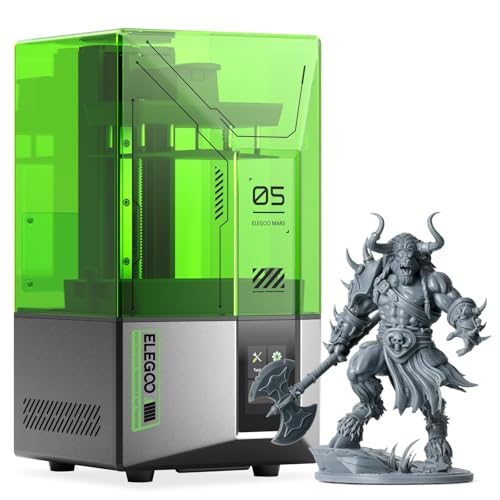
- One-click automatic leveling
- 4K mono LCD with COB light source
- Residue, shortage, and overheat protection
Best For: Students seeking simple setup and dependable everyday printing
Ultra-Detail Materials Pick

- 14K mono LCD for exceptionally fine detail
- Supports resins up to 8,000 cps viscosity
- Auto-leveling and AI print monitoring
Best For: Advanced prototypes and high-viscosity resin experimentation
Best Fast, High-Detail Option

- 10K resolution with 17 × 17 μm pixels
- Up to 120 mm/h maximum print speed
- Five intelligent inspections for easier monitoring
Best For: Detailed prototypes and rapid design iterations
Best Straightforward Student Pick

- 10K detail with 17 × 17 μm XY pixels
- 153.4 × 87 × 165 mm build volume
- Pre-calibrated setup and power-loss resume
Best For: Student-scale parts and approachable coursework projects
Best Complete Resin Printing Setup – Saturn 4 Ultra 16K with Mercury Plus V3.0
ELEGOO Saturn 4 Ultra 16K Resin 3D Printer and ELEGOO Mercury Plus V3.0 Wash and Cure Station
Check Price On AmazonFor engineering students who want resin printers for engineering students with a more complete workflow, this bundle pairs the high-resolution ELEGOO Saturn 4 Ultra 16K with the Mercury Plus V3.0 wash and cure station. Its large build area, heated resin tank, and fast 150mm/h printing support detailed project work, while the included station simplifies post-processing.
Best For: Students who want a high-detail printer and dedicated washing and curing equipment in one setup.
Pros:
- Includes both the Saturn 4 Ultra 16K printer and Mercury Plus V3.0 wash and cure station.
- Large 8.33 x 4.66 x 8.66-inch printing area supports substantial models.
- Smart tank heating maintains resin at 30°C for more consistent printing conditions.
- Advertised print speeds reach up to 150mm/h.
Cons:
- The bundle requires space for both the printer and 7.5-liter wash and cure station.
- Resin printing still requires careful post-processing and handling.
This is a practical choice for students building a dedicated resin-printing workspace. The included wash and cure station adds convenience, while the large format and high speed make it suitable for detailed prototypes and repeated project work.
Best Beginner-Friendly Option – ANYCUBIC Photon Mono 4
The ANYCUBIC Photon Mono 4 is a compact option for engineering students comparing resin printers for engineering students. Its 7-inch 10K monochrome LCD delivers fine detail, while the 4-point leveling system, power-resume function, and moderate footprint make it approachable for everyday coursework and small prototypes.
Best For: Beginners who need detailed prints in a relatively compact, easy-to-use machine.
Pros:
- 10K resolution with 17 x 17µm X/Y pixels supports highly detailed models.
- 6.04 x 3.42 x 6.49-inch build volume handles many student projects.
- Laser-engraved platform improves adhesion while keeping removal manageable.
- Four-point leveling avoids repeated leveling after the initial setup.
Cons:
- Its build volume is smaller than the larger ELEGOO and ANYCUBIC models in this roundup.
- The Anycubic app is not supported for this model.
Choose the Photon Mono 4 when simplicity and detail matter more than maximum capacity. It offers a useful balance for students printing precise components, models, and classroom projects without needing a large-format machine.
Best High-Speed Detail – ELEGOO Saturn 4 Ultra 16K
Engineering students who need resin printers for engineering students with advanced automation should consider the ELEGOO Saturn 4 Ultra 16K. It combines 16K resolution, a large build area, automatic resin heating, AI camera monitoring, and a claimed 150mm/h print speed for detailed, higher-throughput prototyping.
Best For: Students producing intricate, larger models who value monitoring and automated setup features.
Pros:
- 16K LCD provides 14 x 19µm XY resolution for intricate models.
- Large 8.33 x 4.66 x 8.66-inch printing size supports bigger parts.
- Automatic heating activates when the resin temperature drops below 25°C.
- AI camera, automatic leveling, power-on resume, and Wi-Fi transfer improve convenience.
Cons:
- Its 35.4-pound weight and larger dimensions require a sturdy, dedicated workspace.
- Advanced monitoring and automation may be more than casual users need.
The Saturn 4 Ultra 16K is well suited to demanding student labs and project teams. Its combination of fine resolution, large capacity, heating, and automated checks can reduce routine interruptions during extended printing jobs.
Best Large-Format Choice – ANYCUBIC Photon Mono M7 MAX
For engineering students whose projects exceed typical desktop build areas, the ANYCUBIC Photon Mono M7 MAX stands out among resin printers for engineering students. Its 298 x 164 x 300mm build volume supports large or batch-printed models, while temperature control, automatic material management, and self-checks target more efficient operation.
Best For: Students and teams printing large parts or multiple components in batches.
Pros:
- Large 298 x 164 x 300mm build volume reduces the need to split models.
- 13.6-inch 7K LCD provides 46 x 46µm XY pixel size and detailed textures.
- Automatic material management monitors resin and adds it as needed.
- Self-checks cover printer status, residual resin, failed prints, and more.
Cons:
- The 60.9-pound printer has a substantial footprint and needs significant workspace.
- Its 1300ml resin tank and large format may be excessive for small projects.
- The listed print speed is up to 60mm/h, lower than the Saturn 4 Ultra models here.
The M7 MAX is the strongest fit when scale and batch efficiency are the deciding factors. It trades compactness for a very large build volume and management features that can help with demanding engineering prototypes.
High-Precision Speed Pick – Reflex RS Turbo Resin 3D Printer
For engineering students who need fast, repeatable prototypes, the Reflex RS Turbo is a high-end option among resin printers for engineering students. Its high-contrast amber screen, automated preparation tools, and detailed motion controls are designed for accurate parts and efficient iteration.
Best For: Engineering students printing dimension-sensitive prototypes and complex models while prioritizing speed and process monitoring.
Pros:
- High-contrast amber screen supports crisp details, dimensional accuracy, and faster curing.
- One-click slicing can repair common model defects and generate supports automatically.
- Force sensors can detect residue, pause prints, and create a diagnostic report after each job.
- C5 ball-screw Z-axis and calibrated LCD are specified for repeatability and consistent tolerances.
Cons:
- At 50.6 pounds, it is substantially heavier than the other listed options.
- Its advanced feature set may be more than beginners need for simple student projects.
The Reflex RS Turbo stands out when precision, automation, and throughput matter more than portability. Its professional support and real-time monitoring add reassurance for demanding prototype work.
Best for Everyday Use – ELEGOO Mars 5 Resin 3D Printer
The ELEGOO Mars 5 is a practical entry point for students comparing resin printers for engineering students. Automatic leveling, self-checks, residue detection, and a 4K mono LCD reduce setup friction while supporting detailed classroom prototypes and small functional models.
Best For: Students who want straightforward setup, helpful safety checks, and detailed prints without extensive manual calibration.
Pros:
- One-click automatic leveling simplifies initial setup and routine use.
- Smart sensors detect residue, resin shortages, and leveling failures.
- One-click self-check helps verify printer components before a job.
- 4K mono LCD with COB lighting reproduces fine details and textures.
Cons:
- The supplied notes do not identify support for specialized or high-viscosity engineering resins.
- Its 4K display offers less stated resolution than the 14K Anycubic option in this roundup.
Choose the Mars 5 if ease of use is your priority. Its automated checks and overheat protection make it a sensible student-focused printer for learning resin workflows and producing detailed parts.
Ultra-Detail Materials Pick – ANYCUBIC Photon P1 14K
The ANYCUBIC Photon P1 is aimed at students who need exceptionally fine detail and broader resin flexibility. For engineering students evaluating resin printers for engineering students, its 14K mono LCD, stable motion system, automatic leveling, and support for high-viscosity resins make it well suited to advanced prototype work.
Best For: Engineering students producing highly detailed models or experimenting with industrial and ultra-high-viscosity resins.
Pros:
- 14K mono LCD and small stated pixel dimensions support crisp fine features.
- Ball screws and precision guide rails are designed to minimize vibration and wobble.
- Factory-calibrated auto-leveling includes self-checks and four-corner pressure feedback.
- AI monitoring checks build plate installation, layer separation, resin level, and residue.
Cons:
- At 29.7 pounds and over 24 inches long, it requires a substantial workspace.
- The advanced capabilities may be unnecessary for basic models or introductory projects.
The Photon P1 is the strongest fit when detail and resin compatibility are central to the assignment. Its release technology and monitoring features also target more reliable, repeatable printing during extended project work.
Best with Extra Features – ELEGOO Jupiter 2
For engineering students who need to prototype larger assemblies or print several components together, the ELEGOO Jupiter 2 is one of the most capable resin printers for engineering students. Its large build volume, 16K resolution, automated resin monitoring, and smart heating system are geared toward demanding project work.
Best For: Large prototypes, multiple-part batches, and students who value monitoring and automated safety features.
Pros:
- Large 302.4 × 161.98 × 300 mm build volume supports bigger parts or batch printing.
- 16K resolution and 20 × 26 μm XY resolution produce highly detailed models.
- Smart tank heating, auto leveling, resin shortage alerts, and power-loss recovery simplify operation.
- Built-in camera, Wi-Fi, and cluster management support remote monitoring and workflow control.
Cons:
- Its 63.8-pound weight and large footprint require substantial workspace.
- The extensive feature set may be more than needed for small student projects.
The Jupiter 2 is the strongest choice here when project scale matters most. Its size and weight are trade-offs, but the combination of capacity, detail, automation, and monitoring suits serious engineering prototyping.
Best Fast, High-Detail Option – ANYCUBIC Photon Mono 4 Ultra
The ANYCUBIC Photon Mono 4 Ultra is a practical choice for engineering students who want detailed prototypes without giving up print speed. Its 10K screen, 120 mm/h maximum speed, uniform COB lighting, and intelligent inspections support repeatable project work.
Best For: Detailed functional models, quick iterations, and students who want built-in checks for common printing issues.
Pros:
- 10K resolution with 17 × 17 μm XY pixels supports fine model detail.
- Maximum print speed reaches 120 mm/h with the ACF film and Intelligent Release Algorithm.
- COB lighting and Fresnel lenses provide a light angle within 3° and at least 90% uniformity.
- Five intelligent inspections help monitor residue, failed prints, printer status, and component lifespan.
Cons:
- The supplied notes do not specify its build volume, making project-size planning less certain.
- Its advanced inspection and release features may be unnecessary for basic introductory prints.
For students balancing accuracy and iteration speed, the Mono 4 Ultra offers a well-rounded feature set. It is especially appealing when print consistency and diagnostic assistance matter as much as resolution.
Best Straightforward Student Pick – ANYCUBIC Photon Mono 4
The ANYCUBIC Photon Mono 4 is a straightforward option for engineering students who need detailed resin prototypes in a compact format. Its 10K display, 153.4 × 87 × 165 mm build volume, quick 1.5-second exposure times, and prepared setup make it approachable for regular coursework.
Best For: Individual parts, classroom projects, and students seeking a compact printer with simple initial setup.
Pros:
- 10K resolution and 17 × 17 μm XY pixels support fine model details.
- 153.4 × 87 × 165 mm build volume accommodates many student-scale components.
- Exposure times as low as 1.5 seconds can improve printing efficiency.
- Pre-assembled, calibrated, and tested design plus power-loss resume reduce setup and waste.
Cons:
- Its build volume is much smaller than the Jupiter 2, limiting large assemblies.
- The supplied notes do not mention automated resin monitoring or built-in print inspection.
The Photon Mono 4 is a sensible entry point among resin printers for engineering students. It combines detailed output and a useful build area with an uncomplicated setup, making it well suited to routine prototypes and coursework.
How We Picked the Best Resin Printers for Engineering Students
We evaluated these printers against the needs of student engineers: fine detail for small mechanical features, dependable exposure and leveling systems, useful build volume, straightforward software workflows, and reasonable operating costs. We also considered whether a printer is better suited to classroom demonstrations, iterative prototyping, or larger project parts.
Resolution is only one part of the assessment. A high-resolution screen can improve surface detail, but print quality also depends on calibration, resin settings, model orientation, support placement, and post-processing. Wash-and-cure compatibility, replacement film and screens, ventilation requirements, and warranty support should influence the final decision.
Quick Comparison
| Best For | What to Prioritize | Models to Consider |
|---|---|---|
| First resin printer | Simple setup, auto-leveling, manageable size | ELEGOO Mars 5, ANYCUBIC Photon P1 |
| Fine-detail prototypes | High-resolution mono screen and stable exposure | ELEGOO Saturn 4 Ultra, ANYCUBIC Photon Mono 4 Ultra |
| Large parts or assemblies | Expanded build volume and strong Z-axis stability | ELEGOO Jupiter 2, ANYCUBIC Photon Mono M7 MAX |
| Complete workflow | Printer plus washing and curing equipment | Saturn 4 Ultra with Mercury Plus V3.0 |
Key Buying Factors for Resin Printers for Engineering Students
Build Volume and Project Scale
Check the printer’s usable build area against the parts you expect to make. Compact models are easier to place and often waste less resin, while larger machines can print enclosures, aerodynamic forms, and multiple components in one batch.
Detail, Accuracy, and Materials
Choose a high-resolution mono-screen printer when small holes, lettering, threads, or complex contours matter. For functional prototypes, however, resin selection is equally important. Standard resin is useful for visual models, while tough, durable, or high-temperature formulas may be better for testing fit and basic performance.
Setup and Maintenance
Auto-leveling can reduce setup time, especially for students sharing equipment. Look for accessible resin vats, replaceable release films, clear exposure controls, and readily available spare parts. Every resin printer also requires washing, curing, careful handling, and appropriate ventilation.
Total Cost and Workspace
Budget for resin, gloves, filters, cleaning alcohol or an approved alternative, replacement FEP or ACF film, and a wash-and-cure station. Resin fumes and liquid waste require responsible handling, so a dedicated, ventilated workspace is essential.
Who Should Buy Which Resin Printers for Engineering Students?
Buy a compact model such as the Mars 5 or Photon P1 if you are new to resin printing, have limited bench space, or mainly produce small components. Choose a Saturn 4 Ultra or Photon Mono 4 Ultra when detailed prototypes and repeatable results are the priority. If your projects involve larger housings, robotics parts, or multiple pieces per batch, consider the Jupiter 2 or Photon Mono M7 MAX. For students who want a more complete post-processing setup, the Saturn 4 Ultra bundle with the Mercury Plus V3.0 station can simplify the workflow.
Before ordering, confirm current dimensions, included accessories, software compatibility, resin requirements, and local support. The best option is the one that matches your actual part sizes and available workspace—not necessarily the printer with the highest headline resolution.