
Personalizing rings, bracelets, pendants, and other small pieces demands more than a laser with high headline wattage. Accuracy, metal compatibility, work area, safety, and ease of setup all affect whether an engraver produces clean, repeatable results.
This roundup compares 10 machines and compact engraving tools for different budgets and workflows, including fiber, infrared, diode, dual-laser, enclosed, and portable options.
Best 10 Laser Engraver for Jewelry Picks for 2026
Fast Dual-Laser Customization

- Fiber and diode lasers handle jewelry metals and craft materials
- 10,000mm/s speed with 0.0027mm precision
- Portable 6.02kg design with 3D grayscale support
Best For: Mobile sellers and mixed-material creators
Compact Metal Marking

- 1064nm infrared laser targets fine jewelry and metal marking
- 3.5-inch touchscreen enables standalone operation
- Compact 7.24-pound desktop design
Best For: Small studios and personalized metal gifts
Handheld Detail Work

- Cordless rotary tool for hands-on jewelry etching
- Three speeds from 5,000 to 18,000 rpm
- Includes 42 bits, accessories, and stencils
Best For: Beginners and hobbyist jewelry makers
Production-Ready Dual Laser

- 20W fiber laser marks gold, silver, copper, and other metals
- 20W diode laser expands work to wood, acrylic, leather, and more
- 10,000mm/s speed, 16MP camera, and 3D embossing support
Best For: Jewelry businesses and high-volume customization
Best for Countertop Metal Personalization

- 1064nm infrared laser for suitable metal
- On-device touchscreen design tools
- Compact format for counters and markets
Best For: Gift shops and makers personalizing small metal keepsakes
Best for Fast, Camera-Assisted Metal Marking

- 5W IR and 15W diode laser combination
- 50MP camera for precise alignment
- Enclosed design with up to 6000 mm/s speed
Best For: Shops and mobile sellers handling varied materials and small batches
Best Foldable Pick
Ortur R1 Infrared Jewelry Engraver
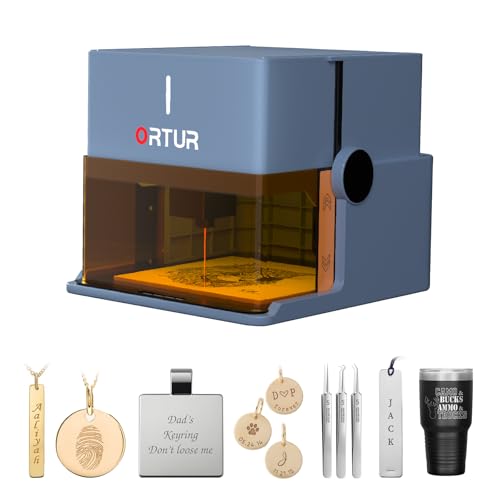
- 1064nm infrared module for gold, silver, platinum, and copper
- Foldable no-installation design with app control
- Class 1 safety system for home and classroom use
Best For: Personalized metal jewelry and gift projects
Best Touchscreen Option

- 3.5-inch offline touchscreen with built-in templates
- Adjustable power and speed for detailed engraving
- Enclosed Class 1 design with smart safety protections
Best For: Beginners and small workshops needing simple mixed-material engraving
Best Portable Roller Kit
LaserPecker LP2 Portable Engraver

- Fine 0.05mm spot with up to 2K resolution
- Electric roller supports cylindrical and extended projects
- Not compatible with pure or shiny metal
Best For: Portable engraving on coated metal, leather, wood, and cylinders
Fast Dual-Laser Customization – LaserPecker LP5
If you need a laser engraver for jewelry that can also handle wood, leather, acrylic, and other craft materials, the LaserPecker LP5 offers a flexible dual-laser setup. Its fiber laser is designed for metals, while the 20W diode laser expands its usefulness for thicker non-metal projects and portable customization work.
Best For: Mobile sellers, craft-fair vendors, and creators engraving jewelry and mixed-material products.
Pros:
- Fiber and diode lasers cover jewelry metals plus wood, leather, acrylic, and other materials.
- Advertised speeds reach 10,000mm/s, with 0.0027mm precision for detailed work.
- Portable 6.02kg design suits workshops, craft fairs, and in-store customization.
- Supports 3D grayscale engraving for coins, relief art, and other dimensional designs.
Cons:
- The listed 0.5mm metal-cutting capability is limited to thin materials.
- Its extensive capabilities may be more than needed for simple surface marking.
- Specific jewelry fixture or enclosure accessories are not detailed in the supplied notes.
The LP5 is a strong choice when jewelry engraving is only part of your business. Choose it over a dedicated marker if you also want cutting, mixed-material versatility, and a portable setup.
Compact Metal Marking – AlgoLaser Pixi 1064nm
For a laser engraver for jewelry focused on clean surface personalization, the AlgoLaser Pixi uses a 1064nm infrared laser to mark stainless steel, aluminum, coated metals, jewelry, and selected dark plastics. Its compact desktop format and touchscreen workflow are suited to small studios and personalization businesses.
Best For: Beginners and small businesses making names, logos, patterns, and gift markings on metal jewelry and tags.
Pros:
- 1064nm infrared laser is designed for fine marking on jewelry and metal surfaces.
- 3.5-inch touchscreen and AlgoOS support standalone operation without constant PC use.
- Compact 7.24-pound desktop design fits home studios and small workspaces.
- Includes a 1-year warranty and customer support.
Cons:
- It is intended for surface marking rather than deep engraving or cutting.
- Reflective metals may require slower speeds or marking spray for darker, more consistent results.
- Proper goggles, ventilation, focusing, and secure positioning are required for safer operation.
The Pixi is a focused option for jewelry personalization rather than a general-purpose laser cutter. Its compact controls make it appealing when clean metal marking matters more than cutting or large work areas.
Handheld Detail Work – Uolor USB Engraving Pen
The Uolor engraving pen is a low-cost, hands-on alternative to a full laser engraver for jewelry. Its cordless rotary design supports engraving, etching, polishing, and light craft work across jewelry, metal, glass, wood, plastic, stone, and other surfaces.
Best For: Beginners and hobbyists who want manual jewelry detailing, lettering, etching, and small DIY projects.
Pros:
- Cordless, USB-rechargeable design is easy to carry and use away from a workbench.
- Three speed levels range from 5,000 to 18,000 rpm for different materials and tasks.
- Includes diamond burrs, drill bits, cutting accessories, mandrels, and stencils.
- Overload protection can automatically shut the tool off when resistance is too high.
Cons:
- Its approximately 30-minute battery life limits extended projects.
- Manual rotary engraving will not provide the automated precision or repeatability of a laser.
- The 3-month manufacturer warranty is relatively limited.
This pen makes sense if you want an accessible tool for learning jewelry work or adding hand-finished details. It is not a substitute for a production laser, but its included accessories and small size make it practical for casual projects.
Production-Ready Dual Laser – xTool F1 Ultra
The xTool F1 Ultra is a high-capability laser engraver for jewelry built around 20W fiber and diode lasers. It can mark metals including gold, silver, copper, stainless steel, brass, and titanium, while the diode laser handles materials such as wood, acrylic, leather, glass, and fabric.
Best For: Businesses needing detailed jewelry marking, 3D embossing, batch workflows, and broader material capability.
Pros:
- 20W fiber laser supports marking across a wide range of jewelry metals.
- 20W diode laser adds cutting and engraving capability for wood, acrylic, leather, and more.
- Up to 10,000mm/s speed, 16MP camera, and a 220mm x 220mm working area support detailed production.
- Enclosed design includes smoke extraction, a fire alarm, and an emergency stop button.
Cons:
- At 43.8 pounds, it is substantially less portable than compact desktop markers.
- The Auto Conveyor for expanded batch production is sold separately.
- It is identified as a Class 4 laser, so appropriate safety practices are essential.
The F1 Ultra is aimed at serious personalization and production rather than occasional hobby use. Its dual lasers, camera system, and 3D capabilities are compelling for businesses, provided the larger footprint, safety requirements, and accessory costs fit the workspace.
Best for Countertop Metal Personalization – AlgoLaser Pixi 1064nm
If your search for a laser engraver for jewelry starts with metal tags, nameplates, or small keepsakes, the AlgoLaser Pixi 1064nm is a compact option built around metal personalization. Its infrared laser has a 0.04 x 0.05 mm spot for detailed lettering and artwork, while the touchscreen lets you prepare simple designs without a computer.
Best For: Gift shops, makers, and sellers who want an easy-to-move desktop engraver for personalized metal keepsakes.
Pros:
- 1064nm infrared laser is designed for suitable metal pieces.
- 3.5-inch touchscreen supports on-device text, drawing, previews, and 300+ built-in designs.
- Compact approximately 3 kg design fits counters and market tables.
- Compatible with LightBurn and LaserGRBL for computer-created artwork.
Cons:
- Its listed focus is metal personalization rather than broad material versatility.
- The compact format is better suited to small tags, nameplates, and keepsakes than larger workpieces.
The Pixi makes the most sense when convenient, customer-facing metal customization matters more than a large work area. Its on-device controls can streamline simple names, dates, and motifs at a retail counter.
Best for Small, Enclosed Craft Projects – Twotrees TS1 Mini
The Twotrees TS1 Mini is a small laser engraver for jewelry-related tags, charms, and other compact craft projects when portability and an enclosed design are priorities. Its 3W adjustable laser provides a stated 0.1 mm engraving precision, and Bluetooth control allows jobs to be sent from an iOS or Android device.
Best For: Beginners, classrooms, and hobbyists working on small projects with materials such as painted metal, leather, wood, paper, and bamboo.
Pros:
- Fully enclosed acrylic cover helps contain light and debris.
- Bluetooth smartphone control reduces reliance on a laptop.
- Compact 80 x 80 mm work area and approximately 1 kg weight suit small workspaces.
- Supports painted metal and other common craft materials.
Cons:
- The 80 x 80 mm work area limits project size.
- Its 3W laser is intended for detailed small projects rather than demanding production work.
- Adult supervision is specified for family workshops and classrooms.
Choose the TS1 Mini if you need a portable, plug-and-play machine for small engraved pieces and value smartphone operation. It is a practical entry point, but its small workspace favors jewelry-scale items over larger batches.
Best for Fast, Camera-Assisted Metal Marking – xTool F2 Dual Laser
For a laser engraver for jewelry that also needs to handle varied materials and repeatable small-batch work, the xTool F2 combines a 5W infrared laser with a 15W diode laser. Its built-in 50MP camera supports up to 0.1 mm alignment accuracy on small pieces, while speeds up to 6000 mm/s are aimed at efficient production.
Best For: Shops, workshops, and mobile personalization services that need camera-assisted alignment, metal marking, and broader material capability.
Pros:
- Dual lasers support metal color marking, 3D embossing, and cutting tasks.
- 50MP camera helps position designs on small pieces with up to 0.1 mm alignment accuracy.
- Fully enclosed design, built-in fan, and optional purifier support indoor use.
- Fully assembled and compatible with accessories for on-site and batch workflows.
Cons:
- Additional accessories such as the RA3 and Slide Extension expand capability but are not included in the listed base package.
- The dual-laser feature set may be more than needed for occasional single-piece engraving.
The xTool F2 is the strongest fit here for sellers who need versatility and repeatability rather than a basic hobby machine. Its camera alignment and high stated speed can help reduce setup time when personalizing jewelry-scale pieces or running small batches.
Best Foldable Pick – Ortur R1 Infrared Jewelry Engraver
The Ortur R1 is a practical laser engraver for jewelry when you want direct metal engraving in a compact, beginner-friendly design. Its 1064nm infrared module is intended for materials including gold, silver, platinum, and copper, while the foldable body requires no installation.
Best For: Jewelry makers who want to personalize rings, bracelets, necklaces, and other metal gifts with a portable machine.
Pros:
- 1064nm infrared laser is designed for engraving several jewelry metals.
- Foldable, ready-to-use design with an aluminum alloy base plate.
- Class 1 safety features include tilt detection, auto shutdown, and lid-stop protection.
- App supports text, photos, hand-drawn designs, and QR-code projects.
Cons:
- The supplied specifications do not state the maximum engraving area.
- App-based operation may be less suitable for users who prefer a fully computer-driven workflow.
The R1 stands out for combining jewelry-focused infrared engraving with easy setup and extensive safety protections. Its 365-day warranty and lifetime technical support add reassurance for first-time users.
Best Touchscreen Option – AlgoLaser Pixi 10W Engraver
The AlgoLaser Pixi 10W is a convenient laser engraver for jewelry if you value standalone operation and simple controls. Its 3.5-inch touchscreen lets you draw, type, or upload designs without a computer, and adjustable power and speed settings help with detailed text and logos on metal.
Best For: Beginners, educators, and small workshops that want touchscreen control for jewelry, gifts, and mixed-material projects.
Pros:
- Offline touchscreen operation requires no computer for basic engraving.
- Adjustable power and speed support detail-focused work and multiple light passes.
- Supports more than 300 listed materials, including metal, glass, acrylic, leather, and wood.
- Enclosed Class 1 design includes an auto-pause lid, password lock, and alerts.
Cons:
- External ventilation is recommended for wood, leather, and coated materials.
- The supplied notes do not identify the specific jewelry metals it can engrave.
Pixi’s touchscreen workflow makes it especially approachable for users who do not want to begin with design software. It is a versatile choice for jewelry and gift work, though buyers should verify compatibility with their preferred metal before purchasing.
Best Portable Roller Kit – LaserPecker LP2 Portable Engraver
The LaserPecker LP2 is a portable laser engraver for jewelry and accessories when your projects include coated or brushed metal rather than bare, shiny surfaces. Its compact galvo design offers fine detail, while the included electric roller supports cylindrical items and longer mobile engraving projects.
Best For: Makers engraving coated metal jewelry, leather goods, wooden gifts, and cylindrical accessories with a smartphone or computer.
Pros:
- 0.05mm compressed spot and up to 2K resolution support detailed designs.
- Included roller enables cylinder, slab, and trolley engraving modes.
- Portable plug-and-play design connects with smartphones or PCs.
- Fast engraving and preview speeds suit repeat personalization work.
Cons:
- It cannot engrave pure or shiny metal, limiting its use for some jewelry.
- Light-colored or transparent materials need black paint or spray preparation.
- Engraving width remains 4 inches in extended trolley and slab modes.
The LP2 is a flexible travel-friendly kit with useful rotary capability, but its metal limitations are important for jewelry buyers. Choose it for coated metal and mixed-material personalization; users focused mainly on bare metal should consider a different LaserPecker model.
How We Picked the Best Laser Engraver for Jewelry
We evaluated these models by focusing on the factors that matter most for jewelry work: compatibility with precious and coated metals, marking precision, laser type, speed, workspace, software or app controls, safety features, portability, and expandability. We also considered whether each machine suits occasional personalization, craft production, retail work, or a growing engraving business.
Fiber and 1064nm infrared systems generally deserve priority for bare metals because they are designed to mark materials such as stainless steel, aluminum, brass, and some precious-metal surfaces. Diode lasers can be useful for wood, leather, acrylic, coated items, and selected marking applications, but buyers should confirm material compatibility before purchasing.
Quick Comparison
| Best For | Recommended Type | What to Look For |
|---|---|---|
| Detailed metal jewelry | Fiber or infrared | Fine spot size, adjustable power, reliable focus |
| Mixed materials | Dual laser | Fiber or IR for metal plus diode capability |
| Small businesses | Fast enclosed or dual-laser system | Repeatability, camera alignment, ventilation, accessories |
| Beginners and gifts | Compact enclosed or portable unit | Simple controls, presets, safety features |
| Manual touch-ups | Engraving pen | Low cost, cordless handling, interchangeable bits |
Key Buying Factors for a Laser Engraver for Jewelry
Laser Wavelength and Material Support
Choose a fiber or 1064nm infrared model when metal marking is the primary job. A diode laser may be more versatile for nonmetal projects, while a dual-laser machine can reduce the need to own separate equipment. Always check the manufacturer’s material list for sterling silver, gold, stainless steel, plated jewelry, and anodized finishes.
Precision, Focus, and Work Area
Small jewelry surfaces leave little room for alignment errors. Look for fine positioning, dependable autofocus or height adjustment, and a work area that fits your largest expected pieces. A rotary attachment can be especially valuable for rings, tumblers, and curved items.
Safety and Workflow
Fully enclosed or Class 1 designs simplify home and studio use by limiting exposure to the beam, though ventilation and safe-material practices still matter. Camera alignment, touchscreen controls, preview functions, and fast software can significantly improve production efficiency.
Portability and Running Costs
Portable machines suit markets, workshops, and occasional personalization, but compact formats may limit speed or workspace. Include rotary accessories, protective equipment, ventilation, replacement parts, and software requirements in the total budget.
Who Should Buy Which Laser Engraver for Jewelry?
Choose a fiber or infrared-focused model if you mainly engrave names, dates, logos, or fine artwork on metal jewelry. Choose a dual-laser system if you need one machine for both metal and materials such as wood, leather, or acrylic. An enclosed mini engraver is a sensible starting point for beginners who prioritize a cleaner, simpler setup. Portable models work well for sellers who personalize items on-site, while an engraving pen is best for inexpensive manual touch-ups and basic DIY work rather than automated production.