
If you debug microcontrollers, buses, or digital timing issues, the right logic analyzer can save hours of guesswork. This roundup covers 10 practical picks for different budgets, channel counts, and workflow needs.
Whether you want a simple USB model or a deeper-capture analyzer for more demanding electronics work, use this guide to narrow down the best fit before you buy.
Best 10 Logic Analyzers for Electronics Debugging Picks for 2026
Portable 16-Channel Pick
LA1010 100MHz USB Logic Analyzer

- 16 channels at 100MHz per channel
- Decodes 30+ protocols like I2C, SPI, UART, CAN
- Windows, macOS, and Linux support
Best For: Embedded debugging and digital bus analysis
Budget 8-Channel Starter
HiLetgo 24MHz USB Logic Analyzer

- 8 channels with up to 24MHz sampling
- Covers UART, IIC, and SPI debugging
- Includes EMI ferrite ring USB cable
Best For: Basic embedded and serial bus troubleshooting
High-Speed Capture Choice
DSLogic Plus 400MHz USB Logic Analyzer

- 16 channels with up to 400MHz sampling
- 256Mbits SDRAM and dual-mode capture
- DSView supports many decoders on major OSes
Best For: Advanced timing and protocol analysis
Clip-In Debug Kit
USB 8CH Logic Analyzer with Test Hooks

- Includes 12 test hook clips
- 8 channels at 24MHz sampling
- Works with sigrok and open-source tools
Best For: DIY microcontroller debugging with easy probing
Portable High-Speed Capture
DSLogic 100MHz 16-Channel Analyzer
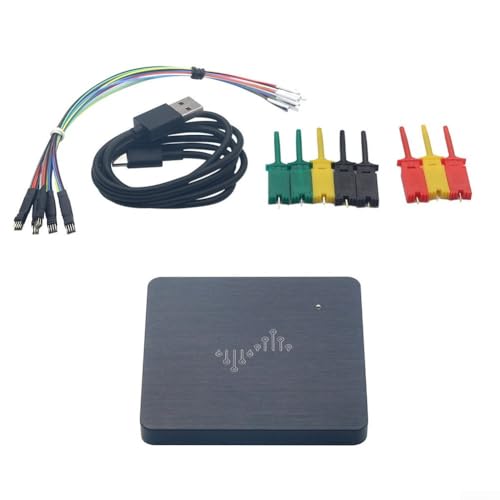
- 100MHz sampling for detailed digital capture
- 16 channels with 16GB depth
- Supports 64 protocols and multiple voltage thresholds
Best For: Multi-signal digital debugging with long capture depth
Open Hardware Debug Kit

- Open hardware platform for custom debugging
- Easy to program with Python libraries
- Includes GreatFET One, Wiggler, cable, and wires
Best For: Hackable debugging and development workflows
Compact Screened Analyzer
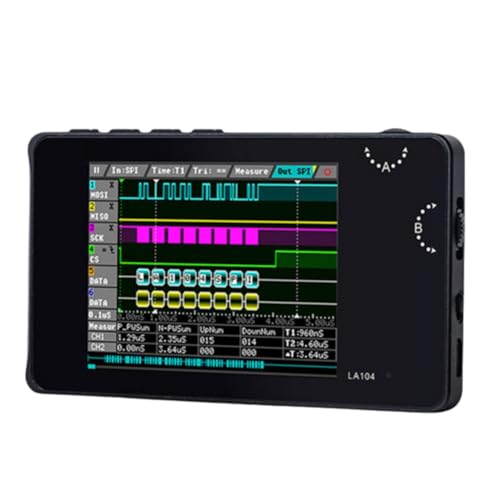
- 2.8-inch screen for on-device viewing
- Supports SPI, IIC, and UART
- 100M Sa/s max sampling in a compact body
Best For: Portable, screen-based debugging of smaller circuits
High-Speed Multi-Channel Pick
LA5016 16-Channel USB Logic Analyzer

- 16 channels with 500MS/s sampling
- Deep memory plus PWM generation
- Decodes UART, I2C, SPI, CAN and more
Best For: Advanced MCU, ARM, and FPGA debugging
Accessory-Rich Starter Kit
LONELY BINARY 8-Channel Logic Analyzer Kit

- 8 channels up to 24MHz
- Breadboard adapters and breakout boards included
- USB-A and USB-C cables plus clips
Best For: Students and hobbyists who want an all-in-one kit
Balanced Budget Debugger
24MHz 8-Channel USB Protocol Analyzer

- 8 channels up to 24MHz
- Works with Sigrok PulseView
- Supports 5V, 3.3V, 2.5V, and 2.0V logic
Best For: General-purpose microcontroller and digital protocol debugging
Portable 16-Channel Pick – LA1010 100MHz USB Logic Analyzer
If you need logic analyzers for electronics debugging with plenty of channel count and broad protocol support, the LA1010 is built for practical day-to-day work. It captures up to 16 digital signals at 100MHz per channel, shows waveforms on your PC in real time, and supports decoding for 30+ protocols, making it a strong fit for embedded troubleshooting.
Best For: Developers and hobbyists debugging MCU, ARM, FPGA, and digital communication buses.
Pros:
- 16 input channels with 100MHz sampling rate per channel
- Decodes 30+ standard protocols including I2C, SPI, UART, and CAN
- Works with Windows, macOS, and Linux with included KingstVIS software
- Portable, low-power design for bench or field use
Cons:
- USB 2.0 hardware interface may not suit users wanting newer connectivity
- Included software focus is PC-based rather than standalone operation
Overall, this is a flexible all-around analyzer if you want a higher channel count and broad protocol decoding without moving into a more specialized, higher-end platform.
Budget 8-Channel Starter – HiLetgo 24MHz USB Logic Analyzer
For buyers comparing logic analyzers for electronics debugging on a tighter budget, this HiLetgo unit covers the basics well. It offers 8 channels at up to 24MHz and supports common protocols such as UART, IIC, and SPI, which makes it useful for simple embedded troubleshooting and learning projects.
Best For: Beginners and budget-minded users working on common serial buses.
Pros:
- 8-channel design with up to 24MHz sampling
- Supports UART, IIC, SPI, and related digital debugging tasks
- Includes EMI ferrite ring USB cable
- Lightweight and compact for basic bench use
Cons:
- Lower channel count than 16-channel options
- Best suited to moderate-speed signals rather than advanced capture needs
This is a straightforward entry-level choice when you mainly need protocol visibility on common interfaces and do not require the deeper capture headroom of more advanced analyzers.
High-Speed Capture Choice – DSLogic Plus 400MHz USB Logic Analyzer
If your logic analyzers for electronics debugging need serious capture speed and deeper memory options, the DSLogic Plus stands out. It combines 16 channels with dual-mode operation: stream mode for long captures and buffer mode for high-speed work, plus adjustable thresholds and support for nearly a hundred protocol decoders in DSView software.
Best For: Advanced users who need high-speed capture, deeper memory, and flexible analysis modes.
Pros:
- Up to 400MHz sampling in buffer mode with 16 channels
- 256Mbits on-board SDRAM and up to 16G sample depth in stream mode
- Dual-mode design for both long captures and high-speed captures
- DSView software supports Windows, macOS, Linux, and many protocol decoders
Cons:
- More advanced than needed for simple one-off protocol checks
- Premium feature set is likely overkill for casual users
For teams or hobbyists who regularly chase timing issues and need more capture flexibility, this model offers a much stronger analysis platform than basic USB logic analyzers.
Clip-In Debug Kit – USB 8CH Logic Analyzer with Test Hooks
This kit is aimed at practical logic analyzers for electronics debugging when you want both the analyzer and the hookup accessories. It includes 12 test hook clips and a 24MHz, 8-channel analyzer, making it easier to connect to MCU, ARM, FPGA, UART, SPI, and IIC projects without having to source probes separately.
Best For: DIY developers who want a starter analyzer plus convenient clip probes.
Pros:
- Includes 12 SMD IC test hook clips for easier probing
- 8-channel analyzer with 24MHz sampling
- Supports common debugging tasks for UART, SPI, and IIC
- Compatible with sigrok and other open-source analysis tools
Cons:
- Lower channel count than 16-channel analyzers
- Focused on basic digital protocol work rather than advanced capture needs
It is a sensible bundle for users who value convenience and want a ready-to-use setup for common microcontroller debugging tasks.
Portable High-Speed Capture – DSLogic 100MHz 16-Channel Analyzer
For logic analyzers for electronics debugging, this DSLogic model focuses on fast capture, wide voltage compatibility, and deep memory so you can inspect digital faults with more context. Its 100MHz sampling rate and 16-channel design make it a practical fit for tracking complex signals across mixed digital projects.
Best For: Debugging multi-signal digital circuits that need high-speed capture, flexible threshold levels, and long recording depth.
Pros:
- 100MHz sampling helps reveal detailed digital waveforms for fault tracking.
- 16 channels and 16GB depth support longer, broader capture sessions.
- Adjustable thresholds cover 1.2V, 1.8V, 2.5V, 3.3V, and 5.0V devices.
- Supports 64 open-source protocols, including I2C, UART, SPI, CAN, PWM, JTAG, and USB packet analysis.
Cons:
- Compatible with Windows, so it may not suit users needing other operating systems.
- The feature set is geared toward more involved debugging rather than casual use.
Overall, this is the strongest pick here if you want a feature-rich logic analyzer with deep capture options and broad protocol support for serious debugging work.
Open Hardware Debug Kit – GreatFET One Bundle
If you want logic analyzers for electronics debugging with a flexible, hackable workflow, this GreatFET One bundle leans into open hardware and Python programmability. It is designed as a high-speed USB peripheral and can expand through add-on “neighbors,” making it a versatile development and debugging platform.
Best For: Developers who want an open hardware debugging board they can script and expand for custom projects.
Pros:
- Open hardware design supports custom development and experimentation.
- Python libraries make it easy to program at both high and low levels.
- Can be used for logic analyzing, debugging, and electronic development.
- Bundle includes GreatFET One, Wiggler, USB cable, and 120 prototyping wires.
Cons:
- More of a development-focused tool than a dedicated standalone logic analyzer.
- Its modular approach may be unnecessary for users who only need basic capture.
This is a strong choice if you value flexibility, scripting, and expandability over a simple plug-and-play analyzer.
Compact Screened Analyzer – LA104 4-Channel Logic Scope
For logic analyzers for electronics debugging, this LA104 aims to be a compact, bench-friendly option with a built-in 2.8-inch screen and support for common serial buses. Its 4-channel layout and 100M Sa/s max sampling rate make it better suited to focused troubleshooting than heavy multi-bus capture.
Best For: Quick bench debugging of smaller digital circuits and common bus protocols on a portable screen-based tool.
Pros:
- Built-in 2.8-inch screen allows on-device viewing.
- Supports SPI, IIC, and UART for common embedded debugging tasks.
- Up to 100M Sa/s max sampling rate for fast capture.
- Compact aluminum-alloy build keeps it portable.
Cons:
- 4 channels are less suited to larger, more complex debugging jobs.
- Product appearance and printed text may vary by batch.
This model makes sense if you want a small, self-contained analyzer for quick checks on common protocols without needing a larger channel count.
High-Speed Multi-Channel Pick – LA5016 16-Channel USB Logic Analyzer
If you need logic analyzers for electronics debugging that can handle more demanding captures, the LA5016 stands out with 16 channels, 500MS/s sampling, and deep memory for detailed work on MCU, ARM, and FPGA projects. It also adds PWM generation and broad protocol decoding, making it a strong fit for users who want analysis and signal generation in one USB tool.
Best For: Developers and advanced hobbyists debugging complex digital systems, especially MCU, ARM, and FPGA designs.
Pros:
- 16-channel capture with 500MS/s sampling and 10GB deep memory
- Supports protocol decoding for UART, RS-232/485, I2C, SPI, CAN, USB1.1, and HDMI CEC
- Includes PWM generation for added test flexibility
- Works with Windows, macOS, and Linux
Cons:
- More capability than many casual users need for simple projects
- Requires PC-based software workflow
For deeper electronics troubleshooting, this model offers the broadest channel count and the most headroom in the group. It is the best fit when you want one analyzer for higher-speed, multi-signal debugging across several platforms.
Accessory-Rich Starter Kit – LONELY BINARY 8-Channel Logic Analyzer Kit
For logic analyzers for electronics debugging where setup convenience matters, this 8-channel kit is built to get you connected quickly. It captures up to 24MHz and comes with breakout boards, breadboard adapters, clips, and both USB-A and USB-C cables, so it is especially practical for breadboard-based prototyping and mixed-device labs.
Best For: Students, hobbyists, and embedded tinkerers who want a complete, ready-to-use kit.
Pros:
- 8 channels with up to 24MHz capture speed
- Includes breakout boards and a breadboard adapter for easy connections
- Comes with USB-A and USB-C cables plus test clips and alligator clips
- Works across Windows, Mac, Linux, and Ubuntu
Cons:
- Lower channel count than 16-channel alternatives
- Best suited to general embedded debugging rather than very advanced captures
This is the most complete kit in the lineup if you value accessories and flexibility over raw analyzer depth. It is a smart choice for hands-on debugging of I2C, SPI, UART, and similar signals on breadboards and microcontroller setups.
Balanced Budget Debugger – 24MHz 8-Channel USB Protocol Analyzer
This option keeps things straightforward for logic analyzers for electronics debugging, with 8 channels, 24MHz sampling, and support for open-source software like Sigrok PulseView. It is aimed at common digital troubleshooting jobs, especially when you need reliable decoding for UART, I2C, and SPI across a wide range of logic levels.
Best For: General-purpose microcontroller, FPGA, and digital electronics debugging.
Pros:
- 8-channel capture at up to 24MHz with multiple lower rate options
- Compatible with Sigrok PulseView and common protocol decoding tools
- Supports 5V, 3.3V, 2.5V, and 2.0V logic levels
- Includes timing-focused features like a stable 24MHz crystal and EMI ferrite ring cable
Cons:
- Not recommended for 1.8V systems
- Fewer channels than higher-end multi-channel models
If you want a practical, protocol-focused analyzer without extra complexity, this model covers the essentials well. Its broad logic-level support and open-source software compatibility make it a solid fit for everyday troubleshooting.
How We Picked These Logic Analyzers for Electronics Debugging
We focused on the features that matter most in real-world troubleshooting: channel count, sample rate, memory depth, supported protocols, software compatibility, and connection reliability. We also looked for models that fit common use cases such as Arduino, FPGA, MCU bring-up, and bench debugging.
Quick Comparison: What Matters Most
In simple terms, faster sample rates help capture short events, more channels help when you need to observe multiple signals at once, and deeper memory helps you record longer bursts without missing context. If you mainly inspect UART, I2C, or SPI, an entry-level 8-channel unit may be enough. For denser digital systems, a 16-channel analyzer is usually the smarter choice.
Key Buying Factors for Logic Analyzers for Electronics Debugging
Channel Count
Choose 8 channels for basic serial bus work and simple embedded projects. Move to 16 channels if you need to track parallel signals, address lines, or several control signals at once.
Sample Rate and Bandwidth
A higher sample rate improves your chances of catching narrow pulses and timing glitches. For fast digital systems, look for stronger capture performance rather than the lowest-cost option.
Memory Depth
Memory depth determines how long the analyzer can store captured data before it runs out of room. Deeper memory is especially useful when a bug appears only after a long sequence of events.
Protocol Support and Software
Make sure the analyzer supports the protocols you actually use, such as UART, I2C, SPI, and PWM. Software quality matters too; stable decoding and clear waveform viewing can be just as important as hardware specs.
Portability and Workflow
Some buyers want a compact USB tool for a laptop-based bench, while others prefer a standalone unit with a screen for field use. If you work between benches, portability may matter more than raw specs.
Who Should Buy Which Logic Analyzers for Electronics Debugging?
Beginners and students should usually start with an affordable 8-channel USB model for common serial protocols. Makers and hobbyists who work across several projects may prefer a stronger 16-channel option for more flexibility.
If you are doing more advanced Logic Analyzers for Electronics Debugging on dense boards, FPGA interfaces, or longer captures, prioritize higher sample rates and deeper memory. For portable troubleshooting, a standalone analyzer with an onboard display can be the most convenient choice.
In short, match the analyzer to your signals, not just your budget. The best pick is the one that gives you enough channels, enough capture depth, and software you will actually use.