
If you debug Arduino, FPGA, or serial-bus projects, the right logic analyzer can save hours of guesswork. The best models make it easy to capture SPI, I2C, UART, and other digital signals without slowing down your workflow.
Below, we’ve rounded up 10 options for different budgets and use cases, from compact handheld tools to desktop-friendly analyzers with deeper capture and stronger software support.
Best 10 Logic Analyzers for Makers Picks for 2026
Portable 16-Channel Pick
LA1010 100MHz 16-Channel USB Logic Analyzer

- 16 channels with 100MHz sampling
- Decodes 30+ protocols for debugging
- Works with Windows, macOS, and Linux
Best For: Embedded makers who want affordable wide-channel protocol analysis
Ultra-Portable Analog/Digital Option
Saleae Logic 8 8-Channel Analyzer

- 8 digital/analog inputs in a compact body
- Up to 100 MS/s digital and 10 MS/s analog sampling
- Cross-platform support for Mac, Windows, and Linux
Best For: Makers who want a compact mixed-signal analyzer for routine debugging
High-Speed Deep-Memory Choice
DSLogic Plus 16-Channel 400MHz Analyzer
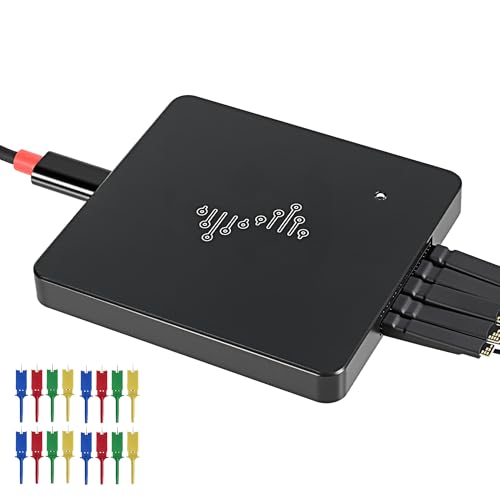
- 16 channels with 400MHz sampling
- Stream and buffer modes with deep capture options
- Nearly 100 protocol decoders and open-source support
Best For: Advanced makers needing high-speed captures and deep memory
Logic Probe Accessory Pack
10-Pin Hook Lead Clips for Testing
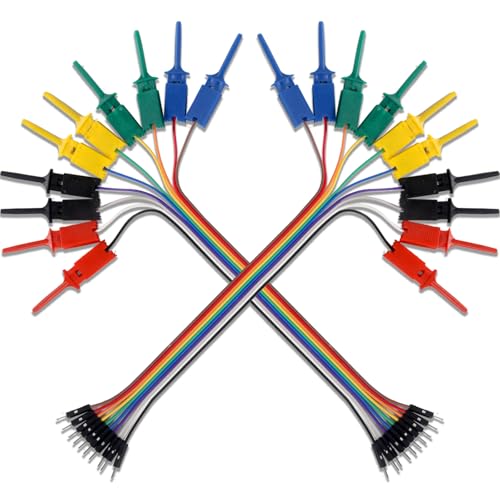
- Two sets of 10-pin hook clip leads
- Clips small points like SOIC legs
- Works with analyzers, multimeters, and oscilloscopes
Best For: Makers who need better probe access for circuit testing
Premium Cross-Platform Pick
Logic Pro 8 (Black) Saleae 8-Channel
- 8 multi-use digital/analog inputs
- Up to 500 MS/s digital capture
- Mac, Windows, and Linux support
Best For: Makers needing a high-performance, cross-platform analyzer
Budget USB Debugger
HiLetgo 24MHz 8CH Logic Analyzer

- 8-channel USB analyzer up to 24 MHz
- Debugs UART, IIC, and SPI
- Low-cost choice for general use
Best For: Hobbyists wanting an affordable everyday debugging tool
Midrange Portable Choice
Logic 8 (Red) Saleae 8-Channel

- 8 multi-use digital/analog inputs
- Up to 100 MS/s digital capture
- Next Gen Logic 2 software support
Best For: Makers wanting a balanced mixed-signal analyzer
Starter 8-Channel Kit
USB Logic Analyzer with Test Hooks

- 24MHz, 8-channel USB capture
- Includes 12 colored test hook clips
- Supports UART, SPI, IIC, sigrok
Best For: Makers needing a budget USB analyzer bundle for MCU and protocol debugging
Handheld Portable Pick
MINIWARE LA104 Pocket Logic Analyzer

- Handheld unit with 2.8-inch color screen
- Rechargeable battery for portable use
- 4 channels, 100Msa/s max sampling
Best For: Beginners who want a pocket-sized analyzer with standalone display and battery
High-Speed Debug Choice
24MHz 8-Channel USB Protocol Analyzer

- 8 channels with up to 24MHz sampling
- Works with Sigrok PulseView and open-source tools
- Supports 5V, 3.3V, 2.5V, and 2.0V logic
Best For: Makers needing a versatile USB analyzer for common digital buses and mixed-voltage projects
Portable 16-Channel Pick – LA1010 100MHz 16-Channel USB Logic Analyzer
If you want a practical logic analyzer for makers, the LA1010 is built around wide digital coverage and straightforward PC-based analysis. With 16 input channels, 100MHz sampling, and support for more than 30 common protocols, it suits embedded debugging, digital circuit testing, and long signal monitoring without adding much power draw.
Best For: Makers and embedded developers who need a low-cost 16-channel analyzer for protocol debugging and general digital signal work.
Pros:
- 16 input channels with 100MHz sampling per channel
- Decodes 30+ protocols including I2C, SPI, UART, and CAN
- Cross-platform support for Windows, macOS, and Linux
- Portable design with low 0.5W power consumption
Cons:
- USB 2.0 connectivity may not suit users wanting the fastest transfer path
- Software-based workflow depends on a PC for viewing and decoding
This is a strong all-around pick if you need channel count and broad protocol support more than fancy hardware extras. For makers working on MCUs, ARM boards, or FPGA projects, it covers the core debugging tasks well.
Ultra-Portable Analog/Digital Option – Saleae Logic 8 8-Channel Analyzer
The Saleae Logic 8 is a compact USB logic analyzer for makers who value portability and flexible capture options. It offers 8 digital/analog inputs, up to 100 MS/s digital sampling, and support for SPI, I2C, and 23+ analyzers, making it a versatile bench tool for everyday embedded work.
Best For: Makers who want a highly portable logic analyzer with analog and digital inputs for general-purpose debugging.
Pros:
- 8 digital/analog inputs for flexible use
- Up to 100 MS/s digital sampling and 10 MS/s analog sampling
- Supports SPI, I2C, and 23+ analyzers
- Cross-platform support for Mac, Windows, and Linux
Cons:
- 8 channels may feel limiting for larger digital buses
- Uses PC memory for very large captures, so performance depends on your computer
If you prefer a small, proven analyzer for quick bench sessions, this model stays focused on the essentials. It is especially appealing when portability matters more than maximum channel count.
High-Speed Deep-Memory Choice – DSLogic Plus 16-Channel 400MHz Analyzer
For makers who want more headroom than a basic USB logic analyzer, the DSLogic Plus brings 16 channels, a 400MHz sampling rate, and dual capture modes. Its stream and buffer modes, plus 256Mbits of onboard SDRAM, make it a better fit for longer sessions or higher-speed digital investigation.
Best For: Advanced makers and embedded users who need higher sampling rates, deep capture options, and broad protocol support.
Pros:
- 16 channels with up to 400MHz sampling
- Dual-mode capture for long stream sessions or high-speed buffer captures
- 16G sample depth in stream mode and 256Mbits onboard SDRAM
- Supports nearly 100 protocol decoders and open-source software
Cons:
- More advanced than entry-level analyzers, so it may be overkill for simple projects
- Uses USB 2.0, so workflow still centers on the connected PC
This is the strongest choice in the group when sampling speed and capture flexibility matter most. If your projects push bus timing or involve longer traces, the extra depth can be a real advantage.
Logic Probe Accessory Pack – 10-Pin Hook Lead Clips for Testing
Not every logic analyzer for makers needs to be the analyzer itself—sometimes the right probe accessories make the biggest difference. This 2-set hook lead pack is meant for precise circuit testing, with small clips that can grab SOIC legs and connect easily to breadboards or standard 0.1-inch headers.
Best For: Makers who already own test gear and need reliable hook clips for logic analyzer probing, multimeters, or other electrical testing.
Pros:
- Small hook clips can reach tiny points like SOIC IC legs
- Male pin ends fit breadboards and standard 0.1″ connectors
- Stretchable pure copper clip design for better conduction efficiency
- Useful with logic analyzers, multimeters, oscilloscopes, and test equipment
Cons:
- Accessory pack only, not a standalone analyzer
- Short 20cm lead length may not suit every bench layout
If your current analyzer setup is awkward to clip onto small points, this is a practical add-on. It is best viewed as a supporting tool that improves access and connection quality during debugging.
Premium Cross-Platform Pick – Logic Pro 8 (Black) Saleae 8-Channel
If you want logic analyzers for makers that can handle both digital and analog work, the Logic Pro 8 is built for serious debugging. It offers 8 multi-use inputs, broad protocol decoding, and very high sample rates, making it a strong fit for complex embedded projects.
Best For: Makers who want a fast, portable, cross-platform analyzer with advanced capture and decode capability.
Pros:
- 8 digital/analog inputs for flexible use
- Decodes SPI, I2C, and 23+ other analyzers
- Up to 500 MS/s digital and 50 MS/s analog sampling
- Works with Mac, Windows, and Linux
Cons:
- Highest sample rates depend on using USB 3.0 and PC memory
- More capability than many casual hobby projects need
For makers who regularly troubleshoot buses and mixed-signal issues, this model stands out for its speed and depth of analysis. It is the most capable option in this group if you value performance and flexibility over simplicity.
Budget USB Debugger – HiLetgo 24MHz 8CH Logic Analyzer
For makers looking for an affordable entry into logic analyzers for makers, this HiLetgo 8-channel USB device covers the basics well. It supports UART, IIC, and SPI debugging, and its 24 MHz channel sampling rate is enough for many common embedded tasks.
Best For: Hobbyists and embedded tinkerers who want a low-cost tool for everyday digital signal debugging.
Pros:
- 8 channels with up to 24 MHz sampling
- Supports UART, IIC, and SPI debugging
- Input range from -0.5V to 5.25V
- Includes an EMI ferrite ring USB cable
Cons:
- Sampling rate is much lower than premium analyzers
- Best suited to general applications rather than very fast signals
This is a practical pick when you need a straightforward analyzer without paying for top-tier speed. It should suit many maker benches where protocol visibility matters more than advanced capture performance.
Midrange Portable Choice – Logic 8 (Red) Saleae 8-Channel
This Logic 8 model is a solid middle-ground option for makers who want a capable analyzer without jumping to the top-end version. It keeps the same 8 digital/analog inputs and wide protocol support, while offering up to 100 MS/s digital sampling and 10 MS/s analog sampling.
Best For: Makers who want a balanced Saleae analyzer for mixed-signal debugging and everyday protocol work.
Pros:
- 8 digital/analog inputs for flexible testing
- Decodes SPI, I2C, and 23+ more protocols
- Up to 100 MS/s digital and 10 MS/s analog sampling
- Uses Next Gen Logic 2 software and works on Mac, Windows, and Linux
Cons:
- Lower sample rates than the premium Logic Pro 8
- Requires USB 2.0 rather than USB 3.0
For many makers, this version offers a very practical blend of capability and simplicity. It is a strong fit if you want Saleae software support and mixed-signal capture, but do not need the fastest available hardware.
Starter 8-Channel Kit – USB Logic Analyzer with Test Hooks
If you’re shopping for logic analyzers for makers, this 24MHz 8-channel USB option is a practical pick for UART, SPI, and IIC debugging on MCU, ARM, and FPGA projects. The included 12-piece test hook clip set makes it easier to connect to small headers and SMD points, and the software support includes Logic Analysis software plus open-source tools like sigrok.
Best For: Makers who want an affordable USB logic analyzer bundle with test clips for microcontroller and protocol debugging.
Pros:
- 8-channel capture with up to 24MHz sampling
- Includes 12 SMD IC test hook clips in 6 colors
- Supports UART, SPI, IIC, and sigrok-based analysis
- Backed by tutorial material and technical support
Cons:
- USB-dongle design is less portable than handheld units
- Best suited to digital protocol work rather than broader bench measurements
Overall, this is a solid entry-level choice if you mainly need a straightforward USB logic analyzer and handy clips for hands-on debugging on maker projects.
Handheld Portable Pick – MINIWARE LA104 Pocket Logic Analyzer
For makers who want logic analyzers for makers that can move from the desk to the field, the MINIWARE LA104 stands out as a pocket handheld unit. It combines 4 channels, a 100Msa/s max sample rate, a built-in 2.8-inch color display, and a rechargeable battery, so you can inspect signals without relying on a laptop during the capture.
Best For: Beginners and hobbyists who want a compact handheld logic analyzer with its own screen and battery.
Pros:
- Handheld design with 2.8-inch color display
- Built-in 500mAh rechargeable battery
- 4 channels with up to 100Msa/s sampling
- 8 MB storage and USB export to computer
Cons:
- Only 4 channels, so it is less flexible for larger digital buses
- Warning notes say not to charge during measurement
If portability and standalone use matter more than channel count, the LA104 is a very approachable option for beginner-level electronics work and quick troubleshooting anywhere.
High-Speed Debug Choice – 24MHz 8-Channel USB Protocol Analyzer
This 8-channel USB model is aimed at makers who need a dependable logic analyzer for everyday protocol debugging. It samples up to 24MHz, works with open-source software like Sigrok PulseView, and decodes UART, I2C, and SPI, making it a useful fit for common microcontroller and FPGA workflows.
Best For: Makers who want a capable USB logic analyzer with broad voltage compatibility and solid protocol decoding.
Pros:
- 8-channel capture with selectable rates down to 25KHz
- Compatible with Sigrok PulseView and other open-source software
- Decodes UART, I2C, and SPI
- Supports 5V, 3.3V, 2.5V, and 2.0V logic levels
Cons:
- 1.8V systems are not recommended
- USB-dongle form factor may be less convenient than a handheld analyzer
With its wide logic-level support and protocol decoding, this is a well-rounded pick for makers who need a practical bench tool for digital troubleshooting.
How We Picked the Best Logic Analyzers for Makers
For this roundup of Logic Analyzers for Makers, we focused on the features that matter most in real projects: channel count, sampling rate, capture depth, software usability, and device compatibility. We also looked for practical extras like portable form factors, probe quality, and support for common development workflows.
Quick Comparison
The right choice often comes down to how you work. Fewer channels can be fine for simple UART or I2C debugging, while more channels help when you need to trace several signals at once. Faster sampling and deeper memory matter more when you are chasing brief glitches, long transactions, or higher-speed buses.
Key Buying Factors for Logic Analyzers for Makers
Channel Count
Most hobby and maker projects do well with 8 channels, but 16 channels is more flexible for parallel buses, multi-device systems, and debugging sessions where you want extra headroom. If your projects are simple, you may not need to pay for channels you will rarely use.
Sampling Rate and Capture Depth
Sampling rate affects how well the analyzer can reconstruct fast transitions, while memory depth determines how long you can record before data wraps. If you are working with higher-speed digital signals or need to inspect an intermittent issue, both specs matter. For slower serial protocols, usability and stability may matter more than headline numbers.
Software and Platform Support
Software quality can make or break the experience. Look for clean signal decoding, reliable drivers, and support for your operating system. Cross-platform compatibility is especially useful if you move between Windows, macOS, and Linux.
Portability and Build Quality
Handheld units are great for field work and bench clutter, while USB analyzers are usually the best value for stationary setups. Pay attention to cable quality and probe clips as well, since weak accessories can make otherwise capable hardware frustrating to use.
Who Should Buy Which Logic Analyzers for Makers?
If you want the easiest setup and the most polished experience, choose a model with mature software and broad platform support. If you need long captures or higher-speed debugging, prioritize deeper memory and higher sampling rates. Makers who move between bench and travel work may prefer a pocket-sized handheld analyzer, while budget users can get solid utility from basic USB units for UART, I2C, and SPI troubleshooting.
In short, the best choice depends on whether you value speed, portability, or software simplicity most. Matching the analyzer to your protocols and workflow will give you far better results than chasing specs alone.