
The right plotter printer can help a small business produce CAD drawings, posters, signage, marketing materials, and technical documents without relying on an outside print shop. The best choice depends on your required width, media types, print volume, and whether you need cutting or scanning capabilities.
We’ve gathered 10 wide-format and specialty options, from compact desktop printers to 36-inch CAD models and dedicated vinyl cutters. Use the guide below to compare practical differences before choosing a machine for your workspace.
Best 10 Plotter Printers for Small Businesses Picks for 2026
Best CAD Plotter

- 24-inch roll printing with automatic cutter
- HP Click helps reduce setup and paper waste
- Wi-Fi, Ethernet, USB, and HP-GL/2 support
Best For: CAD drawings, posters, maps, and sewing patterns
Best Vinyl Cutter for Startups
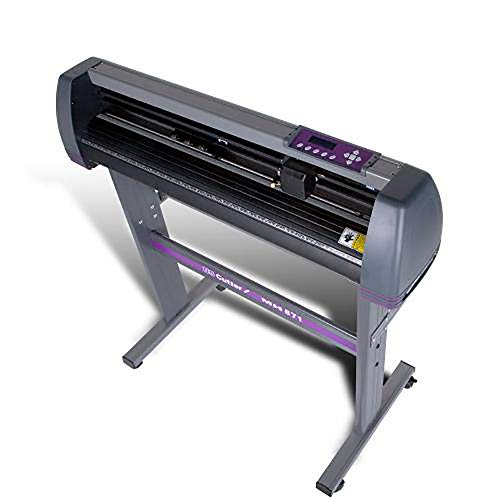
- 30-inch cutting width for signs and decals
- Includes stand and VinylMaster Cut software
- Lifetime phone and US-based technical support
Best For: Home-based signage and apparel decoration
Best Multifunction Plotter

- 24-inch roll printing through A1-size output
- Flatbed scanner supports enlargements and copying
- Cloud, USB, Wi-Fi, and automatic sheet feeding
Best For: Offices needing print, scan, and copy functions
Best Wide Vinyl Cutter

- Up to 49.6-inch cutting width
- Adjustable speed and pressure controls
- Supports USB, U-Disk, SVG, and PDF files
Best For: Wide signage, decals, labels, and heat-transfer work
Best Compact Wide-Format Pick
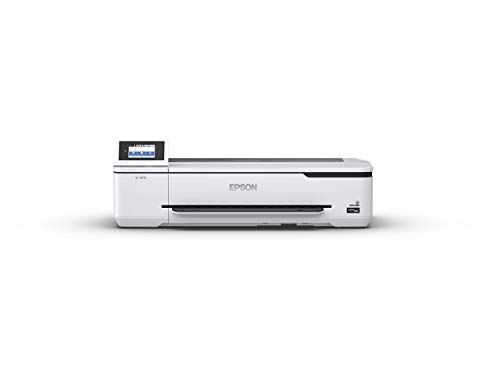
- A1/D-size prints in 34 seconds
- Compact desktop-friendly design
- Wireless and Wi-Fi Direct printing
Best For: Small offices needing fast color prints up to 24 inches wide
Best Professional Poster Printer

- Five-color pigment ink output
- Automatic media selection
- Color calibration for consistency
Best For: Businesses creating polished posters and wide-format graphics
Best All-in-One Value

- Prints, scans, copies, and faxes
- Up to 11 x 17-inch media
- Refillable tanks and auto duplex
Best For: Offices needing multifunction 11 x 17-inch printing
Best with Extra Features
Canon imagePROGRAF TC-21 24-Inch

- Prints up to 24 inches wide
- Includes 280 ml of ink
- Supports roll and cut-sheet media
Best For: Small offices producing posters, labels, banners, and mixed-media graphics
Best for High-Volume CAD Work

- Handles media up to 36 inches wide
- Automatically switches between roll and sheets
- Includes 2-year onsite support
Best For: Architecture, engineering, construction, and technical drawing workflows
Best Stand-Mounted Value

- Includes stand, media bin, and sheet feeder
- Supports 36-inch rolls and 13-by-19-inch sheets
- Offers Wi-Fi, Ethernet, and USB connectivity
Best For: Small technical teams needing a complete floor-standing CAD and graphics printer
Best CAD Plotter – HP DesignJet T210
HP DesignJet T210 Large Format 24-inch Plotter Printer, for Easy CAD & Poster Prints (8AG32D)
Check Price On AmazonThe HP DesignJet T210 is a practical choice for small businesses seeking plotter printers for small businesses that can handle technical drawings, posters, maps, and professional sewing patterns. Its 24-inch roll support, automatic cutter, and HP Click workflow tools are designed to reduce manual setup and paper waste.
Best For: CAD drawings, maps, posters, renders, and sewing patterns requiring crisp lines and text.
Pros:
- Supports media rolls up to 24 inches wide and optional sheets up to 13 by 19 inches.
- HP Click provides PDF error checking, alerts, auto-nesting, and drag-and-drop printing.
- Offers Wi-Fi, Gigabit Ethernet, USB, HP-GL/2 support, and remote printing through the HP Smart app.
- Automatic horizontal cutting and multi-size printing simplify recurring jobs.
Cons:
- The automatic sheet feeder is an optional accessory.
- It uses HP 712 ink cartridges and an HP 713 printhead.
- At 47.4 pounds and 40 inches wide, it requires dedicated workspace.
For businesses focused on accurate technical and presentation graphics, the T210 combines broad media support with useful file-preparation tools. It is less suited to businesses that primarily need vinyl cutting rather than inkjet printing.
Best Vinyl Cutter for Startups – USCutter 34-inch Vinyl Cutter
The USCutter 34-inch model is a strong fit for small businesses looking for plotter printers for small businesses centered on signage and apparel decoration. It cuts vinyl for signs, banners, decals, and heat-transfer projects, while the included software supports original artwork and image vectorization.
Best For: Home-based sign shops, decal production, banners, and heat-transfer apparel work.
Pros:
- Provides a 34-inch feed width and 30-inch cutting width.
- Adjustable pinch rollers, speed, and pressure support different vinyl jobs.
- Includes a stand and VinylMaster Cut software with vectorizing capability.
- Includes US-based technical support and lifetime phone support.
Cons:
- This is a vinyl cutter rather than a full-color inkjet printer.
- The supplied notes do not specify print resolution or color output.
- Its 47-pound weight and stand require dedicated floor space.
Choose this USCutter when your business model depends on cut graphics rather than printed CAD or poster output. Its wide cutting area, included software, and ongoing support make it particularly approachable for starting in-house signage production.
Best Multifunction Plotter – Canon imagePROGRAF TC-21M
The Canon imagePROGRAF TC-21M stands out among plotter printers for small businesses that need printing plus scanning and copying. Its 24-inch roll support, flatbed scanner, automatic sheet feeder, USB printing, and cloud features make it useful for offices handling both oversized documents and everyday paper.
Best For: Small offices that need large-format printing, enlargements, scanning, copying, and flexible paper handling.
Pros:
- Prints roll media up to 24 inches wide and supports sizes through A1.
- Flatbed scanning enables direct enlargements from smaller originals.
- Automatic sheet feeder holds up to 100 letter-size or 50 11-by-17-inch sheets.
- Supports cloud printing and scanning, USB flash drives, Wi-Fi, Ethernet, and a tiltable touchscreen.
Cons:
- It uses simplex printing rather than duplex output.
- The included ink system is specified as ink bottles, so replacement planning is important.
- Its multifunction features may be unnecessary for businesses that only need plotting.
The TC-21M is a versatile office-oriented option when scanning and copying matter as much as wide-format output. It offers more workflow flexibility than a print-only plotter, especially for businesses working with mixed document sizes.
Best Wide Vinyl Cutter – VEVOR 53-inch Vinyl Cutter
The VEVOR 53-inch machine is aimed at small businesses producing wide signs, decals, labels, and heat-transfer work. Its large feed capacity, adjustable cutting controls, steel rollers, and Windows-oriented connectivity make it a high-capacity option among plotter printers for small businesses, although it is designed for cutting rather than inkjet printing.
Best For: Wide-format signage, decoration, labels, decals, and heat-transfer production on Windows systems.
Pros:
- Handles up to 53.1 inches of feed width and 49.6 inches of cutting width.
- Adjustable cutting pressure ranges from 20 to 500 grams, with speeds up to 800 mm per second.
- Double spring pinch rollers and roughened steel rollers help stabilize long feeds.
- Supports USB, U-Disk, COMPIM, SVG, PDF, DM/PL, and HP/GL workflows.
Cons:
- It is not compatible with Mac systems.
- The product has no stated warranty in the supplied specifications.
- Its 61.02-inch depth and 43.31-inch height require substantial space.
This VEVOR model makes sense for businesses that prioritize maximum cutting width and production control. Verify the Windows compatibility and available floor space before choosing it for a sign-making workflow.
Best Compact Wide-Format Pick – Epson SureColor T3170
For small businesses comparing plotter printers for small businesses, the Epson SureColor T3170 is a practical choice when desktop-friendly size, wireless access, and fast A1/D-size output matter. It prints at up to 2400 x 1200 dpi and can produce an A1/D-size print in 34 seconds.
Best For: Offices that need a compact, color wide-format printer for plans, graphics, and other documents up to 24 inches wide.
Pros:
- Produces A1/D-size prints in 34 seconds.
- Compact 20-by-38-by-9-inch design can fit on a desktop.
- Wireless and Wi-Fi Direct printing support smartphones, tablets, and PCs.
- High-capacity cartridges help reduce ink replacement frequency.
Cons:
- Print-only design does not include scanning, copying, or faxing.
- Maximum sheet capacity is 30 sheets.
- The optional stand is sold separately.
The T3170 stands out for businesses that want wide-format capability without committing to a larger floor-standing setup. Its touchscreen and wireless options also make routine printing relatively straightforward.
Best Professional Poster Printer – Canon imagePROGRAF TM-500
Businesses seeking plotter printers for small businesses with a focus on posters and durable color output may prefer the Canon imagePROGRAF TM-500. Its five-color pigment ink system is designed for crisp text, sharp lines, and vibrant images on a wide variety of media.
Best For: Small businesses producing professional posters, line drawings, and other color wide-format materials up to 24 inches.
Pros:
- Five-color pigment ink supports crisp text, sharp lines, and vibrant images.
- Automatic media selection can identify media type, width, and estimated remaining length.
- Color calibration helps maintain consistent prints.
- Tiltable touchscreen and animated installation guides simplify setup and maintenance.
Cons:
- At 88.2 pounds, it is less portable than compact desktop models.
- The listed color speed is 2.4 pages per minute.
- Connectivity details list Wi-Fi and USB 2.0, without mention of Ethernet.
The TM-500 is a stronger fit when print presentation and media-handling convenience outweigh the need for a small footprint. ENERGY STAR and EPEAT Gold ratings may also appeal to businesses tracking equipment efficiency credentials.
Best All-in-One Value – Epson EcoTank ET-15000
The Epson EcoTank ET-15000 is a versatile alternative for small businesses comparing plotter printers for small businesses alongside everyday office equipment. It prints up to 11 x 17 inches and adds scanning, copying, and faxing, while its refillable ink tank is designed for convenient ongoing use.
Best For: Small offices that need wide-format 11 x 17-inch printing plus scanning, copying, faxing, and automatic duplex printing.
Pros:
- All-in-one functionality includes printing, scanning, copying, and faxing.
- Prints at up to 4800 x 2400 dpi.
- Print speeds reach 17 ppm in black and white and 9 ppm in color.
- Refillable ink tanks, auto-duplex printing, Ethernet, USB, and Wi-Fi support productivity.
Cons:
- Its maximum media size is 11 x 17 inches, smaller than 24-inch plotter models.
- It is not a dedicated large-format plotter for A1 or D-size output.
- Fax functionality may be unnecessary for businesses that only need printing.
The ET-15000 makes the most sense for a multifunction office where 11 x 17-inch output is sufficient. It offers broader office capabilities than dedicated plotters, but businesses needing 24-inch plans or posters should consider a larger-format model.
Best with Extra Features – Canon imagePROGRAF TC-21 24-Inch
For small businesses seeking plotter printers for small businesses, the Canon imagePROGRAF TC-21 offers a practical 24-inch format with both roll and cut-sheet printing. Its four-color ink system is designed for crisp text, vibrant images, posters, labels, and other office graphics, while built-in Wi-Fi, Ethernet, and USB support flexible workflows.
Best For: Small offices that need a compact wide-format printer for posters, banners, labels, and mixed roll- or sheet-media jobs.
Pros:
- Prints up to 24 inches wide from roll media or the automatic sheet feeder.
- Includes 280 ml of ink, with 70 ml for each color.
- Offers Wi-Fi, Ethernet, and USB connectivity for wired or wireless printing.
- Tiltable touchscreen and front/top access simplify setup, refills, and maintenance.
Cons:
- Its 24-inch maximum width is less than the 36-inch capacity of the HP alternatives.
- The listed maximum sheet size is 11.69 by 24 inches, which may limit larger sheet-based projects.
- At 71 pounds, it still requires a dedicated, sturdy workspace.
The TC-21 is a balanced choice when a business wants wide-format capability without moving up to a 36-inch plotter. Its included ink, automatic media handling, and wireless connectivity make it especially convenient for recurring poster and signage work.
Best for High-Volume CAD Work – HP DesignJet T650 36-Inch
The HP DesignJet T650 is a strong option among plotter printers for small businesses that routinely handle technical drawings, maps, posters, or construction documents. It supports 36-inch rolls and up to 13-by-19-inch sheets, and its automatic sheet/roll switching helps reduce manual intervention during mixed-size print jobs.
Best For: Architecture, engineering, construction, and design businesses needing precise 36-inch technical prints with automated media handling.
Pros:
- Supports roll media up to 36 inches wide and sheets up to 13 by 19 inches.
- Includes automatic sheet/roll switching, a horizontal cutter, media bin, and sheet feeder.
- HP Click software provides PDF error checking, alerts, auto-nesting, and drag-and-drop printing.
- Includes a 2-year HP Care Pack with onsite support.
Cons:
- Its 52-inch-wide body and 37-inch height require substantial installation space.
- It is a large 36-inch machine suited to businesses with regular wide-format demand rather than occasional use.
- HP recommends using genuine HP 712 ink cartridges and HP 713 printheads.
With 1GB of memory, HP-GL/2 support, and advertised output of up to 82 A1/D-size prints per hour, the T650 is aimed at workflow efficiency. The included onsite support adds reassurance for businesses where plotter downtime can interrupt active projects.
Best Stand-Mounted Value – HP DesignJet T630 36-Inch
For businesses comparing plotter printers for small businesses, the HP DesignJet T630 combines 36-inch roll printing with an included stand, media bin, and automatic sheet feeder. It is designed for technical line drawings, CAD files, maps, posters, and related graphics, with HP Click software helping simplify file preparation and reduce paper waste.
Best For: Small architecture, engineering, construction, and GIS teams that want a complete stand-mounted 36-inch plotting setup.
Pros:
- Prints on rolls up to 36 inches wide and sheets up to 13 by 19 inches.
- Includes a stand, media bin, spindle, automatic sheet feeder, and horizontal cutter.
- Supports Ethernet, USB, and Wi-Fi connectivity.
- HP Click offers PDF checking, alerts, auto-nesting, and drag-and-drop file printing.
Cons:
- At 123 pounds, it is substantially heavier than the Canon TC-21.
- The included warranty is one year, shorter than the T650’s two-year onsite support package.
- Its 52-inch width and 37-inch height demand significant floor space.
The T630 makes a practical case for businesses that need a ready-to-use floor-standing plotter rather than a desktop-format unit. Its bundled stand and media accessories reduce the need to source a separate setup, while the 36-inch capacity accommodates larger plans, maps, and posters.
How We Picked the Best Plotter Printers for Small Businesses
We evaluated these models by looking at the needs most common to small offices, contractors, designers, sign shops, educators, and print-service businesses. Key considerations included maximum media width, print technology, connectivity, workflow features, included accessories, support, and overall versatility.
The selection includes true large-format printers for CAD and poster work, multifunction models, compact wide-format inkjets, all-in-one alternatives, and vinyl cutter plotters. Because workloads vary significantly, no single machine is ideal for every business.
Quick Comparison
| Best For | Look For |
|---|---|
| CAD drawings and technical plans | Precise lines, roll handling, and reliable sheet feeding |
| Posters and marketing graphics | Color quality, wider media support, and automatic cutting |
| Signs and decals | Vinyl compatibility, cutting width, software, and stand stability |
| Small offices | Compact design, wireless connectivity, and simple maintenance |
| Mixed document workloads | Multifunction scanning, copying, and flexible paper handling |
Key Buying Factors for Plotter Printers for Small Businesses
Width and Workspace
Measure both the maximum media width and the printer’s complete footprint, including roll clearance and rear access. A 24-inch model is often a practical balance for plans and posters, while 36-inch machines suit larger architectural drawings and presentation graphics. Vinyl cutters may require additional room for long material runs.
Printer Versus Cutter
A printer produces inkjet output; a vinyl cutter uses a blade to contour-cut adhesive vinyl and similar media. Some businesses need one function, while others may eventually need both. Do not assume that a “plotter” listing includes printing, cutting, or scanning unless the specifications clearly say so.
Ink, Media, and Operating Cost
Check cartridge or tank capacity, the number of ink colors, supported roll and sheet sizes, and whether specialty media is readily available. High-volume users should compare replacement ink prices and maintenance requirements, not just the purchase price.
Workflow and Connectivity
Wireless networking, USB support, automatic sheet feeding, roll loading, built-in cutters, and included design software can save time every day. For CAD work, verify driver and file-format compatibility. For sign production, examine the cutter software, cutting force, speed, and supported materials.
Support and Reliability
Small businesses often cannot afford extended downtime. Favor models with clear setup documentation, accessible replacement supplies, warranty coverage, and dependable technical support. A bundled stand or onsite service can also improve the machine’s real-world value.
Who Should Buy Which Plotter Printers for Small Businesses?
Choose a compact wide-format printer if you work from a small office and mainly need occasional plans, posters, or presentation documents. These models are easier to place and may offer wireless printing with less setup.
Choose a 24-inch professional printer for regular CAD drawings, construction documents, engineering plans, and higher-quality posters. This size provides useful capacity without the footprint of a 36-inch unit.
Choose a 36-inch model when oversized architectural, engineering, or mapping documents are central to your workflow. Make sure your room, doors, and finishing area can accommodate it.
Choose a vinyl cutter for decals, lettering, vehicle graphics, and cut signage rather than inkjet prints. Confirm that the included software and support match your team’s experience level.
Choose a multifunction or tank-based model when copying, scanning, and lower running costs matter as much as maximum width. Before ordering, confirm that its wide-format capabilities meet your required paper sizes and production volume.