
Choosing from today’s usb logic analyzers can feel overwhelming, especially when specs like sample rate, channel count, and memory depth vary so much. The right tool depends on what you debug, how often you use it, and how much detail you need.
This roundup focuses on practical options for hobbyists, developers, and lab users who want faster troubleshooting and clearer protocol capture without overspending.
Best 10 USB Logic Analyzers Picks for 2026
High-Channel Value Pick
LA1010 16-Channel 100MHz USB Logic Analyzer

- 16 channels with 100MHz sampling per channel
- Decodes 30+ protocols like I2C, SPI, UART, and CAN
- Windows, macOS, and Linux support with auto-install drivers
Best For: Portable embedded debugging with broad digital signal coverage
Budget Debug Kit
8-Channel 24MHz USB Logic Analyzer with Hook Clips

- 8-channel analyzer with 24MHz capture rate
- Includes 12 SMD test hook clips
- Compatible with sigrok and similar analysis software
Best For: Affordable UART, SPI, and IIC debugging for beginners
High-Speed Bench Option
DSLogic Plus 16-Channel 400MHz USB Analyzer

- 16 channels with up to 400MHz buffer-mode sampling
- 256Mbits onboard SDRAM plus dual-mode capture
- DSView software works on Windows, macOS, and Linux
Best For: Fast, flexible digital capture with deep protocol decoding
Premium Mixed-Signal Choice
Logic Pro 8 8-Channel USB Logic Analyzer

- 8 digital/analog inputs for mixed-signal work
- Up to 500 MS/s digital and 50 MS/s analog sampling
- Compatible with Windows, Mac, and Linux
Best For: Advanced mixed-signal debugging in a compact portable tool
High-Speed 16-Channel Pick

- 16 channels for simultaneous digital capture
- Up to 400MHz sampling for fast signals
- 256Mbit memory with Windows/macOS/Linux support
Best For: Engineers and makers needing high-speed digital capture
Budget 8-Channel Debugger

- 8 channels for common digital debugging
- Up to 24MHz sampling per channel
- Includes EMI ferrite ring USB cable
Best For: Hobbyists and students on a budget
Deep-Capture Dual-Mode Option
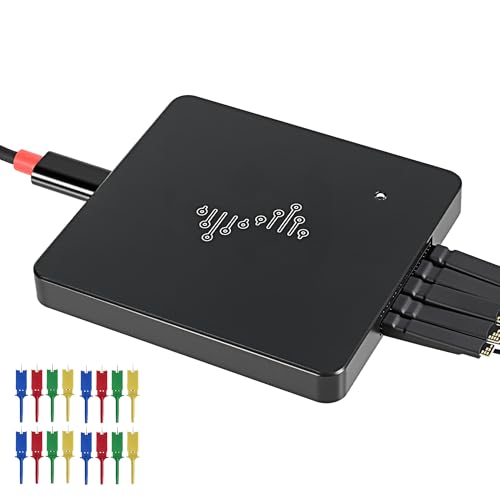
- Dual-mode capture with stream and buffer modes
- Up to 16G sample depth in stream mode
- Supports nearly 100 protocol decoders
Best For: Users needing long captures and protocol decoding
Budget 8-Channel Starter Pick
24MHz, 8-Channel, USB Protocol Analyzer

- 8-channel capture at up to 24MHz
- Sigrok PulseView support with UART/I2C/SPI decoding
- Supports 5V, 3.3V, 2.5V, and 2.0V logic
Best For: General-purpose digital debugging on a budget
High-Capacity Power User Pick

- 16-channel capture with 500MS/s and 10G depth
- PWM generation plus auto-decoding support
- Compatible with Windows, macOS, and Linux
Best For: Advanced MCU, ARM, and FPGA debugging
Versatile 8-Channel Value Pick
USB Logic Analyzer 8 Channel 24MHz Sampling Rate

- 8 channels with up to 24MHz sampling
- Supports 5V, 3.3V, 2.5V, and 1.8V systems
- Easy-to-use design with level indicator
Best For: Beginners needing broad voltage compatibility
High-Channel Value Pick – LA1010 16-Channel 100MHz USB Logic Analyzer
If you want a versatile USB logic analyzer for embedded debugging, the LA1010 is built around 16 channels and a 100MHz sampling rate per channel. It suits engineers working across MCU, ARM, FPGA, and communication protocol work, with cross-platform support for Windows, macOS, and Linux.
Best For: Developers who need a portable 16-channel analyzer with broad protocol support and easy PC-based capture.
Pros:
- 16 input channels give plenty of room for multi-signal debugging.
- 100MHz sampling rate supports detailed digital waveform capture.
- Decodes 30+ protocols, including I2C, SPI, UART, CAN, and more.
- Works with Windows, macOS, and Linux with auto-install drivers.
Cons:
- USB 2.0 connectivity is less modern than newer interfaces.
- Best suited to digital analysis rather than mixed-signal lab work.
The LA1010 is a practical choice if you need broad channel coverage and protocol decoding without moving up to a higher-cost platform. It focuses on core USB logic analyzer features and keeps setup simple across operating systems.
Budget Debug Kit – 8-Channel 24MHz USB Logic Analyzer with Hook Clips
This USB logic analyzer is aimed at basic MCU and communication debugging, especially when you want a low-cost 8-channel tool with accessories included. The package adds 12 SMD test hook clips and supports common protocol analysis through compatible software such as sigrok.
Best For: Hobbyists and students who need an affordable starter kit for UART, SPI, and IIC troubleshooting.
Pros:
- Includes 12 test hook clips for easier probing.
- Supports 8 channels at 24MHz for everyday digital debugging.
- Works with logic analysis software and open-source tools like sigrok.
- Package includes tutorials, demo code, and support resources.
Cons:
- 24MHz sampling is modest compared with faster analyzers.
- Fewer channels than higher-end 16-channel options.
This is a sensible entry-level pick if your workflow centers on microcontroller bring-up and common serial buses. The included clips and documentation make it easier to get started without extra accessories.
High-Speed Bench Option – DSLogic Plus 16-Channel 400MHz USB Analyzer
For buyers comparing higher-end USB logic analyzers, the DSLogic Plus stands out with dual-mode capture, a 400MHz buffer mode, and 16 channels. It also offers 256Mbits of onboard SDRAM, making it suitable when you need either higher sample rates or longer captures through stream mode.
Best For: Users who need a fast, flexible analyzer for demanding digital capture and protocol decoding.
Pros:
- Up to 400MHz in buffer mode with 16 channels.
- Dual-mode operation supports both long captures and high-speed sampling.
- 256Mbits onboard SDRAM adds buffer flexibility.
- DSView software supports Windows, macOS, and Linux with nearly a hundred decoders.
Cons:
- Higher-end feature set may be more than casual users need.
- Stream mode reduces top sample rates as channel count increases.
The DSLogic Plus is a strong fit if your work benefits from both speed and capture depth. Its software support and protocol decoder coverage make it a capable bench tool for serious debugging sessions.
Premium Mixed-Signal Choice – Logic Pro 8 8-Channel USB Logic Analyzer
The Logic Pro 8 is a premium USB logic analyzer for users who want both digital and analog inputs in one portable tool. With 8 digital/analog inputs, high sample rates, and broad OS compatibility, it fits more advanced debugging where timing and signal shape both matter.
Best For: Engineers who want a compact mixed-signal analyzer with very high capture rates and cross-platform support.
Pros:
- 8 digital/analog inputs provide mixed-use flexibility.
- Up to 500 MS/s digital sampling and 50 MS/s analog sampling.
- Supports SPI, I2C, and 23+ additional analyzers.
- Works with Windows, Mac, and Linux.
Cons:
- 8 channels may be limiting for larger digital bus setups.
- Premium positioning may be overkill for simple hobby tasks.
If you need more than basic digital capture, the Logic Pro 8 brings mixed-signal capability and high sample rates into a portable form factor. It is best suited to users who value analysis depth and software compatibility over low-cost simplicity.
High-Speed 16-Channel Pick – 16-Ch 400MHz USB-C Analyzer
BINGOX USB Logic Analyzer, 16 Channels, 400MHz Sampling Rate, 256Mbit Memory, USB-C Interface
Check Price On AmazonIf you need usb logic analyzers for faster digital troubleshooting, this 16-channel model is built for higher-speed capture and broader signal visibility. With up to 400MHz sampling, 256Mbit onboard memory, and USB-C connectivity, it suits embedded debugging, FPGA testing, and protocol analysis where timing detail matters.
Best For: Embedded developers, electronics technicians, and makers who want a high-speed, multi-channel analyzer with modern USB-C connectivity.
Pros:
- Captures up to 16 digital signals at once for broader system analysis
- Supports up to 400MHz sampling for short pulses and fast timing details
- Includes 256Mbit onboard memory for more stable high-speed captures
- Compatible with Windows, macOS, and Linux
Cons:
- Only the supplied compatibility and protocol-decoding details are mentioned, not specific software names
- Best fit is for digital signals rather than mixed-signal work
Overall, this is the strongest pick here if capture speed and channel count are the priority. The USB-C interface and broad OS support make it a practical bench tool for current development setups.
Budget 8-Channel Debugger – 8CH 24MHz USB Logic Analyzer
For basic usb logic analyzers on a tighter budget, this 8-channel unit covers common digital debugging jobs well. It offers up to 24MHz sampling per channel, works with standard USB connectivity, and is aimed at UART, IIC, SPI, and general embedded troubleshooting.
Best For: Hobbyists and students who need an affordable 8-channel analyzer for routine protocol and signal checks.
Pros:
- 8-channel design handles common small-to-medium digital projects
- Up to 24MHz sampling per channel covers many general-use tasks
- Supports UART, IIC, SPI, and digital signal analysis
- Includes an EMI ferrite ring USB cable
Cons:
- Lower sampling rate than the higher-end 400MHz options here
- Only suitable for digital work within its stated voltage range
This is a straightforward choice when you need a simple analyzer for everyday embedded debugging rather than advanced capture depth. It focuses on the essentials and keeps the feature set easy to use.
Deep-Capture Dual-Mode Option – 16-Ch DSLogic Plus Analyzer
If you want usb logic analyzers with deeper capture options, this 16-channel model stands out for its dual-mode design. It combines up to 400MHz sampling, 16G sample depth in stream mode, and 256Mbits of onboard SDRAM, making it suitable for longer sessions and higher-detail analysis.
Best For: Users who need both long-duration streaming and high-speed buffered captures for protocol-heavy debugging.
Pros:
- Dual-mode operation supports both stream mode and buffer mode
- Up to 16G sample depth in stream mode for longer captures
- 16 channels and 400MHz sampling suit detailed digital analysis
- Supports WinXP-Win10, macOS, Linux, and nearly 100 protocol decoders
Cons:
- Feature-rich design may be more than casual users need
- Depends on PC analysis workflow rather than standalone use
Compared with simpler analyzers, this one is built for users who care about capture flexibility as much as raw speed. The large sample depth and broad decoder support make it a strong bench option for complex debugging jobs.
Budget 8-Channel Starter Pick – 24MHz, 8-Channel, USB Protocol Analyzer
If you’re comparing usb logic analyzers for everyday digital debugging, this 8-channel model is a practical entry point. It offers up to 24MHz sampling, broad logic-level support, and compatibility with open-source software like Sigrok PulseView for decoding common buses.
Best For: Makers and hobbyists who need a straightforward USB logic analyzer for UART, I2C, and SPI troubleshooting.
Pros:
- Up to 8-channel capture with selectable sampling rates from 24MHz down to 25KHz.
- Works with Sigrok PulseView and decodes UART, I2C, and SPI.
- Supports 5V, 3.3V, 2.5V, and 2.0V logic levels.
- Includes a ferrite-ring USB cable and documented after-sales support.
Cons:
- 1.8V systems are not recommended.
- Best suited for general applications around 10MHz rather than ultra-high-speed work.
Overall, this is a solid low-cost option if you want a flexible usb logic analyzer for common microcontroller and digital electronics tasks. Its feature set focuses on practical compatibility and clean signal capture rather than maximum channel count or deep memory.
High-Capacity Power User Pick – LA5016 USB Logic Analyzer
For buyers who want more capability from usb logic analyzers, the LA5016 stands out with 16-channel capture, 500MS/s sampling, and 10G deep memory. It is aimed at serious MCU, ARM, and FPGA debugging, while also adding PWM generation and cross-platform software support.
Best For: Advanced users who need high sampling speed, deep memory, and broad protocol decoding on multiple operating systems.
Pros:
- 16 channels with 500MS/s sampling and 10G deep memory.
- Supports PWM generation alongside capture and analysis.
- Decodes UART/RS-232/485, I2C, SPI, CAN, USB1.1, and HDMI CEC.
- Works with Windows, macOS, and Linux.
Cons:
- More advanced than a typical starter analyzer, so it may be more than basic users need.
- Best value comes when you actually need the higher channel count and deeper capture.
The LA5016 is the strongest pick here if your workflow depends on speed, memory depth, and protocol variety. It is especially appealing for users who want a more capable usb logic analyzer for demanding embedded and interface debugging.
Versatile 8-Channel Value Pick – USB Logic Analyzer 8 Channel 24MHz Sampling Rate
This usb logic analyzer targets users who want a simple 8-channel debugging tool with 24MHz sampling and broad voltage compatibility. It is designed for easy operation, with a small light indicator for levels and real-time data upload to help capture and review digital activity.
Best For: Beginners and general electronics users who want an easy-to-use analyzer with wide level support.
Pros:
- 8-channel, 24MHz sampling for multi-signal monitoring.
- Supports 5V, 3.3V, 2.5V, and 1.8V systems.
- Designed for easy use with clear pen instructions and level indication.
- Includes USB cable and wire in the package.
Cons:
- Supplied notes do not list specific protocol-decoding software support.
- Its standout strengths are usability and compatibility rather than advanced specifications.
As a value-oriented option, this model focuses on approachable setup and broad level support. It makes sense if you want a practical usb logic analyzer for mixed-voltage projects without jumping to a more advanced platform.
How We Picked the Best USB Logic Analyzers
We prioritized USB Logic Analyzers that offer a useful mix of channel count, sampling performance, capture depth, software usability, and compatibility. We also looked for models that make sense for common jobs like UART, I2C, SPI, PWM, and general MCU or FPGA debugging.
Because not every user needs the same level of performance, this list includes entry-level 8-channel tools, midrange options, and higher-end devices with more memory and faster capture rates.
Quick Comparison
In general, 8-channel analyzers are best for simple embedded work and basic serial buses, while 16-channel models are better when you need more signal visibility or want to monitor multiple subsystems at once. Faster sampling and deeper memory help preserve detail during long or high-speed captures, but they also tend to increase cost.
Software support matters too. A capable device with clunky software can slow you down, while an easier platform can save time even if its raw specs are more modest.
Key Buying Factors for USB Logic Analyzers
Channel Count
Choose enough channels for the buses and control lines you plan to inspect. For simple serial debugging, 8 channels is often enough. For denser boards, 16 channels gives you more room to capture clocks, chip selects, interrupts, and multiple data lines together.
Sampling Rate and Memory Depth
Higher sampling rates help you resolve fast edges and protocol details, especially on high-speed digital signals. Memory depth is equally important because it determines how long you can capture before the trace ends or details are compressed. For bursty faults, deeper memory can be more useful than peak speed alone.
Software and Compatibility
Look for stable software with decoding support, trigger controls, and export options. Windows support is common, but Mac and Linux compatibility can be a major plus if you work across systems.
Probes, Accessories, and Build Quality
Included clips, cables, and solid connectors improve day-to-day usability. Small accessories may seem minor, but they can make setup easier and reduce connection mistakes during troubleshooting.
Who Should Buy Which USB Logic Analyzers?
If you’re a beginner working on Arduino, basic microcontrollers, or simple bus debugging, a lower-cost 8-channel model is usually the smartest starting point. If you regularly test multiple signals, need longer captures, or work with more complex embedded hardware, step up to a 16-channel device with stronger software and deeper memory.
If your work involves frequent debugging or time-sensitive analysis, investing in a higher-performance option among USB Logic Analyzers can be worth it. If you only need occasional troubleshooting, a budget-friendly model with the right protocol support may be the better value.